Product Description
DOCUMENT HQI-J-FC1-001
ES_DATE 2019-07-19
Fundus camera
HFC-1
RE_DATE 2020-06-08
REV R-3 PAGE 12 / 36
Q-I-300-02(R1):2018/06/04 Huvitz Co.,Ltd
Touch Keyboard Touch Keyboard ON/OFF setting.
Objective Lens Clean
When this option is turned on, the Light is turned
on for convenient cleaning of the Objective
Lens.
User Set User ID and Password for Login.
Auto Export Auto export setting
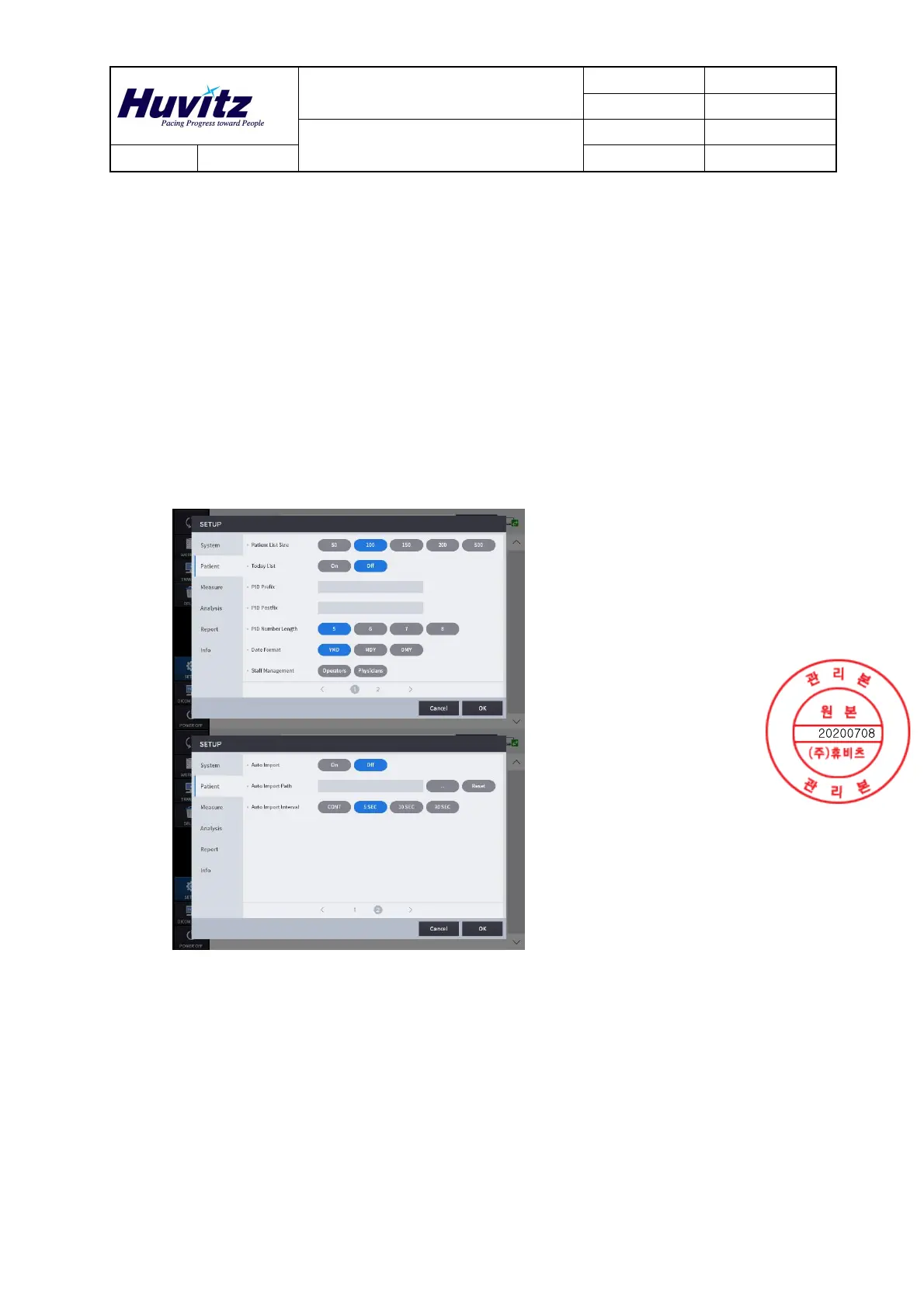
-. Patient Settings
Patient List Size Number of patients to be displayed per pages.
Today List
Today List (List of patients visited today)
settings.
PID Prefix The function to set the prefix of the patient ID.
PID Postfix The function to set the postfix of the patient ID.
PID Number Length The function to set the length of patient ID.
Date Format Format of the date (Year, Month, Day).
Staff Management Register staffs
Auto Import Auto import setting


 To Next Page