Product Description
DOCUMENT HQI-J-FC1-001
ES_DATE 2019-07-19
Fundus camera
HFC-1
RE_DATE 2020-06-08
REV R-3 PAGE 11 / 36
Q-I-300-02(R1):2018/06/04 Huvitz Co.,Ltd
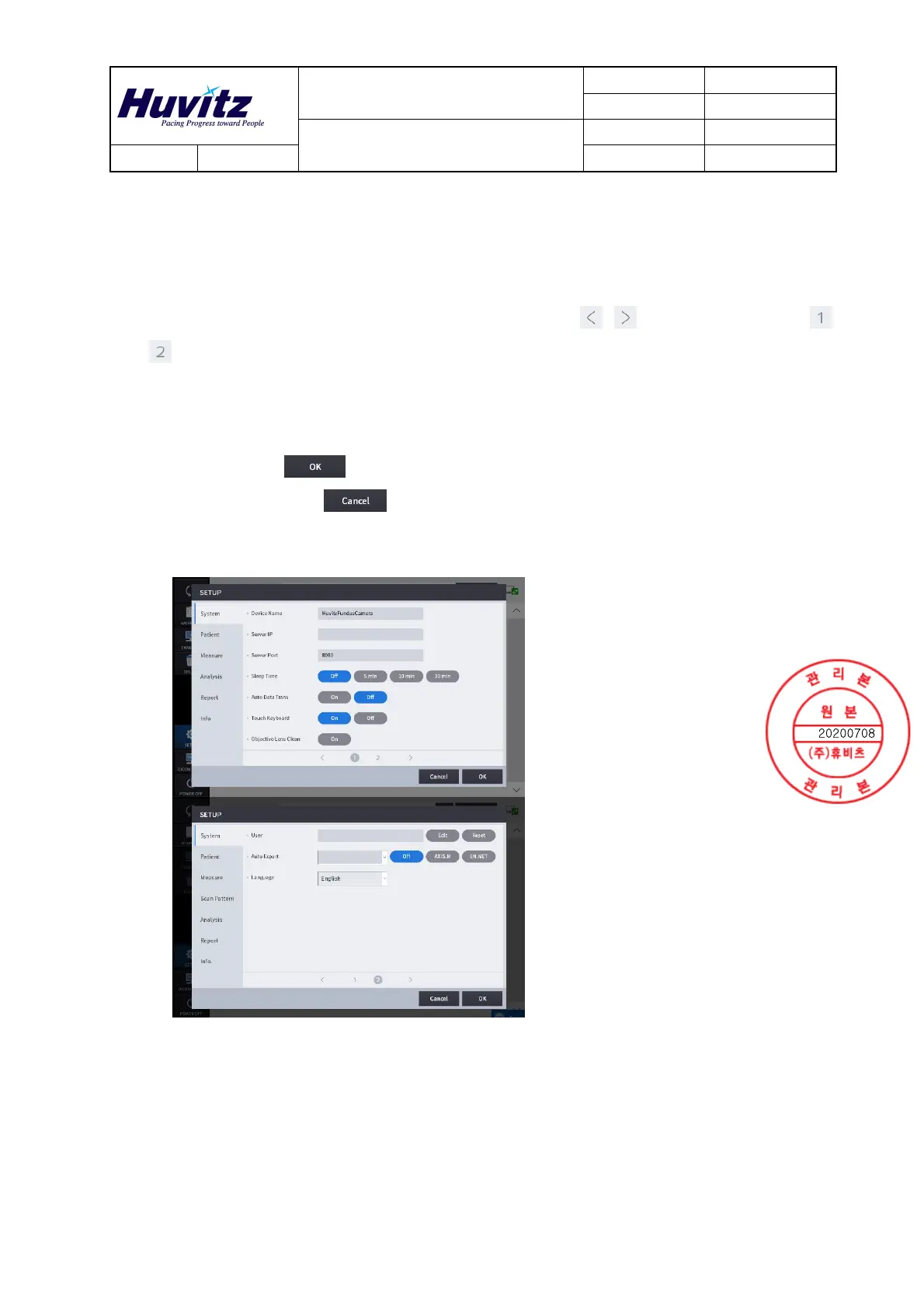
3) SETUP Menu
[To choose the section to setup]
- Setup mode consists of seven sections: System, Patient, Measure, Analysis, Report and info. You
can select the section to setup from the left side.
- You can navigate the setup items with the page move buttons [ , ] or the page numbers [ ,
] at the bottom.
[To change settings]
- Select the item to change.
- To press OK button [ ] will save all the changes made and exit the setup screen.
- To press CANCEL button [ ] will discard the changes and exit the setup screen.
-. System Settings
Device Name Set Device Name.
Server IP Web Viewer Server IP address setting.
Sever Port Web Viewer Server port setting.
Sleep Time Sleep mode setting.
Auto Data Trans
Set the function to transfer the measured data to
Web Viewer automatically.


 To Next Page