Product Description
DOCUMENT HQI-J-FC1-001
ES_DATE 2019-07-19
Fundus camera
HFC-1
RE_DATE 2020-06-08
REV R-3 PAGE 10 / 36
Q-I-300-02(R1):2018/06/04 Huvitz Co.,Ltd
△
3
- Stereo Disc: Capture 2 fundus images for Disc stereo analysis.
- Widefield Panorama: Capture maximum 7 images and stitch it.
12 Focus Move in accordance with focus of patient’s eye.
13 IR.En Change brightness of IR fundus image
14 Flash Change brightness level of white light for capturing fundus image.
15 Optimize Find focus position automatically by split focus image.
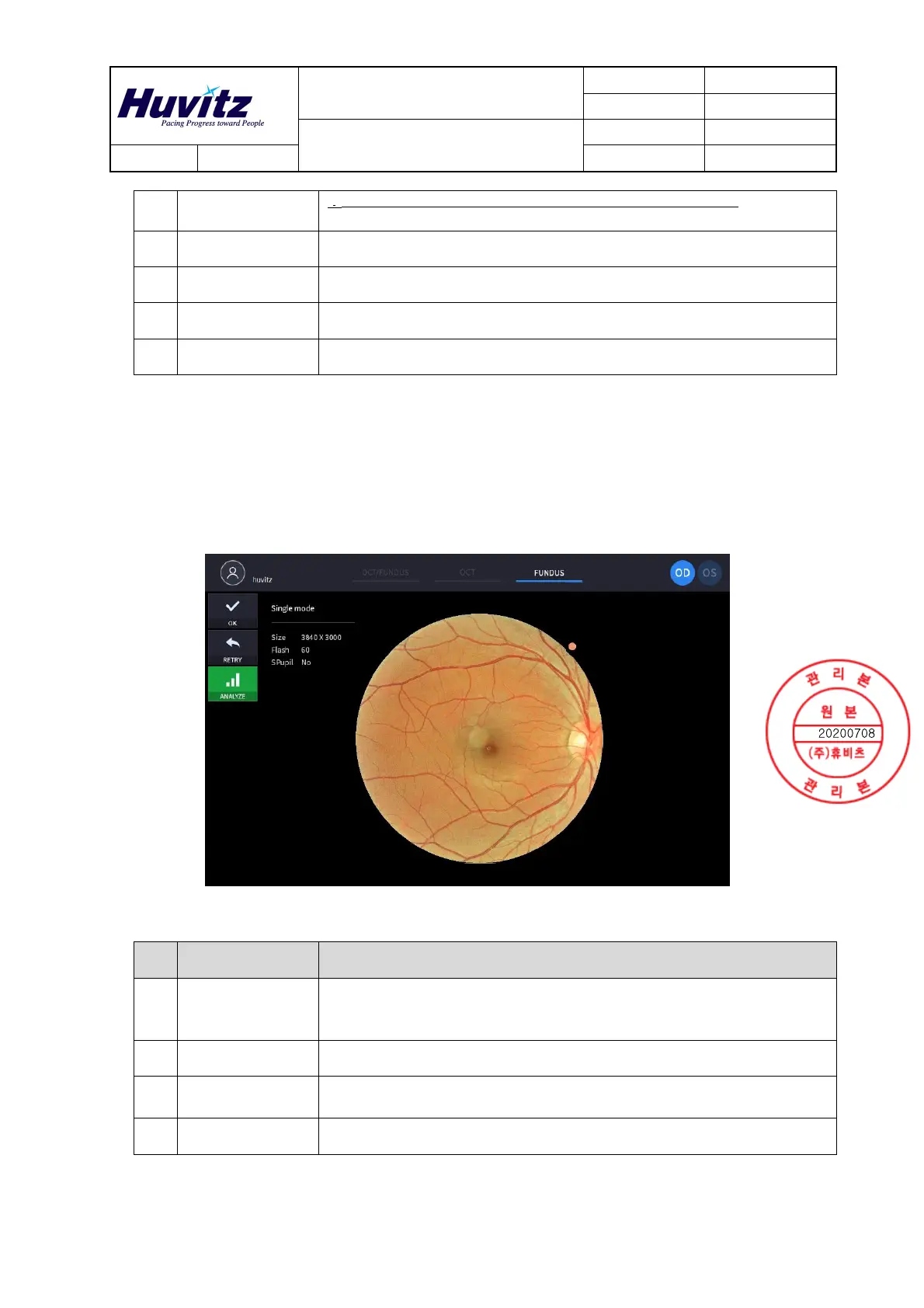
2) Confirmation screen
No Name Function
1 Image selection
Decide validity of current image.
- OK: Save current image.
- RETRY: Discard current image and retry capturing.
2 Analyze Save the camera DATA and enter the analysis screen
3
Fundus
information
Display setting information of fundus image.
4 Fundus image Show captured fundus image.
❷
❶
❸
❹


 To Next Page