Product Description
DOCUMENT HQI-J-FC1-001
ES_DATE 2019-07-19
Fundus camera
HFC-1
RE_DATE 2020-06-08
REV R-3 PAGE 29 / 36
Q-I-300-02(R1):2018/06/04 Huvitz Co.,Ltd
Wipe them using soft cotton swab or lens cleaning paper moistened with alcohol.
④ Be careful not to use the wrong tools, so as not to damage the surface of the lens.
⑤ When the Objective Lens Clean option in Setup mode is ON, the light is turned on to facilitate cleaning of
the Objective Lens.
⑥ If Anterior segment adapter is used for patients with any infectious disease, be sure to clean the
Anterior segment adapter with cotton swab moistened with alcohol to prevent secondary
infection.
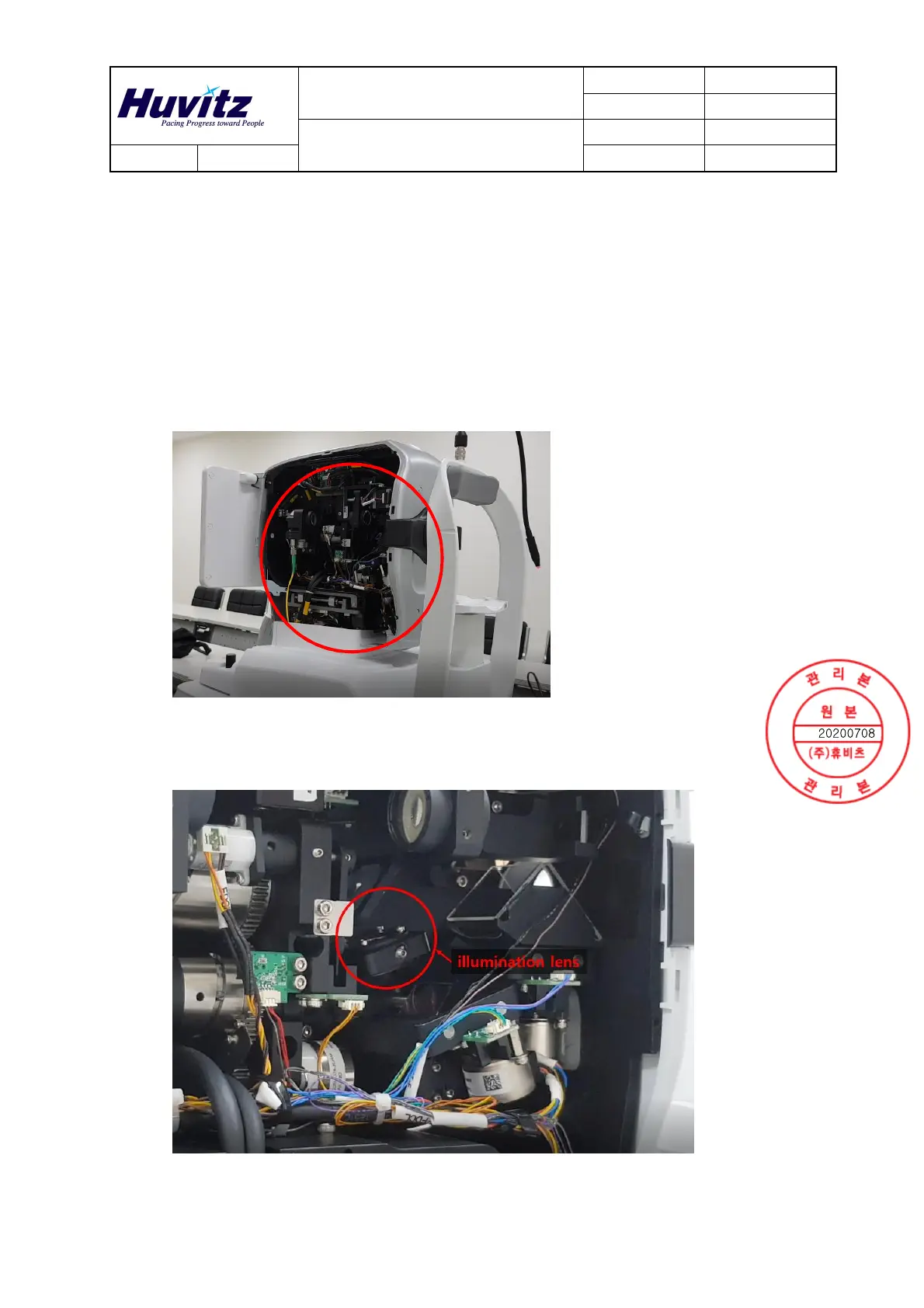
2. Cleaning illumination lens
① Remove the cover as shown below.
② Run the ‘Device Calibrator.exe’ and click the ‘Color Camera Test.’
③ Click the ‘ LEDs’ and check the ‘continuous mode’. The LED will then turn on.
④ Use blower for removing dust on the illumination lens surface
⑤ Cleaning illumination lens as shown below.
Wipe them using soft cotton swab moistened with alcohol.


 To Next Page
 Loading...