74
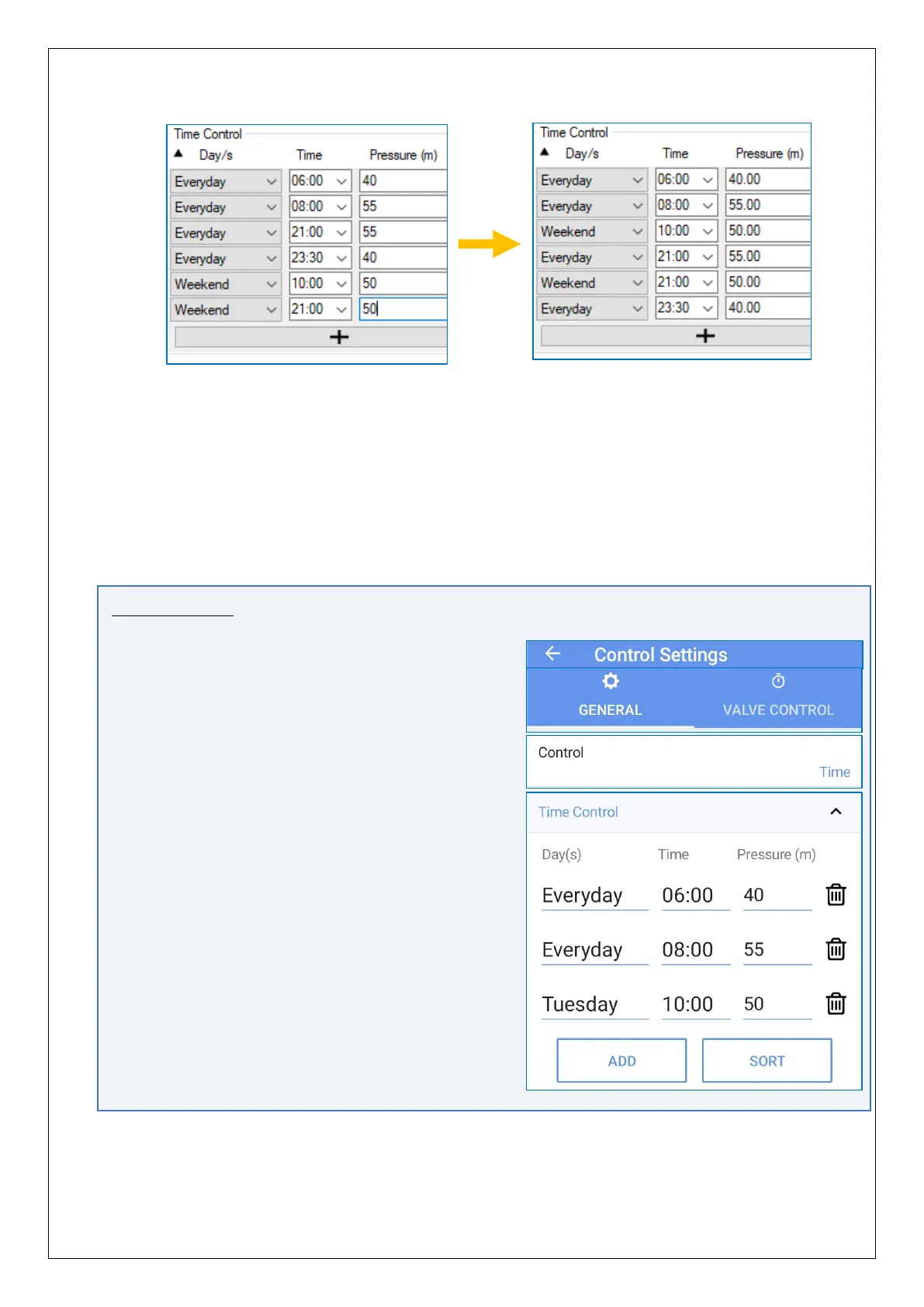
A more specific setting made in the Day selection will over-ride a more general setting.
e.g.
• “Saturday” will over-ride “Weekend” and “Everyday”.
• “Weekend will over-ride “Everyday”.
With the settings as shown above:
• Most days have a target pressure of 55m between 8 a.m. and 9 p.m.
• On weekend days the target pressure ramps down from 55m to 50m (between 8
a.m. and 10 a.m.); it stays at 50m until 9 p.m.
IDT App users:
Equivalent controls are located as follows:
(main) → Configure Device → Control Settings
→ General tab.
Tap on the Control line and select ‘Time’.
Tap the ‘Time Control’ line to reveal the settings, if
hidden.
- Tap any field to edit the table.
- Tap ‘ADD‘ to add a new line.
- Lines can be sorted by tapping on the
‘Sort’ button (ascending time).
Tap the Save button when finished.
Note: When used under the direction of the PressView system, a control table can be
larger in size, but is managed via PressView.


 To Next Page
 Loading...
