76
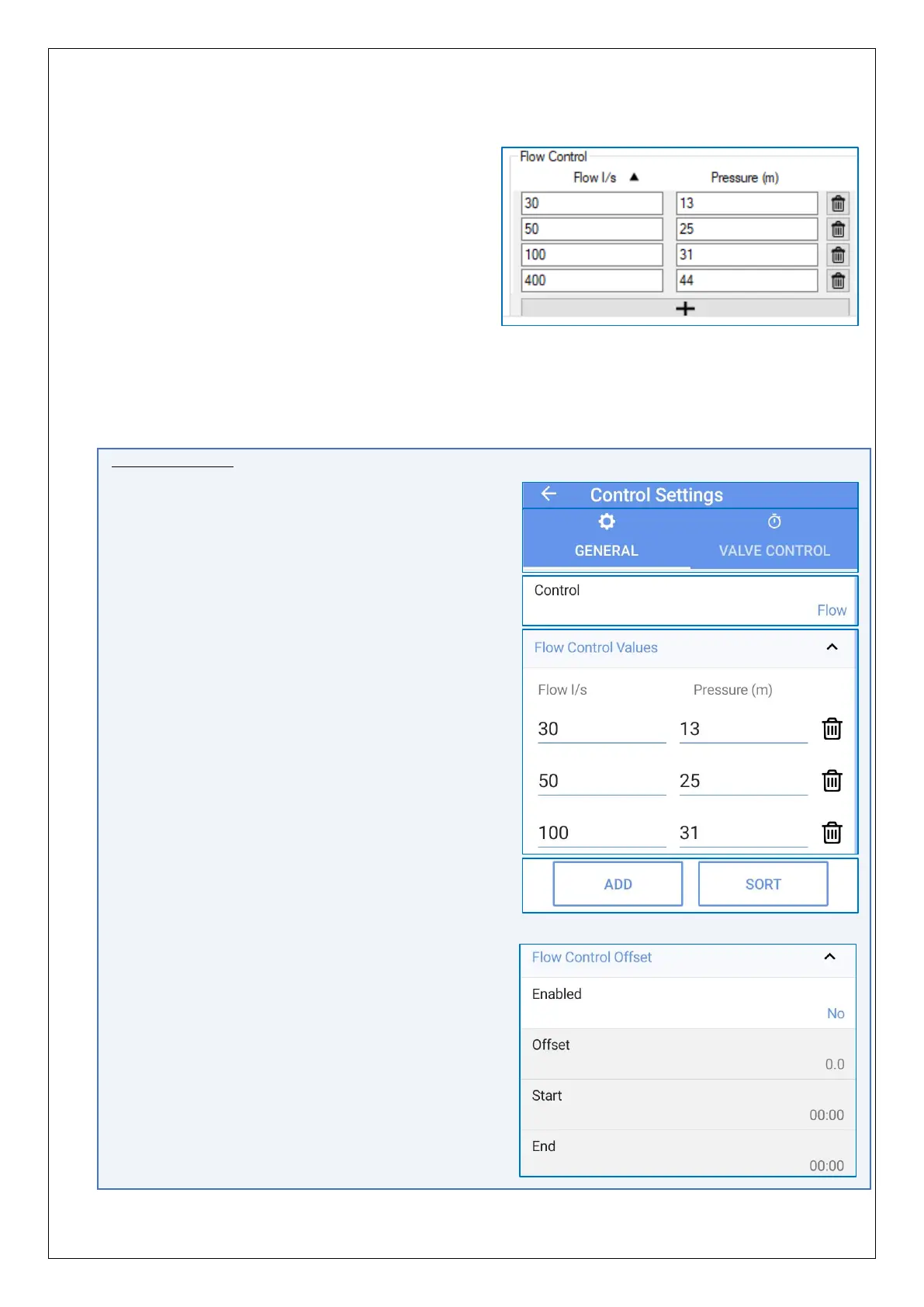
Enter the profile as Flow rate (in litres/second) vs the required PRV outlet pressure.
The Flow Control pressure profile can be built
as a table of Flow-rate (in litres per second)
and pressures (in metres).
The pressure profile is executed with linear
interpolation between the pressures entered
into the profile.
e.g. With the settings shown, pressure will be
19m at a 40 l/s flow rate.
The lowest entered flow rate defines the pressure when at (or below) that flow rate.
Similarly, the highest entered flow rate defines the pressure when at (or above) that
flow rate.
IDT App users:
Equivalent controls are located as follows:
(main) → Configure Device → Control Settings
→ General tab.
Tap on the Control line and select ‘Flow’.
Tap the ‘Flow Control Values’ line to reveal the
settings, if hidden.
- Tap any field to edit the table.
- Tap ‘ADD‘ to add a new line.
- Lines can be sorted by tapping on the
‘Sort’ button (ascending flow rate).
Tap the Save button when finished.
(The rarely used ‘Flow Control Offset’ controls
are also located on this screen).


 To Next Page
 Loading...
