9
CONTROL PANEL OPERATION
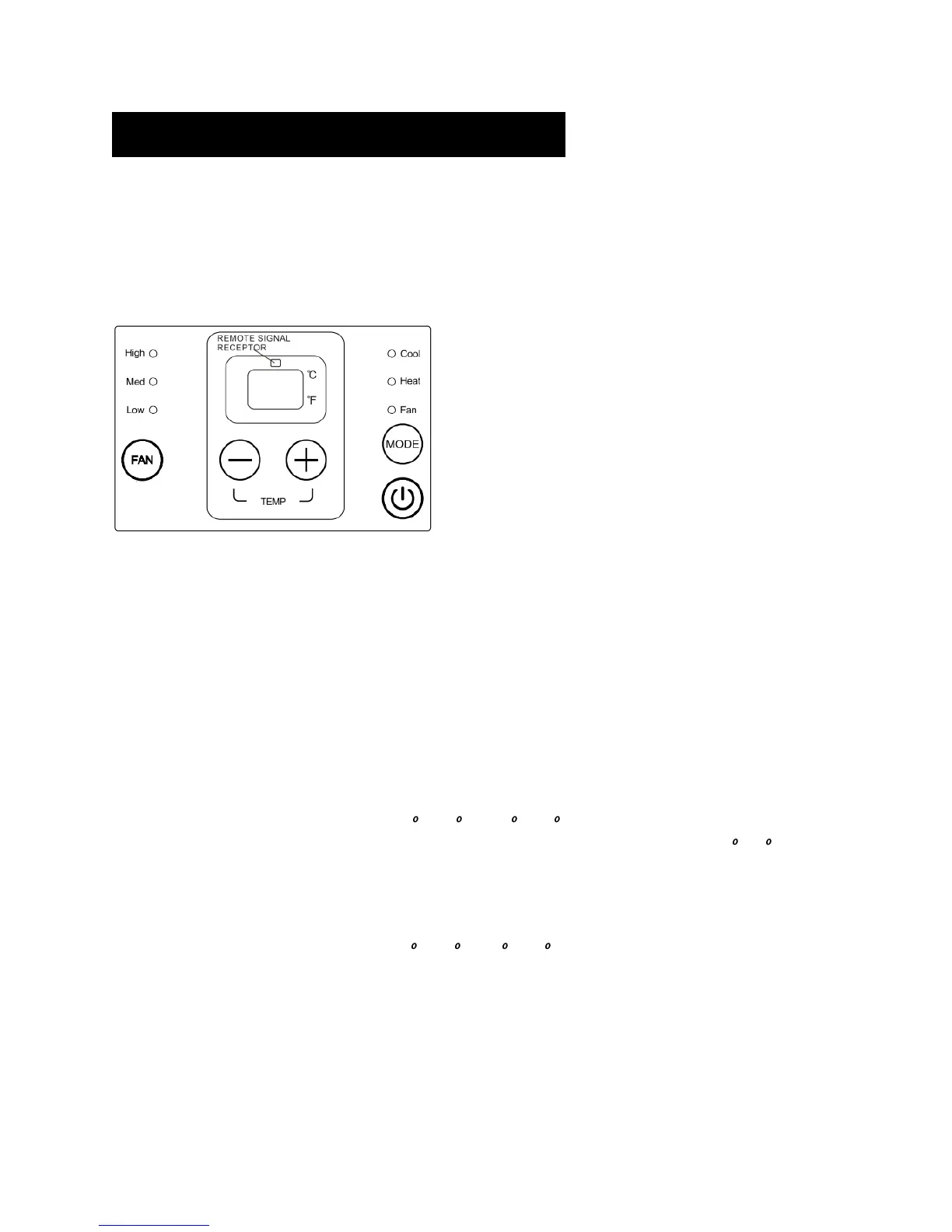
The control panel keypad will look like the following:
For some models with REMOTE SIGNAL RECEPTOR, the unit can be controlled by the control panel alone
or by the remote wall stat.
No REMOTE SIGNAL RECEPTOR.
Fig.1
POWER
- Press the POWER button to turn the unit on or off.
When the unit is on, the power indicator light will be green. When the unit is off, the light will go out.
MODE
- Push this button to cycle through the modes from COOL-HEAT-FAN-COOL. The indicator light beside
the "MODE" option will illuminate, displaying the mode selected.
- COOL: The range of set temperature is 17 C/62 F ~30 C/86 F. Cooling begins automatically when
the room temperature is above the set point, and stops when the room temperature is 2 C(4 F) below
the set point. But the compressor will run 5 minutes at least in COOL mode before stopping. The fan
runs in continuous mode.
- HEAT: The range of set temperature is 17 C/62 F ~29 C/84 F. For heat pump models, the unit can
alternate to run between in reverse cycle heat mode and electric heater mode according to the
difference between the setting temperature and the room temperature. The fan motor cycles on and off
with the compressor and electric heater.
NOTE: The reverse cycle and electric heater cannot be run at the same time.
- FAN: Fan operation only without heating and cooling.



 To Next Page