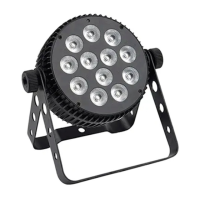
The Hybrid HSS CW is a versatile lighting fixture designed for professional use, offering a range of control options and robust technical specifications. It is suitable for various applications, from stage lighting to event illumination, providing both warm white and cool white light.
Function Description
The Hybrid HSS CW is a high-power LED lighting fixture that can operate in several control modes: Auto, Sound Active, Master/Slave, and DMX512. This flexibility allows it to be integrated into complex lighting setups or used as a standalone unit. In Auto mode, it can run through 7 built-in performance modes. The Sound Active mode enables the fixture to react to music or ambient sound, creating dynamic light shows. For larger setups without a dedicated controller, the Master/Slave mode allows multiple fixtures to synchronize, with one unit acting as the master and controlling up to 15 other slave units. The DMX512 mode provides precise control over various parameters, including dimming, color temperature, and strobe effects, making it compatible with universal DMX controllers.
The fixture features electronic dimming from 0-100%, allowing for smooth transitions and precise light intensity adjustments. It also offers control over cool white and warm white dimmers, enabling users to adjust the color temperature to suit specific moods or requirements. The stroboscopic speed can also be controlled, adding dynamic effects to any lighting design.
Important Technical Specifications
- Light Sources: The Hybrid HSS CW is equipped with 1x 200W Warm White + Cool White 2in1 COB LED, providing powerful and versatile illumination.
- DMX Channels: It operates with a 5 DMX channel configuration, offering comprehensive control over its functions.
- Control Modes: The available control modes are Auto, Sound Active, Master/Slave, and DMX.
- Built-in Performance Modes: It includes 7 built-in performance modes for quick and easy setup.
- Electronic Dimming: The dimming range is 0-100%, ensuring smooth and precise light output adjustments.
- Fuse: The fixture uses a F3A/250V fuse for protection.
- Power Consumption: The total power consumption is 200W.
- Power Supply: It supports a wide power supply range of AC100-240V, 60/50Hz, making it suitable for international use.
- Packing Size: The dimensions for packaging are L340×W300×H390mm.
- Net Weight: The fixture has a net weight of 4.75kg.
The DMX512 configuration details the specific functions controlled by each channel:
- Channel 1 (CH1): Controls Dimming mode (0-5), Auto Run Macro 1 ~ Macro7 (6-180), Sound Mode 1 (181-205), Sound Mode 2 (206-230), and Sound Mode 3 (231-255).
- Channel 2 (CH2): Controls Master dimming (0-255) when CH1 is less than 6, Auto Run speed (0-255) when CH1 is between 6 and 180, and Sound Sensitivity (0-255) when CH1 is greater than 180.
- Channel 3 (CH3): Controls Stroboscopic speed (0-255).
- Channel 4 (CH4): Controls Cool white dimmer (0-255).
- Channel 5 (CH5): Controls Warm white dimmer (0-255).
Usage Features
The Hybrid HSS CW is designed for ease of use and installation. It should be mounted via its screw holes on the bracket, ensuring it is firmly fixed to prevent vibration and slipping. A safety cable capable of holding 12 times the unit's weight is required for installation. The equipment must be installed by professionals in a location out of reach of unauthorized personnel.
The unit features a user-friendly interface with four buttons: MENU, UP, DOWN, and ENTER, along with a display for navigation.
- MENU: Navigates forward through menus or returns to the last level.
- UP: Selects menu items or increases parameters.
- DOWN: Selects menu items or reduces parameters.
- ENTER: Enters a submenu.
The main function menu allows users to set various parameters:
- Addr (DMX512 Address): Sets the DMX address (001-512).
- SLAU (Master/Slave mode): Selects Master (NO) or Slave (YES) mode.
- SOUN (Sound mode select): Selects sound mode (S0-1 to S8-3) and sound sensitivity (SP-1 to SP-8).
- PrOn (Built-in program running): Activates built-in programs and sets the built-in program speed (SP0 to SP20).
- MANU (Manual control): Adjusts cool white dimmer (0000-0255) and warm white dimmer (0000-0255).
- FLOO (Strobe speed adjust): Sets strobe speed (FL00 to FL15).
- DISP (Display inversion): Sets display to Normal (NO) or Inversion (YES).
- Uer (Software version): Displays the software version.
The fixture can be controlled in three ways:
- Universal DMX Controller: The fixture's DMX address can be set remotely. For a chain of fixtures, programming two scenes into a chase on the DMX controller will automatically set the DMX addresses for all units. The fixture uses four channels.
- Master/Slave Operation: Up to 16 fixtures can be linked together without a controller. The first fixture acts as the master, providing an automatic, sound-activated, synchronized light show. Slave fixtures are connected in a daisy chain from the master's DMX output.
- Controller (Internal): The unit can be controlled directly via its menu buttons.
DMX512 connections are crucial for multi-fixture setups. The DMX512 standard supports up to 512 channels. Fixtures are connected in a daisy chain using 3-pin or 5-pin XLR cables. A DMX terminator (120-ohm 1/4W resistor between pin 2 and pin 3) should be used at the last fixture in the chain to reduce signal errors. Each fixture requires a unique DMX address (0-511).
Maintenance Features
Regular maintenance is essential to optimize light output and ensure the longevity of the fixture.
- Internal Cleaning: Internal cleaning should be performed periodically, with frequency depending on the operating environment (damp, smoky, or dirty surroundings require more frequent cleaning).
- External Optics Cleaning: Clean the external optics at least every 20 days.
- Internal Optics Cleaning: Clean the internal optics at least every 30-60 days.
- Cleaning Method: Use a soft cloth and normal glass cleaning fluid.
- Drying: Always dry the parts carefully after cleaning.
Troubleshooting guidelines are provided to address common issues:
- No Light: Check power connection, main fuse, and mains voltage.
- No DMX Response: Verify DMX LED status, check DMX connectors and cables, address settings, and DMX polarity. If intermittent, check pins on connectors or PCB. Try a different DMX controller and ensure DMX cables are not near high-voltage cables.
- Some Fixtures Don't Respond (Master/Slave): Check for breaks in DMX cabling and verify DMX address settings.
- No Sound Response: Ensure the fixture is not receiving a DMX signal and check the microphone by tapping it.
By following these instructions, users can ensure safe operation, optimal performance, and extended lifespan of the Hybrid HSS CW lighting fixture.

 Need help?
 General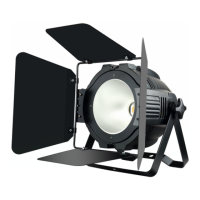

 To Next Page