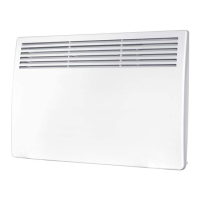
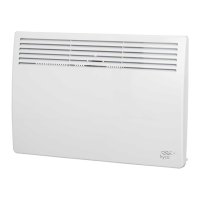
The Hyco Accona panel heater is a modern, slimline device designed for fixed installation heating in both home and office environments. It is ecodesign compliant, incorporating energy-saving features such as open window detection and a 24/7 electronic timer. The heater offers a curved design and is IP24 splashproof, making it suitable for various settings, including bathrooms, provided it is installed correctly.
Function Description
The Accona panel heater provides warmth through convection, utilizing an electric heating element. It operates with both full and half power settings, allowing users to adjust the heat output according to their needs. A key feature is its ability to maintain a target temperature, which can be set by the user. The device includes a frost protection mode, ensuring that the surrounding temperature does not drop below 5°C, regardless of other settings. This feature operates continuously unless the heater is switched off at the main power supply.
The heater can be operated in two primary modes: Manual and Automatic (24/7 timer). In manual mode, the user directly controls when the heater is active via a standby button. It also offers an "auto power off mode" within manual operation, allowing users to set a specific duration for the heater to operate before automatically switching off, preventing accidental prolonged use.
The automatic operation mode allows for a user-defined schedule, enabling up to four separate periods of operation for each day of the week. This is particularly useful for predictable heat demand, such as pre-warming an office before staff arrive, and helps reduce energy wastage. When operating in automatic mode, the heater will go into standby during defined non-operation periods and can be temporarily woken to alter settings.
Usage Features
The control panel of the Accona heater is designed for intuitive use, featuring a standby on/off button, full/half power select, manual/auto select, and UP/DOWN/SET/OK buttons for navigation and confirmation. An LED indicator shows when the element is on, and separate icons indicate low power, high power, open window active, manual mode active, automatic mode active, and timer active. The display also shows the current time and target temperature.
Setting up the heater involves a few simple steps. After switching on the main rocker switch, the blue power LED illuminates, and the panel is activated by pressing the standby on/off button. The clock can be set by holding down the SET and OK buttons simultaneously, then using the UP/DOWN buttons to adjust the day, hour, and minute, confirming each with the SET button.
The target temperature is adjusted using the UP/DOWN buttons and confirmed with the OK button. Switching between full and half power is done by pressing the full/half power select button, with "LO" or "HI" icons indicating the current setting. Similarly, the manual/auto select button toggles between "M" (manual) and "A" (automatic) modes.
For safety, a child lock feature is available, activated by simultaneously pressing and holding the UP and DOWN buttons until a beep sounds and "[ ]" appears on the target temperature display. This locks the panel, and the same action unlocks it.
Programming the 24/7 timer in automatic mode involves pressing the SET button to enter the programming screen. Users can then select the day, set the "switch on" hour, and "switch off" hour for up to four schedules per day using the UP/DOWN and SET buttons. It's important to note that only full hours can be set for the timer. The OK button stores the schedules and exits the feature.
The heater also features an open window detection system, which helps reduce energy wastage by temporarily adjusting heating when an open window is detected.
Maintenance Features
Regular maintenance is crucial for the safe and efficient operation of the Accona panel heater. The manual emphasizes periodic inspection and cleaning of the inlet grilles at the base and the outlet louvres at the front of the heater. This is to prevent dust or debris from causing blockages, which could reduce airflow and lead to the unit running at hotter temperatures.
Before any cleaning, it is essential to ensure the heater is isolated from the power supply and has fully cooled down. A soft brush or vacuum cleaner should be used to gently remove debris from the grilles and louvres. For cleaning the main body of the heater, a non-abrasive, damp cloth with soapy water is recommended. Care should be taken to avoid using excessive amounts of water that could enter the main body of the heater.
The manual also addresses the issue of sooty deposits, which can adhere to the louvres and surrounding surfaces. This can occur due to excess dust burning off the heating element after prolonged periods of non-use. It clarifies that this does not indicate an overheat occurrence and can be mitigated through regular cleaning of the heater.
In case of troubleshooting, the heater displays error codes: E1 for a temperature sensor error and E3 for an overheat event. For an E3 overheat event, the heater will beep until any button is pressed to clear the fault. It is critical to investigate the cause of the overheat before resuming use of the heater.


 To Next Page
 General