OPERATING INSTRUCTIONS
CYCLE TIMER SETTINGS
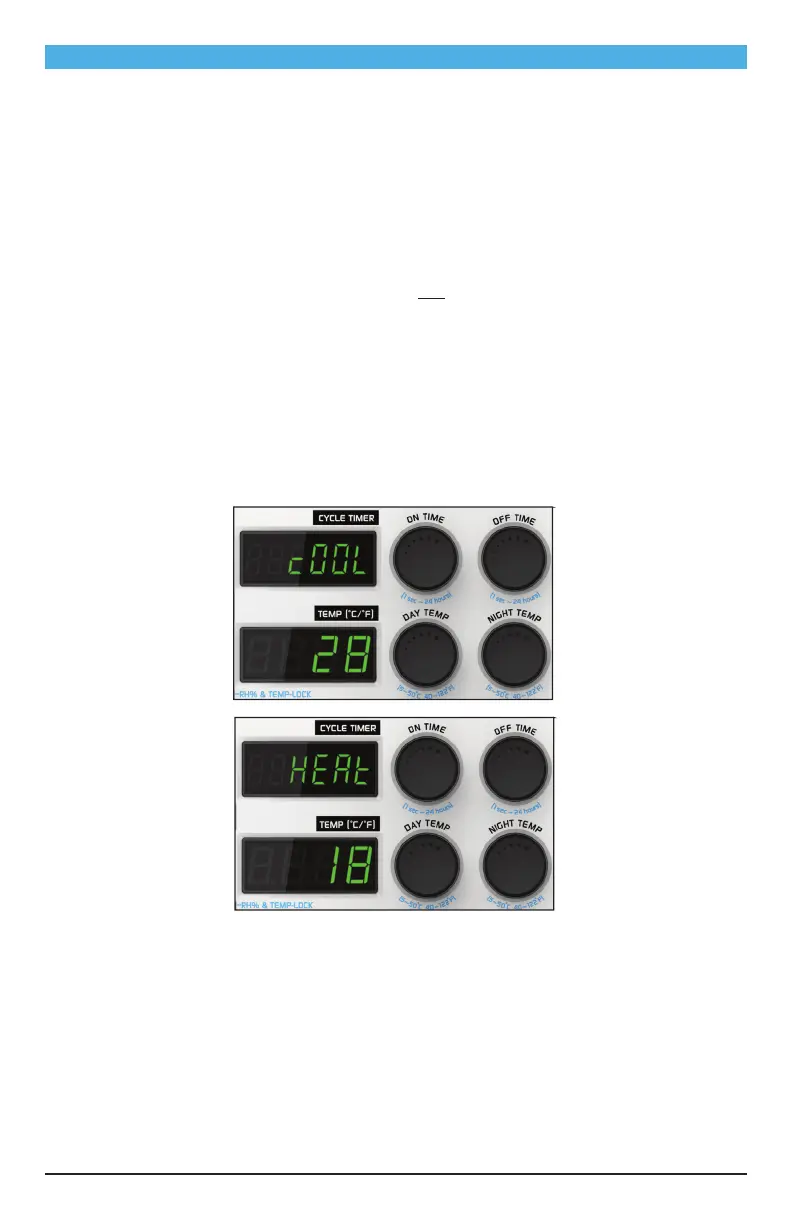
ON TIME: Click the ON TIME knob and turn to set your desired on time point. Set the hour setting
first, then press again to set minutes, and finally seconds. Save the setting by pressing again.
OFF TIME: Set off time by the same process, using the OFF TIME knob.
Timer Modes
DAY mode: The outlet is only energized when the photocell senses light.
24 HOURS mode: The outlet is energized during day and night (during lights-on and lights-off). The
setting should be entered from day/night mode.
NIGHT mode: The outlet is energized only when the photocell senses that the room is dark.
TEMPERATURE SETTINGS
DAY TEMP SETTING: There is a Day Cooling set point and a Day Heating set point.
1. To set the Day Cooling, Click the DAY TEMP knob. “COOL” will be displayed. To change the
setting, turn the DAY TEMP function knob to select your desired temperature. Click again to
accept the new setting.
2. “HEAT” will then be displayed. Turn the DAY TEMP knob to select your desired setting, then click
the knob again to save the new setting.
NIGHT TEMP SETTING: Night temps are set exactly the same way as described above for day
temps, but using the NIGHT TEMP knob this time.
TEMP MIN/MAX RECALL: Press the DAY TEMP and NIGHT TEMP knobs simultaneously to recall the
min/max temperature record.
TEMP UNIT: Press and hold the DAY TEMP and NIGHT TEMP knobs simultaneously knobs for 3
seconds, then turn the DAY TEMP knob to select the desired temperature unit (°F or °C). Press both
simultaneously again to confirm the setting.
7


 To Next Page