Need help?
Do you have a question about the HydroPoint WeatherTRAK ET Pro2 and is the answer not in the manual?
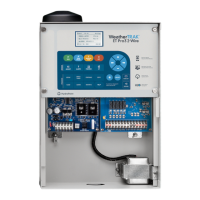
Delivers local weather-based ET updates daily, automatically adjusting irrigation based on changing weather.
Provides steps and figures for wiring 120-volt and 220-volt connections to wall-mount enclosures.
Details the process for connecting AC power to pedestal-mounted controller enclosures.
Explains how to connect field wires for stations, pump/master valve, flow meter, and sensors to the controller.
Provides instructions for connecting compatible flow sensors to the controller for monitoring water flow.
Explains how to use the Valve Test feature to confirm electrical continuity for all stations and components.
Explains the benefits and requirements of activating the ET Everywhere service for daily ET updates.
Details the step-by-step process for activating the controller using the ET Everywhere service.
Covers essential initial configurations including date, time, time zone, max stations, stack/overlap, and master valve/pump start.
Details setting first start times, water windows, and Hi ET second start times for programs.
Guides on selecting stations, modes, programs, water windows, usable rainfall, and run times for new landscapes.
Details steps for assigning stations to programs, including soil type, plant type, and slope factors for existing landscapes.
Explains copying station data between stations, to all stations, and copying defaults.
Lists minimum hardware needed for flow monitoring: a flow sensor and communication path.
Describes controller capabilities for monitoring high flow, leaks, and no flow conditions.
Details the steps to set up flow monitoring, including meter mode, exclusions, and thresholds.
Covers selecting meter mode, size, editing K/Offset values, and setting flow thresholds.
Guides on viewing daily and average weekly ET data directly from the controller.
Enables manual watering of specific stations or all stations for a set duration.
Allows adjusting water amount or day frequency/depletion on a station-by-station basis.
Details alerts related to high flow, no flow, and leaks, including character displays and possible causes/resolutions.
Covers alerts for valve issues like no connect, shorts, and defective solenoids, with resolution steps.
Provides solutions for the Water Window Alert, such as adjusting start times or water windows.
Addresses issues where the controller is programmed but stations are not irrigating, checking time/day settings and rain sensors.
 General
| Model | WeatherTRAK ET Pro2 |
|---|---|
| Type | Smart Irrigation Controller |
| Weather Data Integration | Yes |
| Zone Control | Yes |
| Mobile App | Yes |
| Number of Stations | 48 |
| Flow Monitoring | Yes |
| Warranty | 5 years |
| Water Savings | Up to 50% |
| Remote Access | Yes |
| Power Source | AC Power |
| Connectivity | Ethernet, Cellular |
| User Interface | LCD Display |
| Water Management | Advanced |


 To Next Page