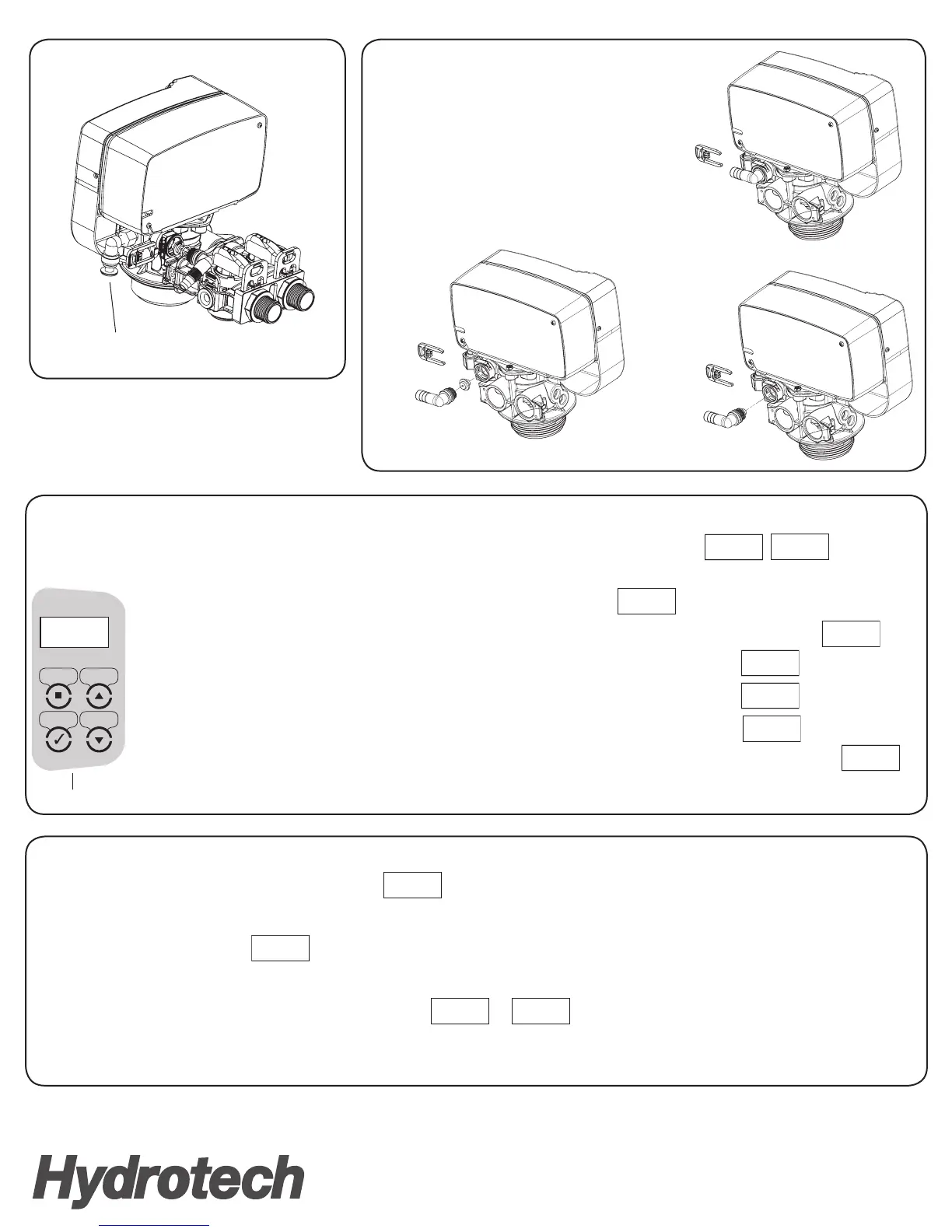
Push the Plug inside
the Brine Elbow here
6(77,1*6 83
'2:16(/(&7
TIME
08:27 AM
KEYPAD
1.
2. 3.
Step 6 – Program the Valve
1. Press SETTINGS key to advance to TIME OF DAY. TIME OF DAY will flash.
2. Press the UP or DOWN key to adjust the TIME OF DAY. Press & hold the UP or DOWN key to quickly advance the hour and minutes. When desired time is displayed press SELECT to advance to the
REGEN DAYS setting. REGEN DAYS will flash.
3. Press SELECT to complete pro-gramming. Now you will notice that two screens below will alternate. Time and Reg Days
Step 3 – Attaching Brine Port Plug
Step 5 – Power the Valve and Master Program to Filter Conguration
Step 4 – Change Drain Line Flow Washer
TOLL-FREE: 1-877-288-9888
Regina, SK • Cambridge, ON • Carmel, IN • Fridley, MN • Phoenix, AZ
www.hydrotechwater.com
55119 05/16
TIME
08:27 AM
TIME
08:27 AM
REG. DAYS
03
REMAIN
DAYS 03
TIME
08:27 AM
REMAIN
GAL 1060
Follow the Instruction Manual to Complete
the Installation of the Product
1. Hold UP and DOWN button for 5 seconds and Adjust Valve Type to “CALENDAR CLOCK”. PRESS SELECT
2. Adjust Regeneration Time. Press UP and DOWN key to quickly advance the hour and minuted. When desired time is displayed, press SELECT to Backwash
3. Adjust Backwash Time to 10 Minutes. UP and DOWN key to quickly change the minutes. When desired minutes press SELECT to Brine
4. Adjust Brine Time to 1 Minute. Press UP and DOWN key to quickly change the minutes. When desired minutes press SELECT to Rinse
5. Adjust Rinse Time to 10 Minutes. Press UP and DOWN key to quickly change the minutes. When desired minutes press SELECT to Refill
6. Adjust Refill Time to 0.0 Minutes. Press UP and DOWN key to quickly change the minutes. When desired minutes press SELECT to complete the programming
1. Remove the red clip as shown
2. Pull the drain elbow
3. Remove and Replace the washer as shown.
For 1 CF - use #5 (3.5 GPM)
For 1.5 CF - use #6 (4.0 GPM)
CALENDAR
CLOCK
BACKWASH
10 MIN
REG TIME
02:00 AM
BRINE
01 MIN
RINSE
10 MIN
REFILL
0.0 MIN
Attach the Transformer cable to the valve and plug in the transformer to the 110V Power outlet. you will notice the two screens on right will alternate.


 To Previous Page
 Loading...