44 45
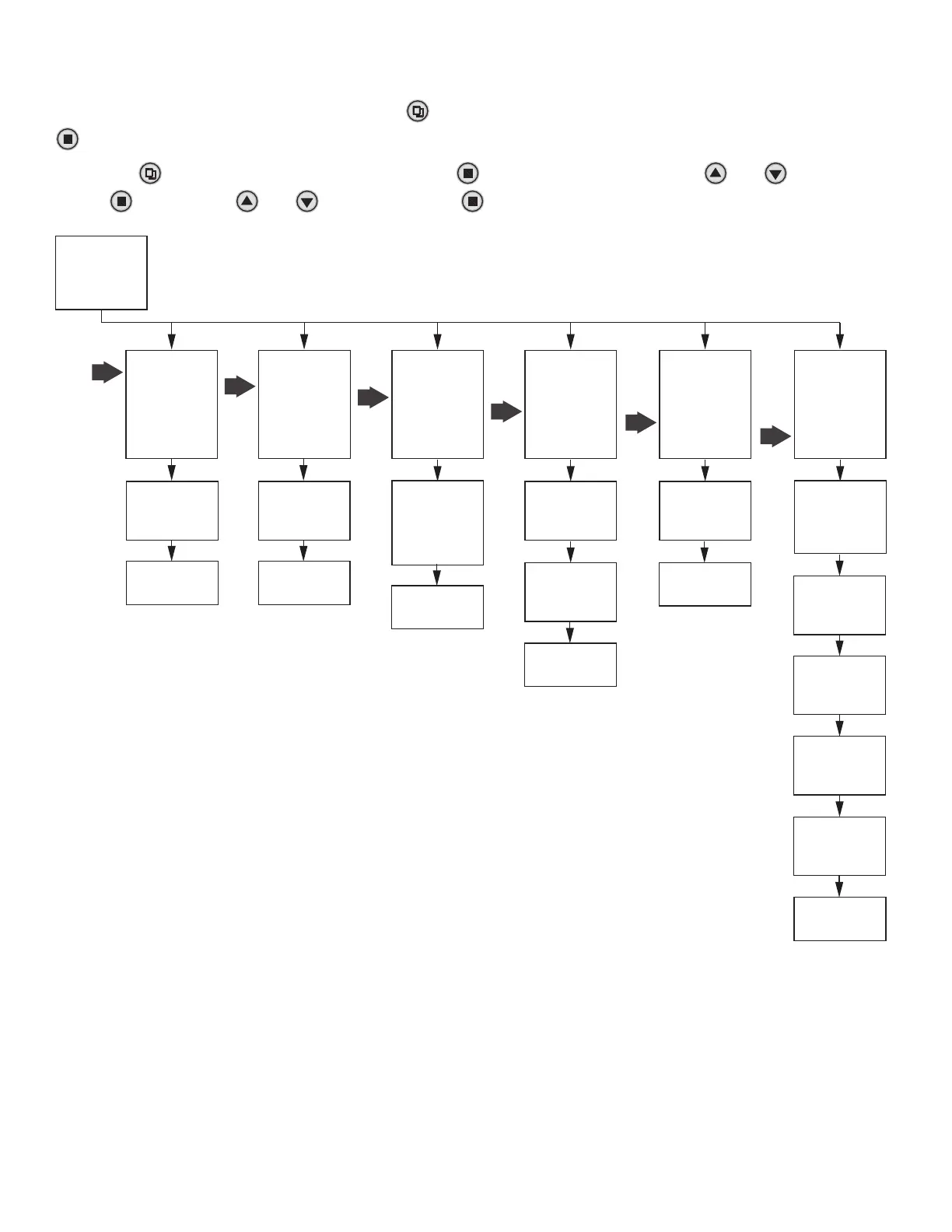
= Advanced Menu =
Resin Volume
Rell Rate
Regen. Mode
Backwash Override
Emergency Regen.
Regen. Cycles
History Values
= Main Menu =
Regen. Time Setting
System Capacity
Salt Mode Setting
Advanced Menu
= Resin Volume =
Depends on model
Press To Cancel
Press
To Conrm
= Backwash Override =
ON OFF
Press To Cancel
Press
To Conrm
= Advanced Menu =
Resin Volume
Rell Rate
Regen. Mode
Backwash Override
Emergency Regen.
Regen. Cycles
History Values
= Regen. Mode =
Days
Calendar
Meter Immediate
Meter Delay
Meter Override
= Advanced Menu =
Resin Volume
Rell Rate
Regen. Mode
Backwash Override
Emergency Regen.
Regen. Cycles
History Values
Setting Complete
Press To Return
= Rell Rate =
0.7gpm
Press To Cancel
Press
To Conrm
Setting Complete
Press To Return
Setting Complete
Press To Return
= Advanced Menu =
Resin Volume
Rell Rate
Regen. Mode
Backwash Override
Emergency Regen.
Regen. Cycles
History Values
= Backwash Duration =
12 Minutes
Press To Cancel
Press
To Conrm
= Brine Draw Durationn =
123 Minutes
Press To Cancel
Press
To Conrm
= Rinse Durationn =
12 Minutes
Press To Cancel
Press
To Conrm
= Rell Durationn =
12.5 Minutes
Press To Cancel
Press
To Conrm
= Backwash Override =
06 Regens
Press To Cancel
Press
To Conrm
Setting Complete
Press To Return
= Emergency Regen. =
ON OFF
Press To Cancel
Press
To Conrm
= Advanced Menu =
Resin Volume
Rell Rate
Regen. Mode
Backwash Override
Emergency Regen.
Regen. Cycles
History Values
Setting Complete
Press To Return
= Advanced Menu =
Resin Volume
Rell Rate
Regen. Mode
Backwash Override
Emergency Regen.
Regen. Cycles
History Values
Setting Complete
Press To Return
= Regen. Cycles =
Backwash Duration
Brine Draw Duration
Rinse Duration
Rell Duration
ADVANCED MENU PRESS “MENU” KEY
AND SCROLL TO “MAIN MENU”. THEN PRESS “SET”
TILL IT BEEPS. SCROLL TO ADVANCED MENU
Press “Menu” key . Press - to advance to Advanced Menu Press and hold “SET”
5 seconds or until you hear a beep. Press “+”
or “-”
to choose menu option.
Press “SET”
to enter. Press “+”
or “-” to change option. Press “SET”
to accept.
MASTER PROGRAMMING GUIDE 89 DOWNFLOW
RESIN VOLUME
This setting is the amount of ion exchange media used in the system.
The value is used to calculate system capacity and rell time. It is also
used to select the pre-engineered valve cycle settings. “C” designates
a cabinet model.
REFILL RATE
This value should match the BLFC ow washer. It is used to calculate
the rell time.
REGEN MODE
Days - Every X days the system will regenerate at the regen time.
Calendar - On specic days of the week the system will regenerate at
the regen time.
Meter Immediate - When the volume remaining reaches zero gallons
the system will immediately regenerate.
Meter Delayed - When the volume remaining goes below the
calculated reserve for that day the system will regenerate at the
regen time.
Meter Overide - When the volume remaining goes below the
calculated reserve for that day the system will regenerate at the regen
time or when X days has passed. Which ever occurs rst.
BACKWASH OVERIDE
This setting can be used to skip the back wash cycle. As an example
if the setting is 10, the system will skip 10 back wash cycles. The
setting will only work if the WATER TYPE is set to CITY for clean water
applications.
EMERGENCY REGEN
When set to ON, the system will start a forced regeneration when
the remaining capacity reaches 3%. The regeneration consists of 8
minutes of Brine and 12 minutes of Rinse. The 20 minutes regener-
ation will restore up to 33% of the system capacity. At the next
regeneration time (2:00 AM), the system will automatically perform a
standard regeneration to restore capacity to 100%.


 To Next Page
 Loading...