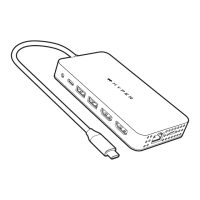
Package Contents
• HyperDrive Next 10 Port Business Class USB-C Dock
• User Guide
Product Compatibility
• MacBook Air/Pro (M1/M2 & Intel powered)
MacBook OS 10.15 or Later
• Chrome OS laptop with Thunderbolt 4, USB4,
USB 3.0 or later Type C with DP Alt-Mode
• Windows OS laptop with Thunderbolt 4, USB4,
USB 3.0 or later Type C with DP Alt-Mode
Introduction
The HyperDrive® Next 10 Port Business Class USB-C
Dock is great for travel & business, and support multiport
function to connect your USB-C laptop to multiple
device. The dock can be seamless to connect 10 kinds of
devices, with this USB-C multiport dock you can connect
HDMI display, 4K60Hz monitors, standard SD card, RJ45
Gigabit Ethernet cable, USB-C PD to your laptop. The
USB-C PD port can connect to a 100W PD 3.0 adapter
to provide PD passthrough charging to your computer.
Hyper also implement eco smart system to use recyclable
materials on the product to support green earth and
healthy environment.
3
Operating System
• Windows 7 and above, Chrome OS R90 and above,
macOS 10.10 and above


 To Next Page