10
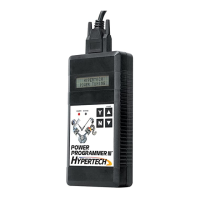
• Press the ▲ arrow on the programmer. The following displays
should appear immediately on the LCD screen (where X.X.X.X
is the version number):
• If these screens do not appear, make sure that both ends of the
cable are securely attached and press the ▲ arrow again.
• The programmer will show applications and copyright
information. The programmer will then identify your vehicle
and perform a self-test. A few seconds after the self-test is
complete, the VIN number of the vehicle will be shown and
a screen should appear with a description
of your vehicle:
• If this screen does not appear, make sure that the key is in the
RUN position with the engine NOT running.
• The programmer will display a series of options. For each
option press the ‘Y’ button to make a change. Press the ‘N’
button to make no change and proceed to the next option.
For some options, you will use the ▲ and ▼ arrows to point
to a particular option. Pressing the ‘Y’ button will then lock in
your selection. This screen will now appear:
• The Power Programmer is checking the vehicle for any
Diagnostic Trouble Codes (DTCs). If no DTCs are found,
this screen will appear:
• If no DTCs are found, the Power Programmer will then go
to Step A (Engine Tuning). If any DTCs are found, this screen
will appear:
HYPERTECH
POWER PROGRAMMER
VERSION
X.X.X.X
CHECKING FOR DIAGNOSTIC
TROUBLE CODES (DTCS)
NO DTCS REPORTED
“X” DTCS REPORTED
YOUR VEHICLE IS:
XXXX CHEVROLET TRUCK/SUV X.XL
FOR XXXX GMC AND
CHEVROLET TRUCKS


 To Next Page