6
NOTE for 1999-2002 GM vehicles: If the previous step
did not
turn off the OnStar light on the dash, follow these
steps to remove three (3) other OnStar related fuses:
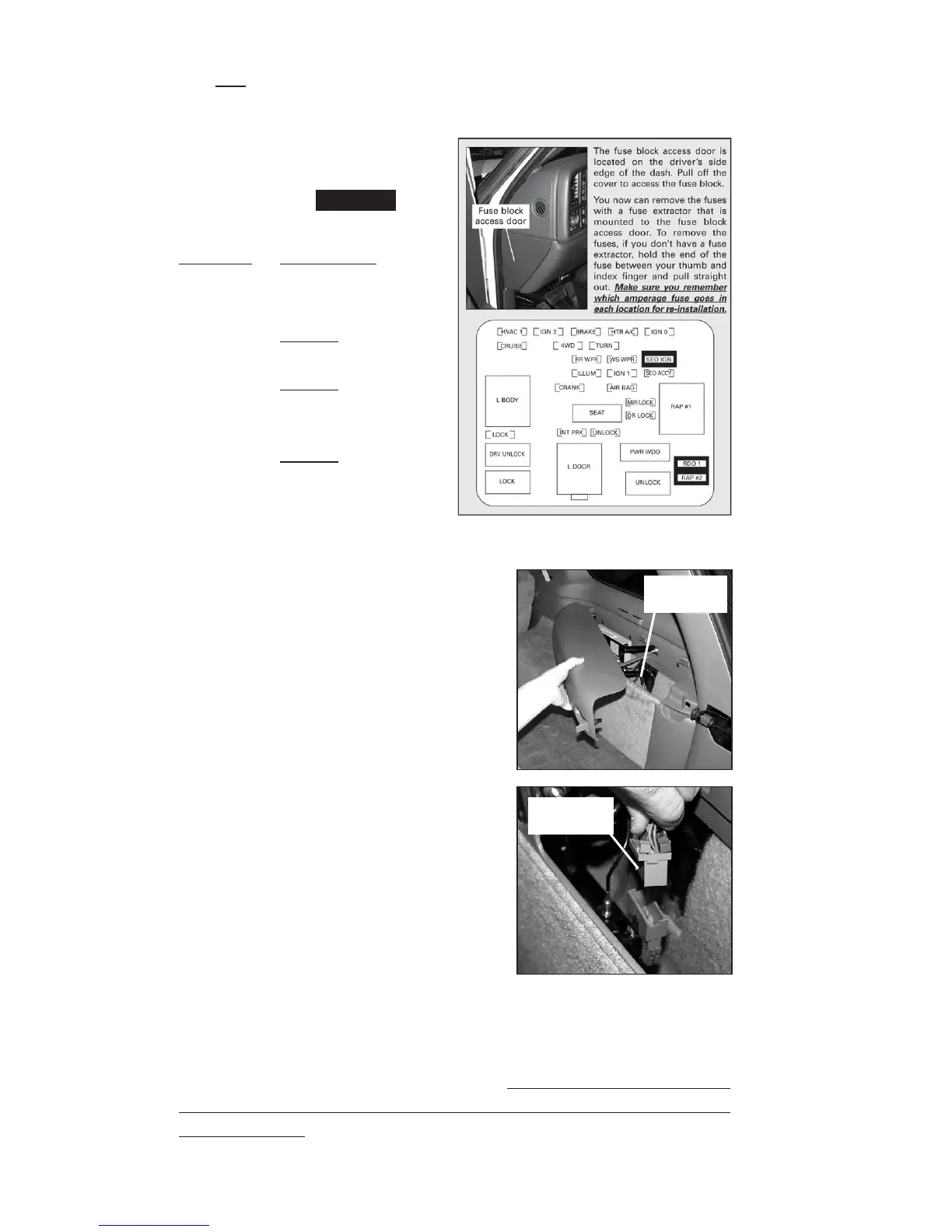
The three (3) fuses that must
be removed are as follows:
(see highlighted
fuse locations to the right.)
Location Description
SEO IGN Special Equipment
Option, Ignition,
OnStar
RDO 1 Audio System,
OnStar
RAP #2
Rear Power Windows,
Sunroof, Radio,
OnStar
NOTE: Owner’s manual
fuse diagram may vary
from example shown.
Disabling OnStar
in 4.3L GM SUVs
To temporarily disable the OnStar
system in 4.3L GM SUVs, the plug
to the OnStar computer must be
disconnected. The OnStar computer is
located in the back of the vehicle under
the passenger’s side rear interior cover
(See Figure A). To remove the cover,
release the clip and swing out. See
Figure B. Squeeze the blue and grey
tabs on the connector and pull up
to temporarily disconnect the OnStar
system in the vehicle.
What To Do After Programming Your Vehicle
After the vehicle computer has been successfully programmed,
reinstall the fuse(s) removed that are OnStar related to enable the
system for 4.8/5.3/6.0/8.1L vehicles, making sur
e the proper
amperage fuse is in each location and the fuse panel cover(s)
arereinstalled. For 4.3L GM vehicles, plug the OnStar connector
back to the original location and reinstall the interior cover.
Figure A
Figure B
OnStar
computer
OnStar
connector
➚
➚


 To Next Page