17 Installation
Automated Load Management
ALM (Automatic Load Management)
Hypervolt's Automatic Load Management control is used to safety
adjust the maximum charging current an EV can take to prevent
the charging device being responsible for overloading the
electrical service to a property.
When activated the charging current will drop to as low as 6A.
Generally the ALM system will activate for short periods every so
often. If the ALM is being triggered very regularly this could be a
sign that the electrical service to the property is inadequate for
requirements.
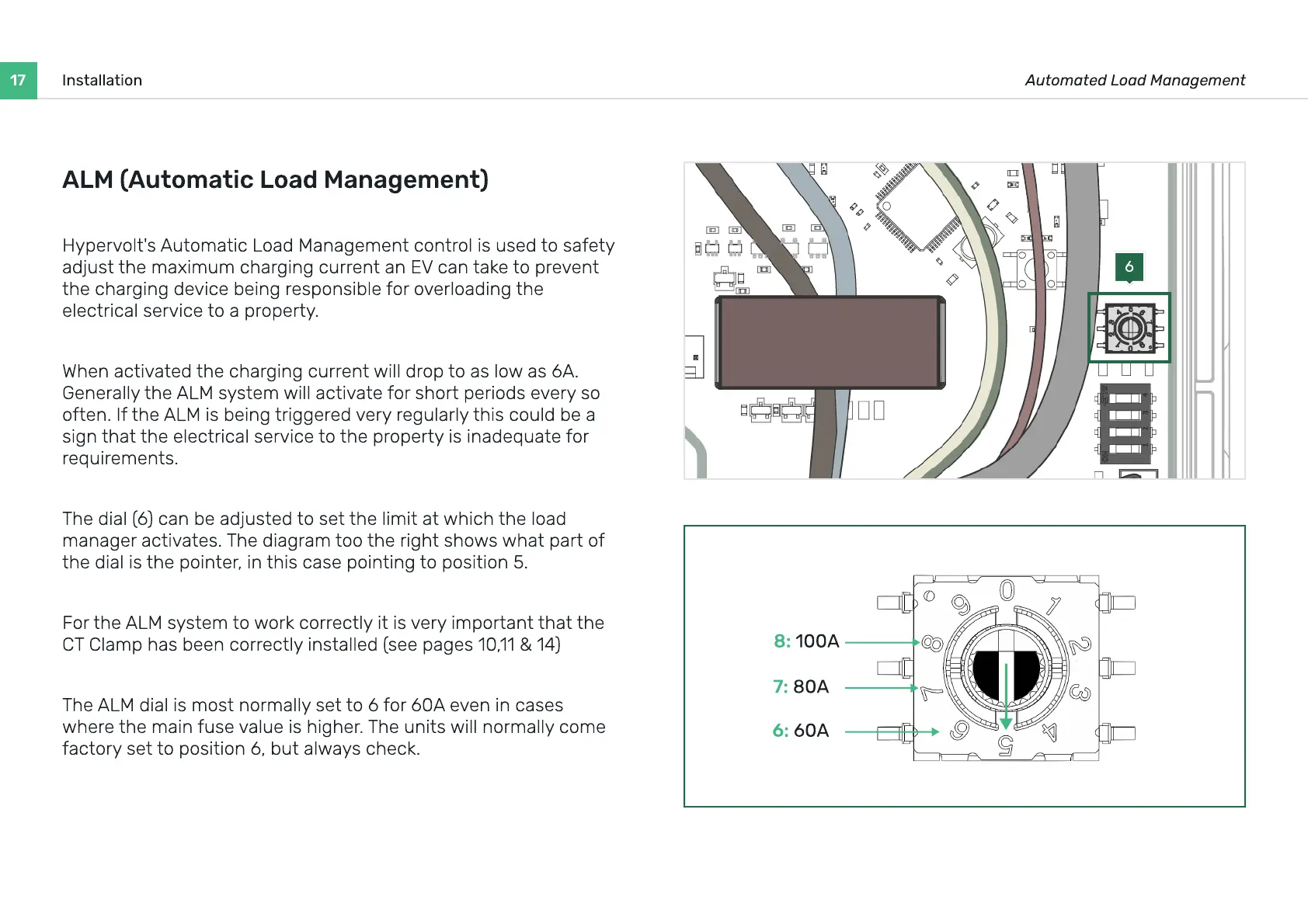
The dial (6) can be adjusted to set the limit at which the load
manager activates. The diagram too the right shows what part of
the dial is the pointer, in this case pointing to position 5.
For the ALM system to work correctly it is very important that the
CT Clamp has been correctly installed (see pages 10,11 & 14)
The ALM dial is most normally set to 6 for 60A even in cases
where the main fuse value is higher. The units will normally come
factory set to position 6, but always check.
6
8: 100A
7: 80A
6: 60A


 To Next Page