SM16 Series Palm Microphone Owner's Manual
6
Cecting to the Mobile Radio
Caution: Power off the mobile radio prior to
connection.
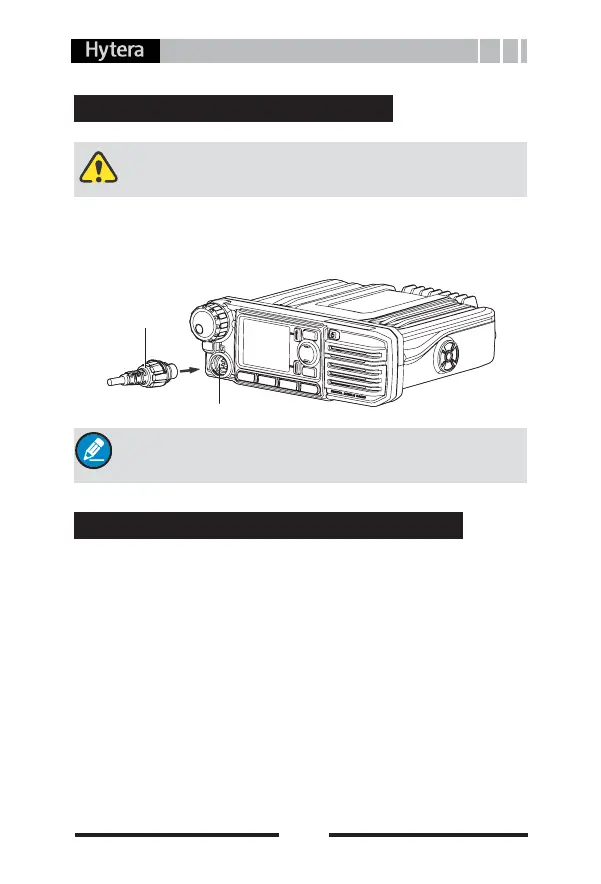
Insert the connector (with the triangle index facing upwards) into
the accessory jack on the front panel, and rotate the connector
knob clockwise to fasten it until a click is heard. See the diagram
below.
Note:To remove the connector, rotate the connector
knob anticlockwise to loosen it.
Hang or Take the Palm Microphone
To hang the microphone, hold the microphone and insert its
buckle into the hanger. See the diagram below.
To take the microphone, hold it and remove it in the direction
shown below.
Place the palm microphone onto the hanger, and the mobile
radio enters Hook state. At this time, you cannot transmit via the
PTT key. For the hang-up function, please refer to the owner’s
manual for the mobile radio.
Accessory Jack
Connector



 To Next Page