EasyManua.ls Logo

Hytera SM27W2 - User Manual

Hytera SM27W2
22 pages
Print Icon
To Next Page IconTo Next Page
Loading...
使⽤说明书
USER MANUAL
PNC550宽带智能终端
PNC550SmartLTETerminal
快速操作⼿册
QuickReferenceGuide
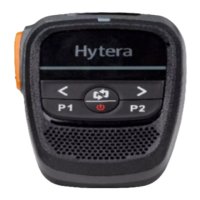
SM27W2WirelessRemoteSpeakerMicrophone
SM27W2⽆线扬声器话筒
使⽤说明书
USERMANUAL
5 2 0 2 0 1 0 0 6 3 4 2 7 A

Questions and Answers

  • C
    Colleen WebbAug 11, 2025
    What to do if the press on any one of keys of Hytera Microphone is invalid?
    • A
      Ashley HumphreyAug 12, 2025
      If the Hytera Microphone is frozen, simultaneously press and hold the TK, Left, and Right keys for two seconds. This will reset and turn off the device. After resetting, you can turn the device back on.
  • C
    Caitlin PayneAug 22, 2025
    Why the LED indicator does not glow during charging of Hytera Microphone?
    • A
      Andrew PowellAug 22, 2025
      If the LED indicator doesn't light up during charging of your Hytera Microphone, the battery might be completely drained. Charge the device for 10 to 20 minutes. After this initial charge, the LED indicator should glow red.
  • D
    davisjenniferSep 1, 2025
    Why automatic re-connection fails on Hytera Microphone?
    • R
      Roger EdwardsSep 1, 2025
      If the automatic re-connection of your Hytera Microphone fails, the distance between the microphone and the radio might be too far. Ensure that the microphone and the radio are within the effective communication range.

Hytera SM27W2 Specifications

General IconGeneral
Weight150g
CategoryMicrophone
Operating Temperature-20°C to +60°C
Storage Temperature-40℃ to +85℃
Waterproof RatingIP67

Related product manuals