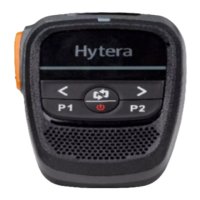
4.15 Adjusting the Volume
This feature is available only when the product is wirelessly connected to the multi-mode advanced radio.
To adjust the call volume during a call, press the
Left
key to decrease the volume, press the
Right
key to
increase it.
To adjust the alert tone volume when the product is in standby mode, press the
Left
key to decrease the
volume, press the
Right
key to increase it.
To adjust the video/audio volume when playback, press the
Left
key to decrease the volume, press the
Right
key to increase it.
4.16 Selecting the Channel/Contact
This feature is available only when the product is wirelessly connected to the multi-mode advanced radio.
1. Press the Play/Pause/Confirm Key in Live View mode.
2. Press the Left key or the Right key to select the channel/contact.
4.17 Selecting the Zone/Group (folder)
This feature is available only when the product is wirelessly connected to the multi-mode advanced radio.
1. Press the Play/Pause/Confirm key in Live View mode.
2. Press the Left key or the Right key to select the zone/group (folder).
4.18 Pressing PTT to Talk
When the product is wiredly or wirelessly connected to the portable radio, press and hold the
PTT
key to speak
into the microphone, and release it when you’ve finished.
If the product is connected to the radio by cable and BT simultaneously, the voice will be transmitted by cable.


 To Next Page