Solar Charger H60
The Solar Charger H60 is a portable and efficient solar charging solution designed for outdoor activities and emergency power needs. It utilizes high-efficiency monocrystalline solar panels to convert sunlight into usable electricity, offering a stable and reliable power source for various devices.
Function Description
The primary function of the Solar Charger H60 is to convert solar energy into electrical power to charge compatible devices. It features dual output ports, including a USB output and a DC output, allowing for simultaneous charging of two devices. This solar charger is designed to provide a stable current to connected devices, which helps to prolong their lifespan. It does not have an internal electrical storage function, meaning it must be used under direct sunlight to operate effectively.
Important Technical Specifications
- Model: H60
- DC Output: 18V, 3.4A (Max)
- USB Output: 5V, 2A
- Efficiency: 23%
- Unfolded Size: 1690x290x2mm
- Folded Size: 165x290x70mm
- Weight: 1300g
- Solar Panel Type: 9 pieces of SUNPOWER mono-crystalline
- Maximum Power Output: Up to 60 watts
- Features: Dust-resistant, water-resistant, salt-resistant, and UV-resistant.
The package includes:
- 1x Solar charger
- 1x DC to DC cable
- 1x User manual
Usage Features
The Solar Charger H60 is designed for ease of use and portability, making it suitable for various outdoor scenarios.
Deployment and Connection:
- Unfold and Stabilize: Unfold the solar charger and spread it out to face direct sunlight.
- Connect DC Cable: Connect the provided DC cable to the DC output port on the solar charger.
- Connect to Device: Connect the other end of the DC cable to the device (e.g., power station) you wish to charge.
- Dual Output: The USB and DC output ports can be used simultaneously to charge two devices.
Optimal Charging Conditions:
- Sunshine: Ideal conditions for solar charging. Avoid placing the solar charger in shaded areas.
- Cloudy: Charging is still possible, but efficiency will be lower, resulting in longer charging times.
- Home Lighting: Home lighting is generally too weak to power the solar charger effectively.
- Best Angle: For maximum charging rate, place the solar charger at a 45° angle facing the sunlight.
Environmental Resistance:
The solar charger features a waterproof layer on both the output pocket and the solar charger itself. This design allows for charging devices near water bodies like swimming pools or beaches without fear of water damage. Additionally, its dust-resistant, salt-resistant, and UV-resistant properties enhance its durability in various outdoor environments.
Portability:
With its compact folded size (165x290x70mm) and lightweight design (1300g), the H60 is highly portable, making it an excellent companion for outdoor activities such as camping, hiking, or travel.
Maintenance Features
To ensure the longevity and optimal performance of your Solar Charger H60, consider the following maintenance guidelines:
General Care:
- Handling: Do not break or disassemble the solar charger. Improper handling can damage the internal components and void the warranty.
- Storage: When not in use, fold the solar charger and store it in a cool, dry place away from direct sunlight and extreme temperatures.
- Cleaning: Regularly clean the solar panels to remove dust, dirt, or debris that may accumulate and reduce charging efficiency. Use a soft, damp cloth for cleaning.
Pre-Use Checks:
- Weather Conditions: Always estimate the weather conditions before using the solar charger to ensure sufficient sunlight for effective charging.
- Sunlight Exposure: Before connecting devices, ensure the solar charger is placed under direct sunlight. Remember that the solar charger does not store electrical energy internally, so continuous sunlight is required for operation.
Troubleshooting:
- Solar charger not charging devices:
- Verify that the input current and voltage requirements of your device are within the accepted range of the solar charger's output (18V, 3.4A Max for DC; 5V, 2A for USB).
- Ensure the solar charger is placed under direct sunlight. Cloudy weather or indirect sunlight can cause fluctuations in the output current and reduce charging effectiveness.
- Low charging efficiency:
- Partially cloudy weather can significantly lower charging efficiency, leading to longer charging times. Optimize placement for maximum direct sunlight exposure.
- Ensure the solar panels are clean and free from obstructions.
Disposal:
- Environmental Responsibility: When the product reaches the end of its life, dispose of the charger according to local environmental laws and regulations. The product marking indicates that it should not be disposed of with general household waste within the EU. Utilize designated return and collection systems or contact the retailer for environmentally safe recycling.
Caution:
- Heat Exposure: Excessive heat from direct sunlight may damage the device. While designed for outdoor use, prolonged exposure to extreme heat should be monitored.

 Need help?
 General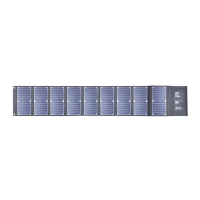

 To Next Page