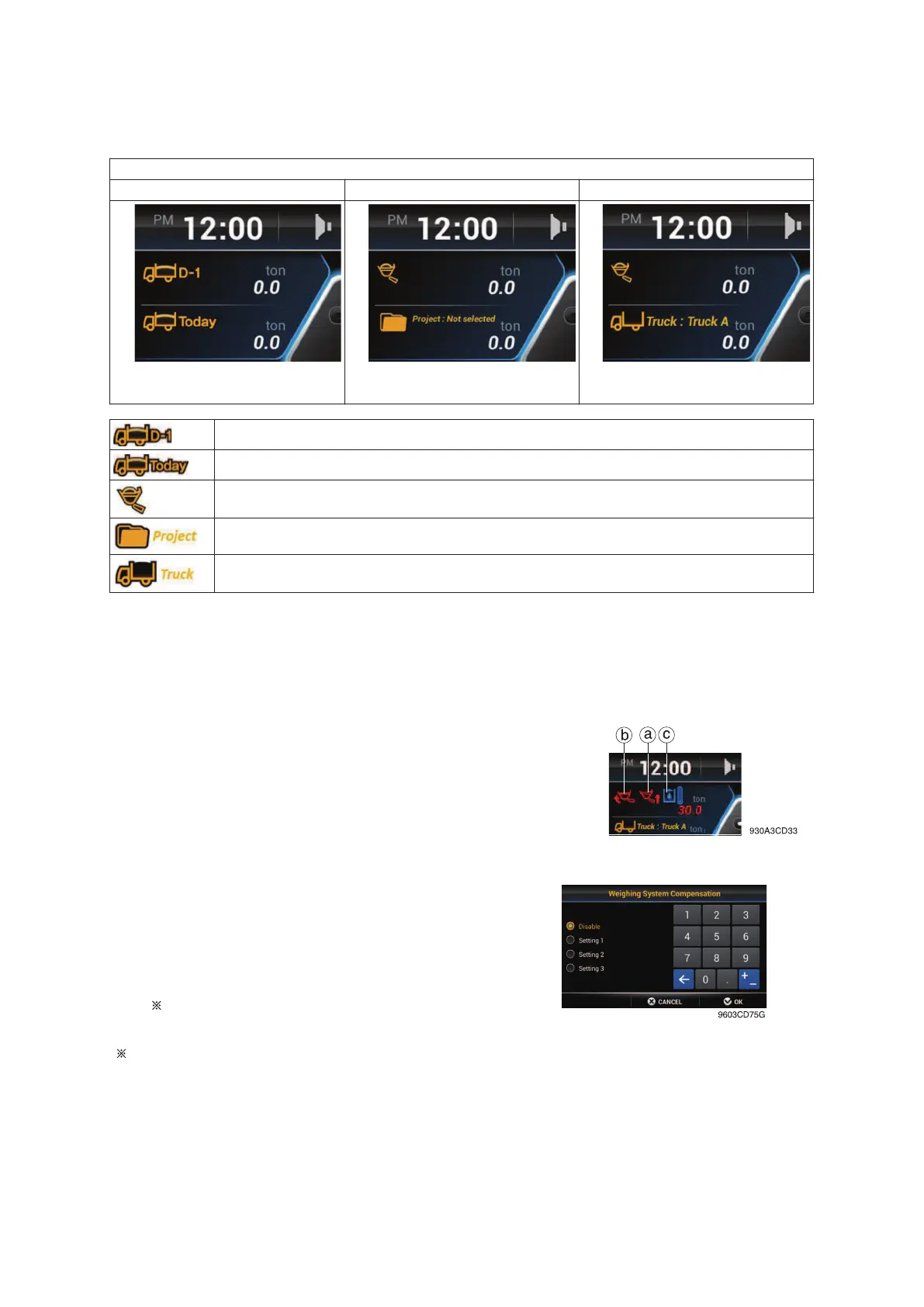
• Weighing display : Set the display on main display screen.
Press Work mode switch on keypad shortly to shift weighing display.**
Weighing display - Daily Weighing display - Project Weighing display - Truck
Work weight (previous day)
Work weight (today)
Current weight
Total weight accumulated in selected Project**.
Total weight accumulated in selected Truck**.
** Refer to page for 3-48 details
• Error detection : Set error detection ON/OFF.
- OFF : Errors are not displayed.
- ON : ⓐ,ⓑ and ⓒ are displayed on main display screen.
ⓐ The boom lift was performed too fast.
ⓑ The bucket was not in the fully tilted back position while bucket
was in the weigh range.
ⓒ The hydraulic temperature is low (below 40 °C).
• Boom pressure calibration : See the page 3-28
for details.
• Weighing system compensation
- Calibration workload depending on work
tool.
Only for the service person. Do not ad-
just arbitrary.
Refer to page 3-48.
3-25


 To Next Page