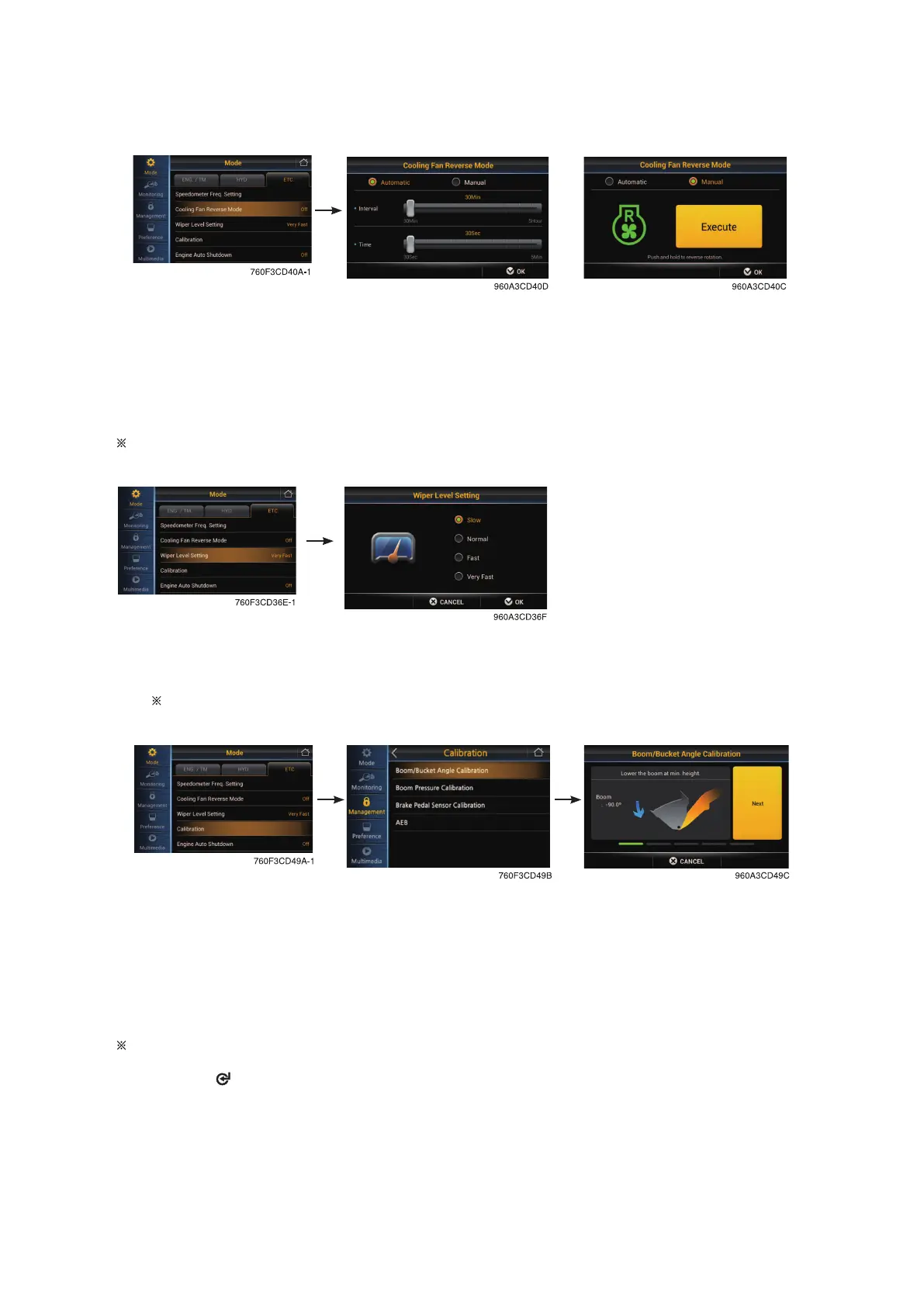
Cooling fan reverse mode
· Manual : Rotate the fan with reverse direction while pressing the button "Execute".
· Automatic : Rotate the fan with reverse direction by preset cycle.
- Interval : 30 min ~ 5 hrs
- Time : 30 sec ~ 5 min
Default : Interval (60 min), time (120 sec)
Wiper level setting (Intermittent mode)
• Setting wiper speed in J position of multi fumction switch (slow, normal, fast and very fast)
Refer to the page 3-57.
Calibration
• You should turn OFF " Soft end stop " before start calibration.
• Press NEXT button after following the instruction at each step.
• If correction is right, NEXT button will be activated, then go to next stage.
• After following each step correctly, the message "Calibration completed" will be shown.
Press OK button, then process be ended.
Using switch
- Using instead of NEXT, complete button.
3-28


 To Next Page