Barrel | 10www.iboxstyle.com
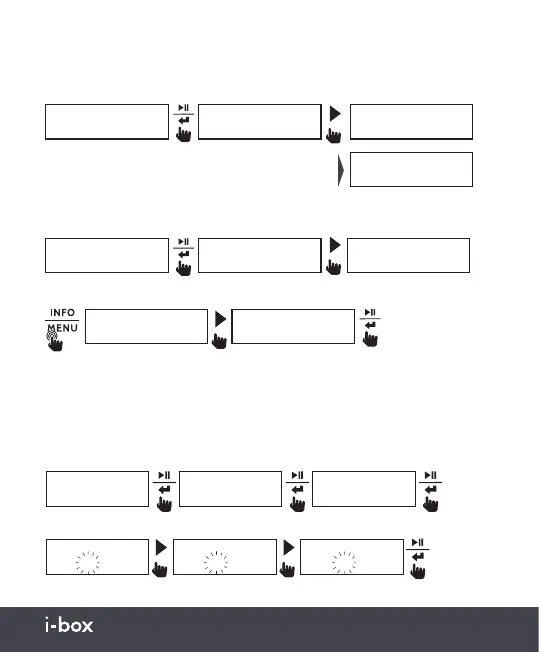
DRC (Dynamic Range Control): Dynamic Range Control can
make quieter sounds easier to hear when your radio is used in a noisy
environment. This function is only available for some DAB stations.
Prune: This function removes any stations that are listed but not
available.
System: DAB system settings.
Time
Set Time
DAB
<DRC >
DAB
<Prune >
DAB
<Full Scan >
DAB
<System >
Prune?
<No> Yes
Prune?
No <Yes>
DRC *
<DRC off >
DRC *
<DRC low >
DRC *
<DRC high >
The currently selected mode will have a ‘*’
sign in the upper right corner.
Choose from Time / Language / Factory Reset / SW Version / Backlight / Sleep
Manual Clock Setting: The time will be set up automatically when the
device has received a DAB or FM signal.
To manually set the Time and Date, follow the steps below.
DAB
<System >
Set Time
00:00
Set Time
02:00
Set Time
15:00
System
<Time >
Time
<Set Time/Date>
≥2s


 To Next Page