EasyManua.ls Logo

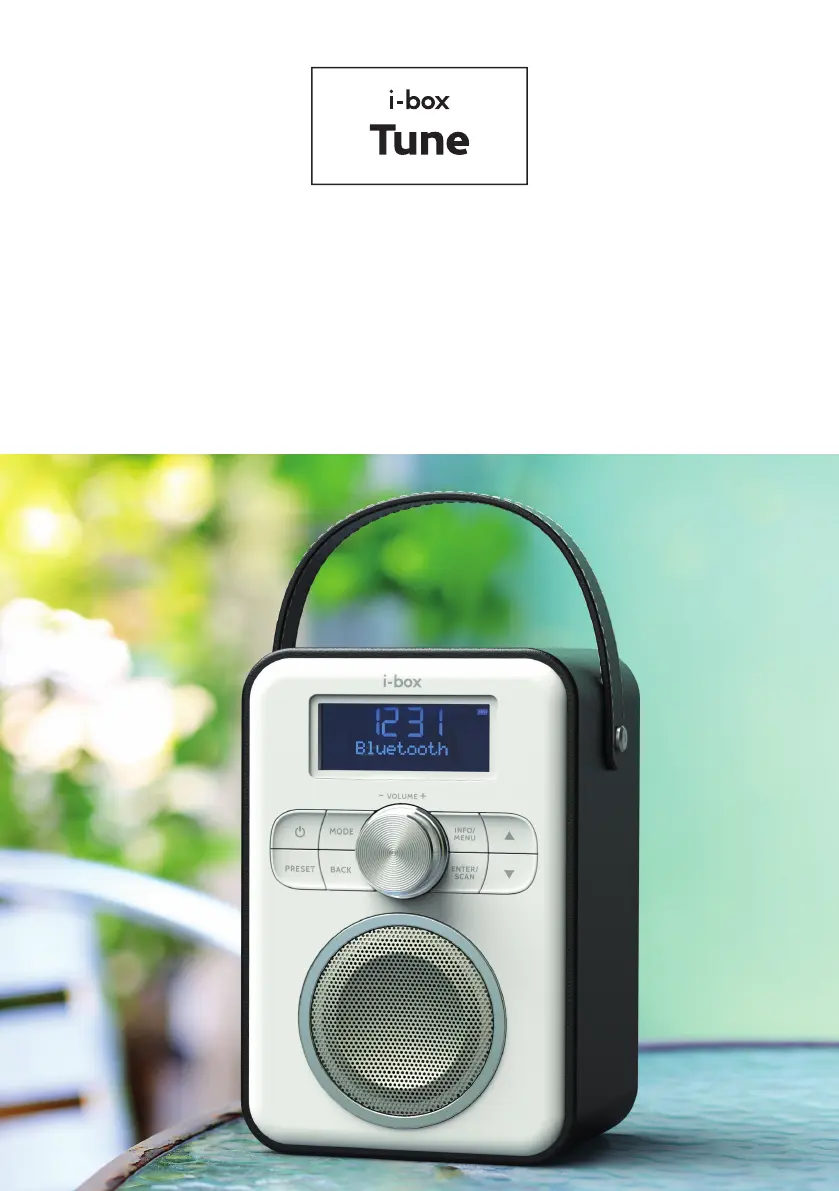
i-box Tune - User Manual

i-box Tune
44 pages
Print Icon
To Next Page IconTo Next Page
Loading...
Tune | 01www.iboxstyle.com
Portable DAB/FM Radio with Bluetooth
Tragbares aufrechtes DAB-Radio
Radio DAB vertical portátil
Radio DAB verticale portable
Radio DAB portatile verticale
Draagbare rechtopstaande DAB-radio

Questions and Answers

  • M
    Mike SanchezAug 5, 2025
    How to improve radio reception on i-box Tune?
    • L
      Leslie BrownAug 5, 2025
      If the radio reception on your i-box Portable Radio is poor: * Ensure the antenna is fully extended to maximize signal strength and improve reception. * Adjust the antenna direction or move the radio closer to a window to improve the signal. * Verify that the radio is not near microwaves, fluorescent lights, or other equipment that may cause interference.
  • E
    Erin GomezAug 15, 2025
    What to do if my i-box Portable Radio has no sound?
    • C
      Christopher AllenAug 15, 2025
      If your i-box Portable Radio has no sound, first ensure that the volume isn't turned down. Try increasing the volume. Also, make sure the radio is switched on and attempt tuning to another radio station.
  • P
    Pamela SchwartzAug 26, 2025
    Why my i-box Tune does not turn on?
    • L
      Lindsay HollowayAug 26, 2025
      If your i-box Portable Radio doesn't turn on, it might be due to a flat battery or an insecure connection to a USB socket. Connect the radio's USB port to a powered USB socket. If that doesn't work, try connecting it to a higher output powered USB socket.

Summary

Caring for your Tune Radio

Controls and Features Overview

Front Panel Controls

Details the buttons, dials, and display elements on the front of the i-box Tune radio.

Back Panel Connections

Outlines the ports and connectors available on the rear of the i-box Tune radio.

Getting Started with your Radio

Charging the i-box Tune Radio

Instructions for charging the built-in lithium battery and initial charge recommendations.

Automatic Clock Setting

Details how the clock automatically sets once the radio is powered and aerial is extended.

Changing Operating Language

Guide to navigating the system menu to select and change the radio's operating language.

Powering On;Off and Standby

Instructions for turning the radio on, off, and putting it into standby mode using the power button.

Selecting Radio Modes

How to switch between different radio modes (DAB, FM, Bluetooth, Aux) using the MODE button.

Menu Navigation

Explains how to navigate through menus and sub-menus using the control buttons.

DAB Radio Operation Basics

Covers performing a full scan for DAB stations and viewing the station list.

Advanced DAB Radio Features

DAB Radio Presets and Tuning

Guide to saving, recalling, and manually tuning DAB radio stations and presets.

DAB Signal Management

Details DRC settings for sound clarity and the 'Prune' function to clean the station list.

FM Radio Operation

FM Radio Scanning and Tuning

Instructions for auto scanning, manual tuning, and managing FM radio stations.

FM Radio Presets and Audio Settings

Guide to saving FM presets and adjusting audio settings like stereo or mono.

Connectivity Modes

Bluetooth Mode Operation

Steps for connecting a Bluetooth device, playing audio, and disconnecting.

AUX In Mode

Instructions for connecting an external audio device via the AUX input port.

System Menu and Settings

Sleep Function

Setting an automatic timer for the radio to switch off or enter standby.

Backlight and Display Settings

Controls for backlight timeout, on-level brightness, and dim level.

Factory Reset

Function to clear all settings, station lists, and presets to default.

Troubleshooting Common Issues

Radio Reception Problems

Solutions for poor radio reception, including antenna adjustment and interference checks.

No Sound or Power Issues

Troubleshooting steps for when the radio has no sound or fails to turn on.

Product Specifications

i-box Tune Specifications

General IconGeneral
DisplayLCD
Headphone JackYes
TypePortable
TunerFM, DAB/DAB+
Presets20 (10 DAB & 10 FM)
Power SourceMains / Battery

Related product manuals