Barrel | 14www.iboxstyle.com
Bluetooth Pairing
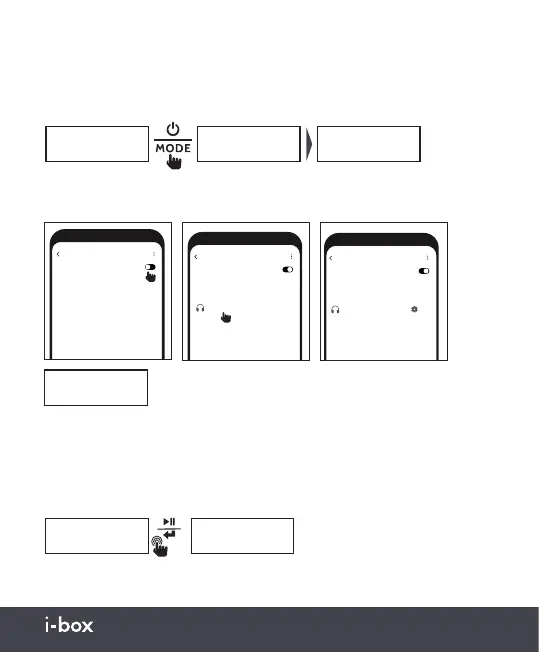
To connect a compatible Bluetooth device, follow the steps below.
Bluetooth
SCAN
Off
Bluetooth devices have been found
AVAILABLE DEVICES
Bluetooth
Connected
Bluetooth
Connected
Bluetooth
BT searching
When successfully connected to a compatible device,
the radio will display ‘Bluetooth Connected’.
Press and hold the Play / Enter button (6) to disconnected from the
currently connected Bluetooth device.
The audio can be controlled using the Barrel or the connected device.
Bluetooth Mode
The barrel has a Bluetooth mode, press the Power/Mode button (3) to enter
Bluetooth mode, if no device is connected, the radio will automatically enter
pairing mode.
BBC radio 1
Now playing: Be
Bluetooth Bluetooth
BT searching
You don’t need to re-pair. Your radio will automatically reconnect with this
device when it is in range and both are turned on.
Bluetooth
SCAN
On
Bluetooth devices have been found
AVAILABLE DEVICES
i-box Barrel
Bluetooth
SCAN
On
1 Bluetooth device is connected
PAIRED DEVICES
i-box Barrel
Connected
≥2s


 To Next Page