07 | Daybreak
➡
ALARM
1 SETUP
/
➡
ALARM 2 SETUP
/
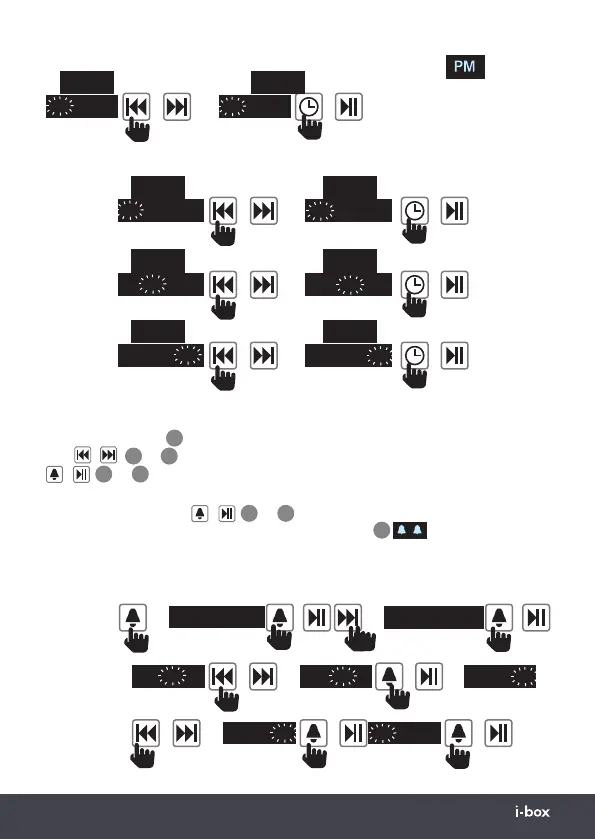
Setting Alarm (In Standby mode)
Press the alarm key
8
to enter alarm setting mode then use the previous and next
keys
/
4
or
5
to change the time and options then the enter or alarm key
/
8
or
7
to confirm each setting.
To set an alarm select: Alarm 1 or Alarm2 ➡ On Time➡Duration ➡ Sound Source:
➡ Alarm ON/OFF Press
/
8
or
7
to save the setting. If an alarm is saved as
ON the corresponding Alarm Set 1/Alarm Set 2 icon(s)
19
1
2
will be displayed
on the left of the screen. These icons will also flash during setup. If you pause for
10 seconds during setup you will see a “NOT SAVED” message and you will need to
restart the Alarm setting process.
Select
Alarm
1 or 2
Set
Alarm
ON time
AM
10
--
23
/
➡
AM
7
--
23
/
➡
AM
7
--
23
/
➡
AM
7
--
15
/
AM
7
--
15
/
to select or go to
set AM/PM
set minutes
set hour
Setting the AM/PM (12 Hour display only)
0:00
AM
10
--
23
/
➡
PM
10
--
23
/
0:00
Setting the Date
0:00
0
1
--
1
--
2020
/
➡
22
--
1
--
2020
/
0:00
Day
0:00
22
--
1
--
2020
/
➡
22
--
1
1
--
2020
/
0:00
Month
0:00
22
--
1
--
2020
/
➡
22
--
1
1
--
202
1
/
0:00
Year
will be displayed top
left of the screen
when time is PM


 To Next Page
 Loading...