06 | Época
1.8 System menu
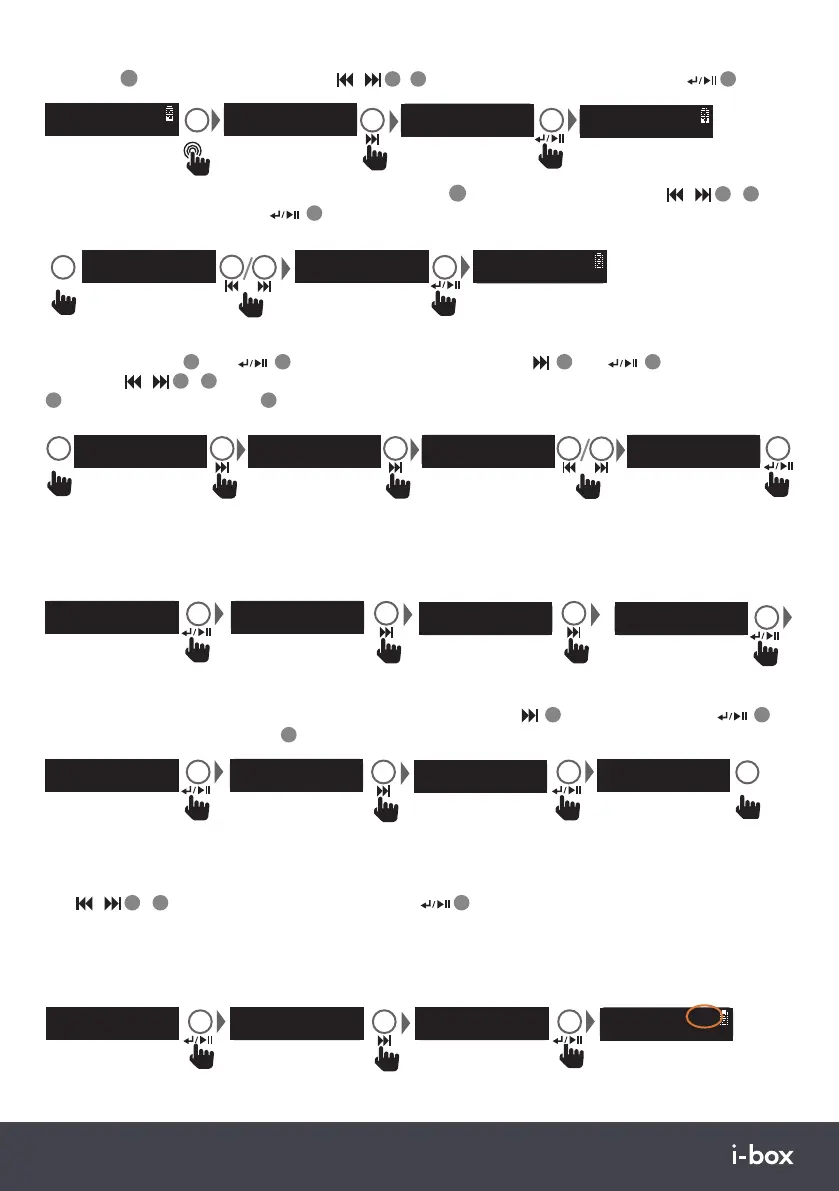
Options are <Sleep><Time><Backlight><Language><Factory reset><SW version>
Use
/
3
/
1
0
keys to scroll through options. Press
14
to select an option or enter a sub menu.
1.8.1 Sleep Function: Allows you to set a period of time after which your Época will switch off or enter
standby automatically. Options <Sleep off><15 minutes><30 minutes><45 minutes><60 minutes><90 minutes>
The Sleep period remaining is displayed top right. To cancel Sleep re-enter the menu and set to Sleep off.
1.7 Prune: Setting Prune to <Yes> clears stations with no signal reception from the DAB “Station list” when
you next perform a Full scan. Select Prune in the Menu and press next
10
to select Yes/No press
14
to
confirm, then press the MENU key
4
to exit.
1.6 DRC: Dynamic Range Control can make quieter sounds easier to hear when your radio is used in a noisy
environment. This function is only available for some DAB stations. Choose high/low/off current selected option
will be marked with an asterisk *.
DRC
<DRC off >
<DRC >
DAB
DRC *
<DRC high >
DRC
<DRC low >
1.5 DAB Manual tune menu option: If you know the frequency of a station you can search for it using this
option.Press MENU
4
then
14
to enter the DAB menu press next
10
then
14
to enter <Manual
tune>. Use
/
3
/
1
0
keys to scroll through DAB frequencies for the one you want.Press the SELECT key
14
to play. Press the MENU key
4
to exit the search.
Note: Sleep will function for Bluetooth as well as DAB and FM modes.
<Sleep >
System
Set sleep time
Sleep off
Set sleep time
90 minutes
x 1-5
Program info
BBC 3CR S90
1.3 DAB Radio saving presets: You can now save the station playing to one of the 30 DAB presets. Long press the
PRESET key
11
and use the previous or next key
/
3
/
1
0
to scroll to an empty preset position, press
14
to store.
Preset Store
<1: <Empty> >
PRESET
Stored
Preset 10
>2s
Playing
BBC Radio 1
Preset Store
<10: <Empty> >
Preset Store
<4: <BBC R4> >
<10: BBC R1 >
Preset Recall
PRESET
BBC Radio 4
Programme Infor
Manual Tune
<5A 174.928MHZ >
MENU
DAB
<Manual Tune >
DAB
<FULL SCAN >
Manual Tune
<6B 183.648MHZ >
1.4 DAB Radio playing presets: Short press the preset key
11
and use the previous or next key
/
3
/
1
0
to
scroll through preset positions, press
14
to play.
Prune?
<No> Yes
<Prune >
DAB
Prune?
No <Yes>
MENU
<Prune >
DAB


 To Next Page
 Loading...