Época | 07www.iboxstyle.com
1.8.2 Time: Should set automatically. Use this menu to set time manually if required.
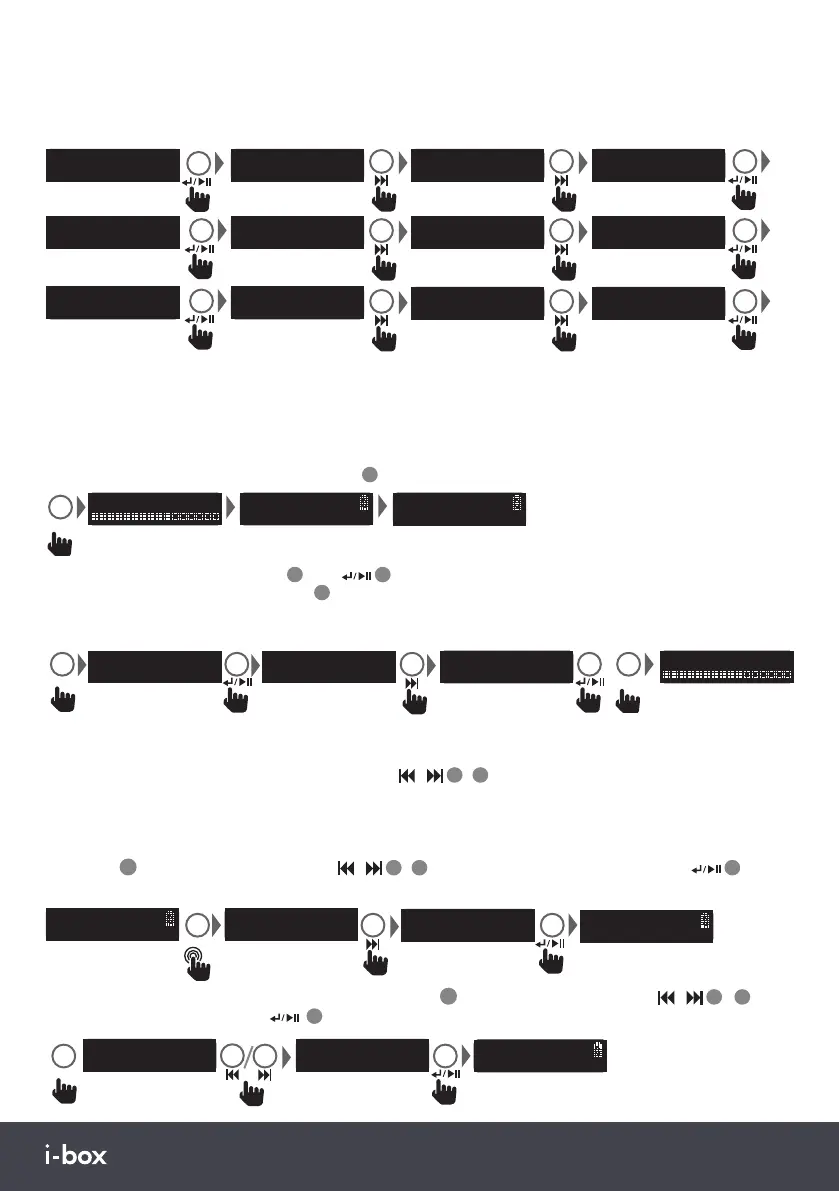
1.8.3 Backlight: Controls are <Timeout> (duration) <On level> (brightness) <Dim level> (brightness)
Timeout settings: <10 sec><20 sec><30 sec><45 sec><60 sec><90 sec><120 sec><180 sec><On>(stays on)
On level settings: <High><Medium><Low> Dim level settings: <Medium><Low><High>
Preset Recall
<On level >
Backlight
On level
<High >
On level
<Medium >
On level
<Low >
1.8.4 Language: See page 5.
1.8.5 Factory Reset: Use this function to clear all settings, station lists and presets.
1.8.6 Software version operating.
Preset Recall
<Timeout >
Backlight
Timeout
<10 sec >
Timeout
<20 sec >
Timeout
<180 sec >
x 1-8
Preset Recall
<Dim level >
Backlight
Dim level
<High >
Dim level
<Medium >
Dim level
<Low >
2. FM Radio Mode:
2.1 Auto scanning: In FM Mode press SCAN
13
to auto search for FM stations
Scanning... 25
Auto Scanning
87.50MHz
SCAN
Auto Scanning
88.60MHz P1
2.2 Scan setting: Or press MENU
4
then
14
to enter the Scan setting menu, choose <All stations> or
<Strong stations only> then press Scan
13
.
Note: If you have a strong signal you may want to choose “strong stations only” to limit the number of
stations found and make sure they have a clear signal.
Stations found will be saved to the preset positions up to 30 if this many are found.
FM
<Strong Stations
>
MENU
FM
<All Stations >
FM
<Scan Setting >
SCAN
Scanning... 25
2.4 Saving FM Radio presets: You can now save the station playing to one of the 30FM presets. Long press the
PRESET key
11
and use the previous or next key
/
3
/
1
0
to scroll to an empty preset position, press
14
to store.
Preset Store
<1: <Empty> >
PRESET
Stored
Preset 10
>2s
[No Radiotext]
93.00MHz
Preset Store
<10: <Empty> >
[No Radiotext]
93.00MHz P10
Preset Store
<10: 93.00MHz >
<1: 88.60MHz >
Preset Recall
PRESET
2.5 Playing FM Radio presets: Short press the preset key
11
and use the previous or next key
/
3
/
1
0
to
scroll through preset positions, press
14
to play.
2.3 FM Manual tune:Long press previous or next key
/
3
/
1
0
to tune the next available station short press to
fine tune.
Save the station found to Preset if you want to keep it.


 To Next Page
 Loading...