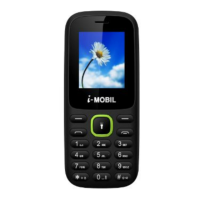
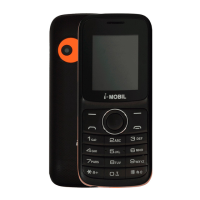
Need help?
Do you have a question about the i-MOBIL M-1 and is the answer not in the manual?
Initial steps before operating the mobile phone.
How to make and receive calls.
How to manage and use the SIM card lock feature.
Managing phone contacts and entries.
Shortcut keys to access frequently used menus.
Accessing the internet with a single key press.
Instructions for inserting and replacing the phone's battery.
Procedures for inserting and changing the SIM card.
Steps for charging the mobile phone's battery.
How to turn the mobile phone on and off.
Instructions on how to initiate phone calls.
Procedures for receiving incoming calls.
Various call-related options available during an active call.
Accessing and using the camera function.
Steps to capture photographs using the phone's camera.
Instructions for taking quick photos.
Adjusting settings for photos like size, quality, and brightness.
Steps to record video clips using the phone.
Sending and receiving Short Message Service (SMS) text messages.
Sending and receiving Multimedia Messaging Service (MMS) messages.
List of numbers that have been dialed.
List of numbers from which calls have been received.
List of incoming calls that were not answered.
Redirecting incoming calls to another number.
Adjusting audio preferences including incoming tones and keypad sounds.
Selecting the user interface language for the phone.
Adjusting screen and keypad backlight settings.
Setting up and managing the Personal Identification Number (PIN).
Enabling or disabling phone lock and changing password.
Browsing and managing multimedia files like photos, videos, and sounds.
Setting and managing alarms.
Recording a new voice memo or message.
Specifications and dimensions of the mobile phone.
Troubleshooting steps for when the phone displays "Locked" upon activation.
Solutions for issues related to no signal display on the phone.
 General
| Network | GSM 900 / 1800 |
|---|---|
| Weight | 70 g |
| Display type | TFT, 256K colors |
| Ringtones type | Polyphonic |
| Loudspeaker | Yes |
| Phonebook | 500 entries |
| GPRS | Class 10 |
| Radio | FM radio |
| Games | Yes |
| Battery Capacity | 800 mAh |
| SIM | Mini-SIM |
| Display size | 1.8 inches |
| Bluetooth | Yes |
| USB | Yes |
| Messaging | SMS |
| Battery | Li-Ion 800 mAh battery |
| Display | 1.8 inches |
| Resolution | 128 x 160 pixels |

 To Next Page