Product Details
05
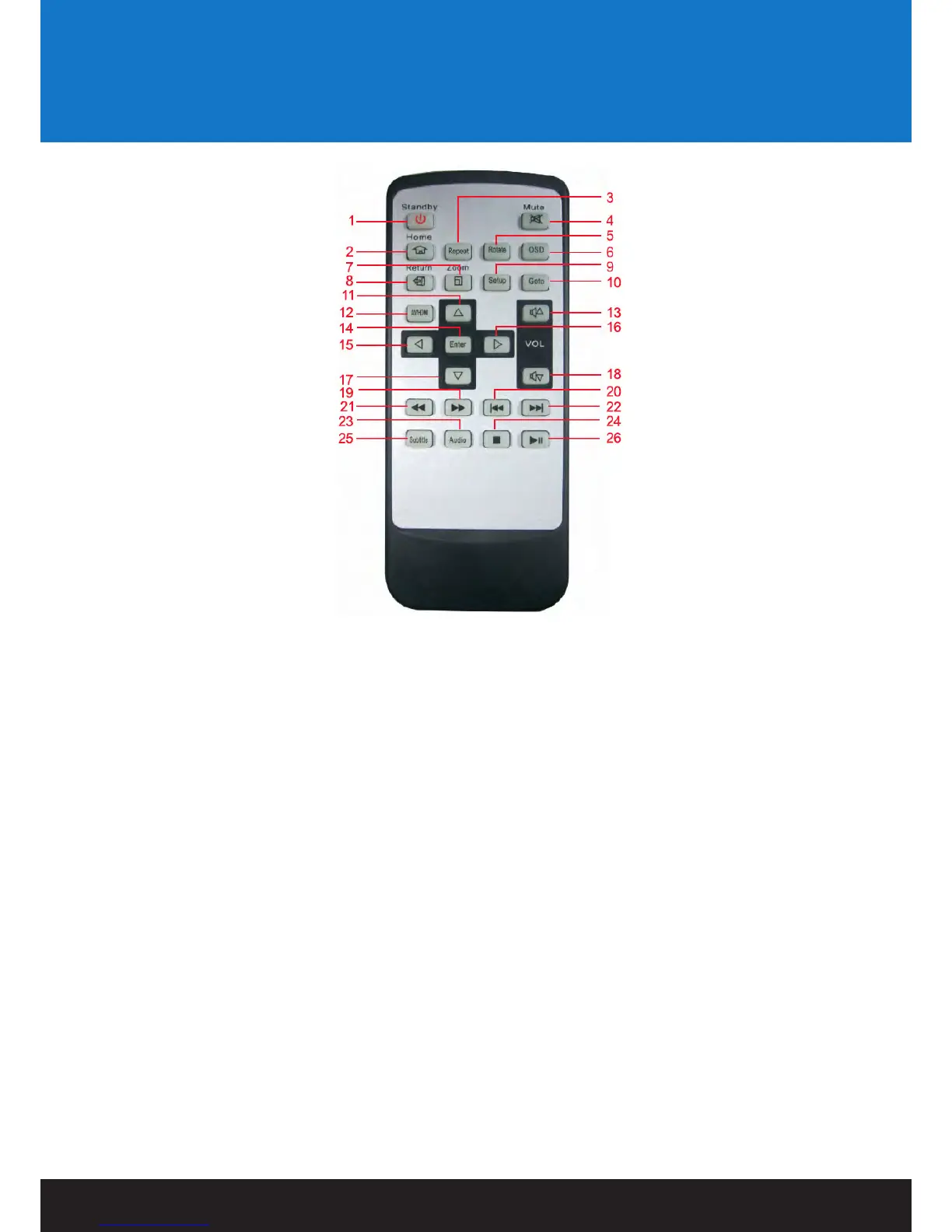
Remote Control:
1. Standby Switches the VORTEX-D on and off from standby mode.
2. HOME Returns user to main menu.
3. Repeat Press to select different video playback modes such as random/rotate one/rotate all.
4. Mute Switches on and off audio output.
5. Rotate Press to rotate image files.
6. OSD Press to view a number of available options.
7. Zoom Press to zoom image files on display.
8. Return Returns user to the previous menu.
9. Setup Shortcut access to setup menu.
10. GOTO Press to select movie chapter.
11. UP Navigation button. Moves cursor up.
12. AV/HDMI Toggles the VORTEX-D between AV and HDMI.
13. V+ Press to increase audio volume.
14. Enter Pressing this button confirms or selects an action.
15. Left Navigation button. Moves cursor left.
16. Right Navigation button. Moves cursor right.
17. Down Navigation button. Moves cursor down.
18. V- Press to decrease audio volume.
19. FF Press to fast forward. Toggles fast forward by X1.5, X2, X4 and X8.
20. Prev Press to return to previous file.
21. FR Press to fast rewind. Toggles fast rewind by X1.5, X2, X4 and X8.
22. Next Press to go to next file.
23. Audio Press to Switch the audio track .
24. Stop Stops media playback.
25. Subtitle Switch subtitle ON or OFF


 To Next Page