Installation & Operation Manual for 600mm Multifunction ovens
2.1 MANUAL Mode
BT-01 remains in MANUAL Mode if no COOKING TIME or END of COOKING TIME is selected. The relay
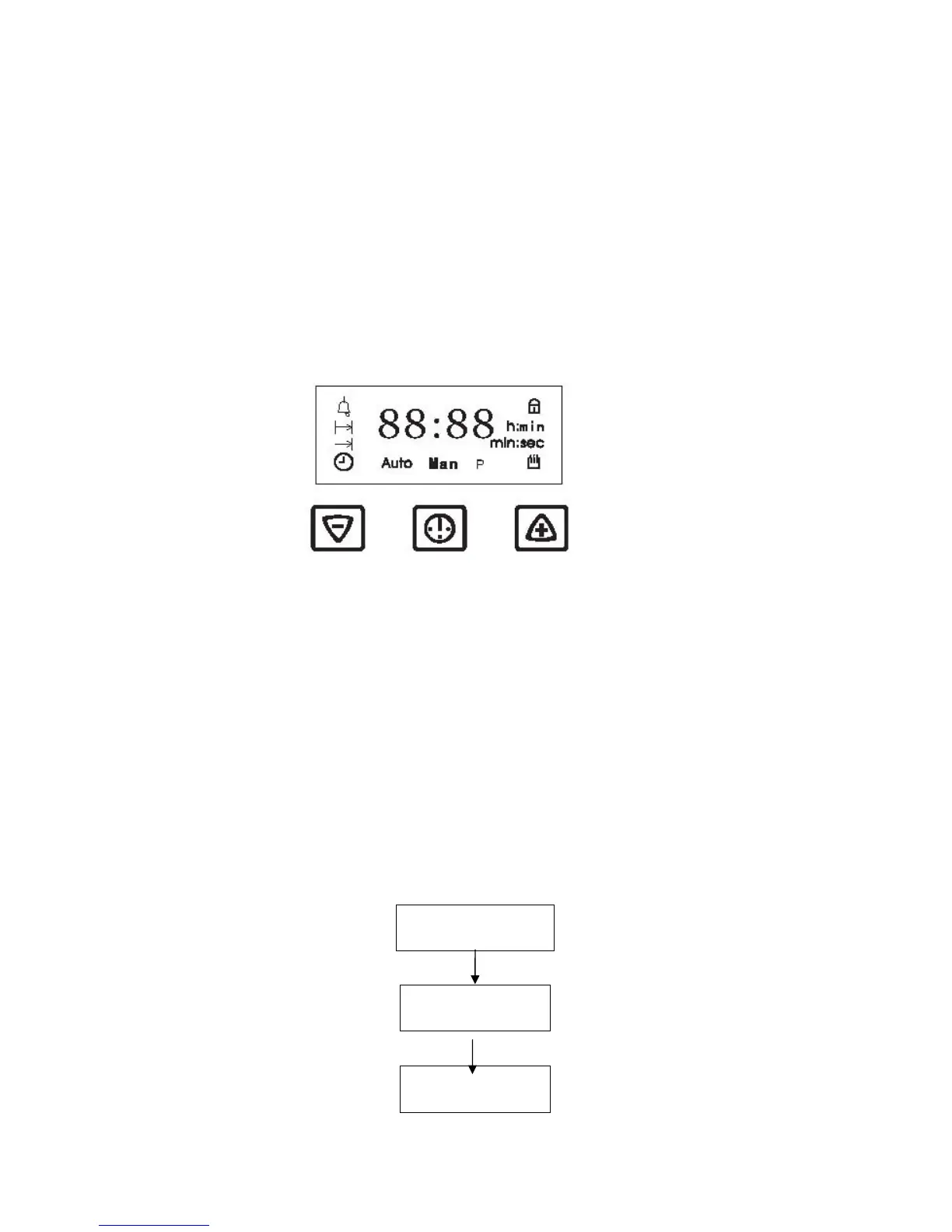
contact is closed and the symbol Man is displayed. The TIME of DAY is shown on the 7-segment
display uniess the MINDER is active.
2.2 AUTOMATIC Mode
If a COOKING TIME or a END of COOKING TIME is selected. BT-01 switches to AUTOMATIC Mode. The
relay contact is closed during the set COOKING TIME. The symbol Auto is displayed until the
COOKING TIME or the END of COOKING TIME has expired.
3.0 Touch Control
3.1 Flexible Touchpad Allocation
For individual design variants the 3 conductive keys. Can be fitted at different positions.
Touchpad SET(-): Conductive key fitted into Touchpad position 1 or 2
Touchpad SELECT: Conductive key fitted into Touchpad position 3
Touchpad SET(+):Conductive key fitted into Touchpad position 4 or 5
3.2 Touchpad SET(+) and SET (-)
Touching SET (+) or SET(-) pad momentarily: touching pads monentarily increases res. Decreases
time by one minute (or the volume of the ACOUSTIC SIGNAL by one step).
Touching SET (+) or SET(-) pad momentarily: permanent touching increases res. Decreases the
speed of time setting automatically.
Rate of change: Permanent actuation for 2…5 seconds →app.3 min/sec Permanent actuation for
more than 5 seconds → app. 20 min/sec
3.3 Touchpad SELECT
Using Touchpad SELECT allows to step through the sequences of function.
Display
TIME of DAY
SELECT
SELECT
MINUTE MINDER
setting
COOKING TIME
setting


 To Next Page