Installation & Operation Manual for 600mm Multifunction ovens
Mode 1 Time display Display always
Display when
oven is working
Mode 2
“Beep” sound after the time
count down
Short Medium Long
Mode 3 Duration of time setting Short Medium Long
Mode 4
Cooling fan working time
after oven finishes cooking
Short Medium Long
Mode 5 Display brightness Dark Medium Bright
Mode 6
“Beep” sound when
selecting the function mode
No Yes
After user finish the selection of “Info” mode, press the key to confirm.
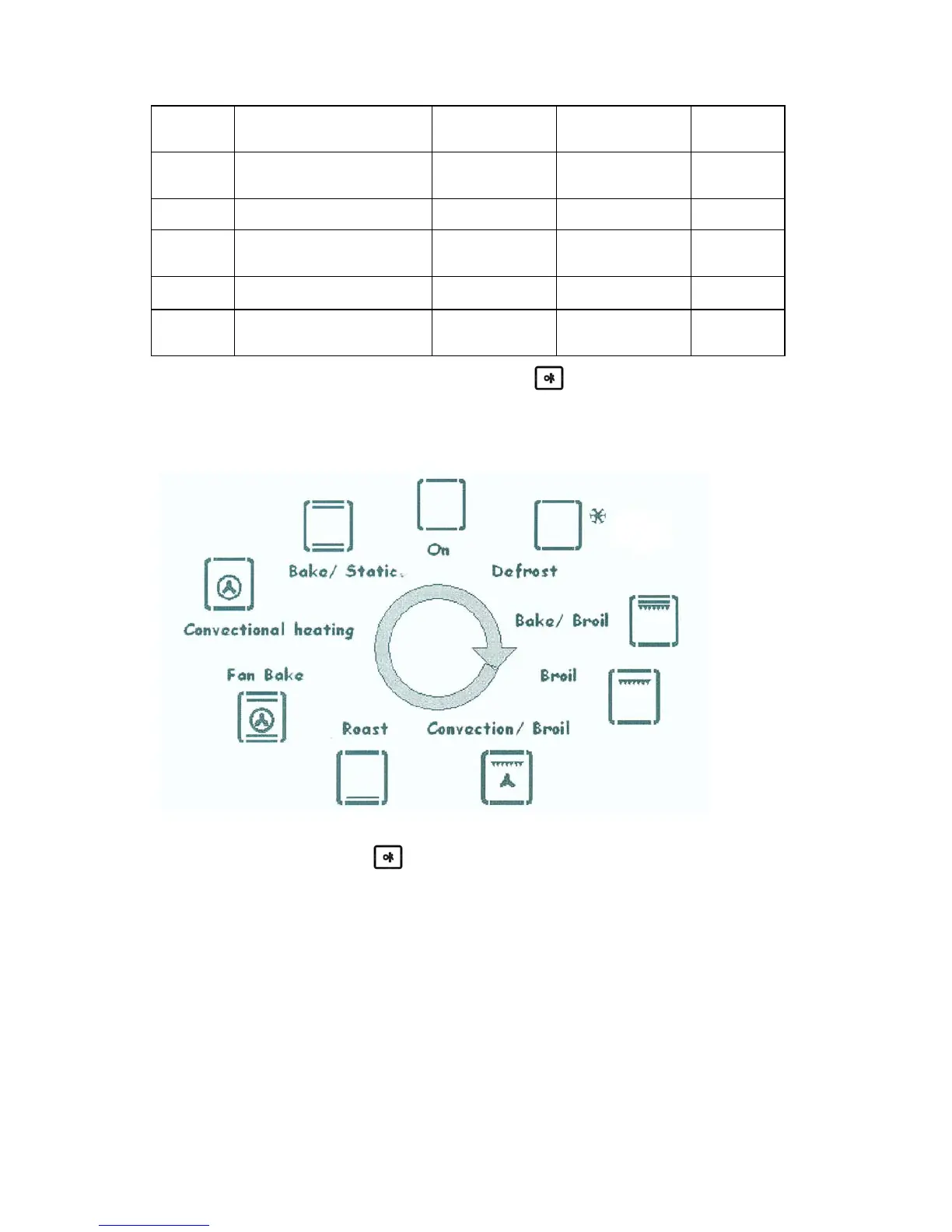
5. Cooking mode symbol:
The sequence of cooking modes displayed in the screen as below:
6. Child-safety lock: Press the
buttom for 5 sec after you switch off the oven.
How to keep Your Oven in Shape
This appliance is for household use only, don’t use it outdoors!
Important: Unplug your oven before cleaning, or performing maintenance!
To extend the life of your oven, it must be cleaned frequently, keeping in mind that:
◎ Do not uses steam equipment to clean the appliance.
◎ To protect against the risk of electrical shock, do not immerse the unit, cord or plug in water or
other liquid or sprinkle water to clean the appliance!
◎ Don’t clean the appliance when it still hot! The inside and external surface of the oven should
preferably be cleaned by damp cloth when it is cooled down.


 To Next Page