- 19 -
3.2.8 Help
About Scanner
Display a dialog about the software.
Help
Open the help file.
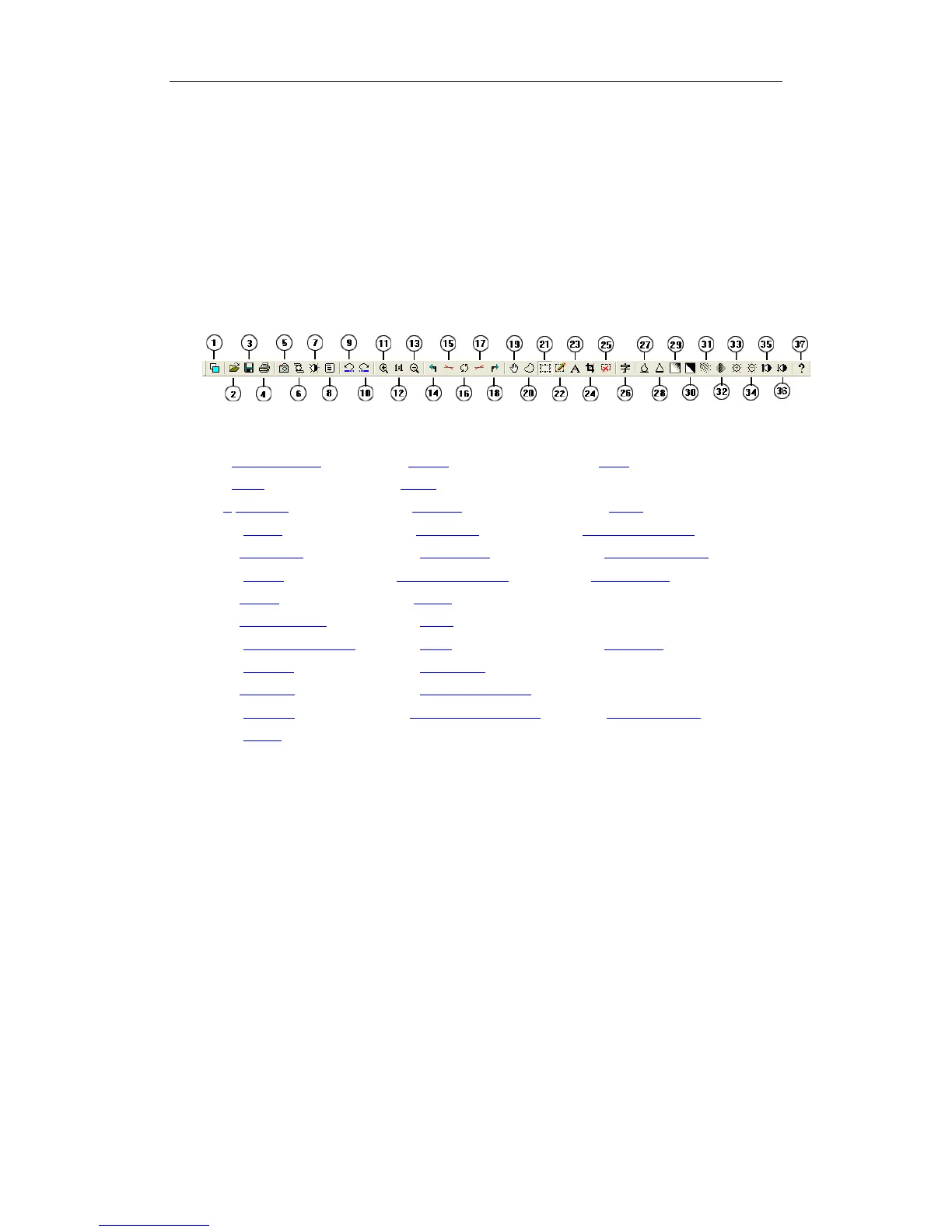
3.3 Toolbar
1->Change View 2->Open 3->Save
4->Print 5-> Scan 6-> Photocopy
7-> Property 8-> Setting 9-> Undo
10-> Redo 11->Zoom In 12->Normal viewing
13->Zoom Out 14-> Rotate Left 15-> Rotate Left(tiny)
16-> Rotate 17-> Rotate Right(tiny) 18-> Rotate Right
19-> Move 20-> Select 21-> Tracker
22-> Set Tracker 23-> Text 24-> Crop
25-> Remove Selection 26-> OCR 27-> Soften
28-> Sharpen 29-> Gray scale 30-> Adaptive Threshold
31-> Dither 32-> Remove Shadow 33-> Lighten
34-> Darken 35-> More Contrast 36-> Less Contrast
37-> About
Chapter IV Common Problems and using Methods
1. How to use OCR?
Answer:
You must install Microsoft Word to execute OCR function of this software, so
please install it.


 To Next Page