Need help?
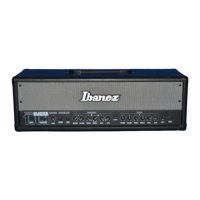
Do you have a question about the Ibanez Tone Blaster 100H and is the answer not in the manual?
Input terminal for standard 1/4" jacks.
Controls boost function for both channels; indicator lamp lights up when on.
Adjusts clean channel gain; produces distortion/crunch with boost.
Equalizer for low-range sound (100 Hz, ±17 dB).
Equalizer for mid-range sound (1 kHz, ±17 dB).
Equalizer for high-range sound (4 kHz, ±17 dB).
Adjusts volume level for the clean channel.
Adjusts reverb level; toggle ON/OFF with footswitch.
Switches between clean and overdrive channels; indicated by LED.
Adjusts gain for overdrive channel; affects distortion and sustain.
Equalizer for low-range sound (100 Hz, ±12 dB).
Controls mid-band EQ and shifts center frequency (1 kHz or 600 Hz).
Equalizer for high-range sound (4 kHz, ±12 dB).
Adjusts volume for overdrive channel; boosted by BOOST switch.
Adjusts reverb level; toggle ON/OFF with footswitch.
Outputs at -10 dB for connecting to effects unit input.
Input jack for -10 dB input from effects unit output.
Adjusts ultra-high frequencies suppression, effective for both channels.
1/4" output for stereo headphones; sound not reproduced through speakers.
Turns the power supply on and off.
Connects included foot switch for channel, boost, and reverb control.
1/4" output for connecting speaker cabinets (rated output varies by impedance).
Indicates the product's serial number.
Allows heat dissipation from the power amp; do not block.
Houses the fuse for safety; consult dealer if fuse burns out.
Socket for the included AC power cable; use indicated voltage only.
Connect amp to speaker system (4Ω, 120W+); select MONO mode for cabinets.
Connect power, guitar, and effects loop cables; turn on power.
Select clean channel; adjust VOLUME, GAIN, EQ, REVERB, PRESENCE for desired tone.
Select overdrive channel; adjust VOLUME, GAIN, EQ, REVERB, PRESENCE, BOOST.
Check power cable connection and try a different socket.
Check guitar connection, volume, effects loop, cables, and headphones.
Check for resonance, loose cable plugs, and external components.
Ensure no footswitch or cable is connected to corresponding jacks.
Verify correct connection of the foot switch cable to the jacks.
Ensure headphones are connected correctly and try another pair.
Check speaker impedance match and test with different equipment.
Stop use immediately and consult dealer for servicing.
Take amp to dealer for service to prevent further damage.
 General
| Power Output | 100 Watts |
|---|---|
| Effects Loop | Yes |
| Reverb | Yes |
| Preamp Tubes | 3 x 12AX7 |
| Type | Guitar Amplifier |
| Channels | 2 (Clean, Overdrive) |
| EQ | 3-band EQ |
| Dimensions | 10.5" (W) |
| Inputs | 1 x Input |
| Outputs | 1 x Speaker Output |
| Footswitch | Optional |

 To Next Page