Installing a Microprocessor
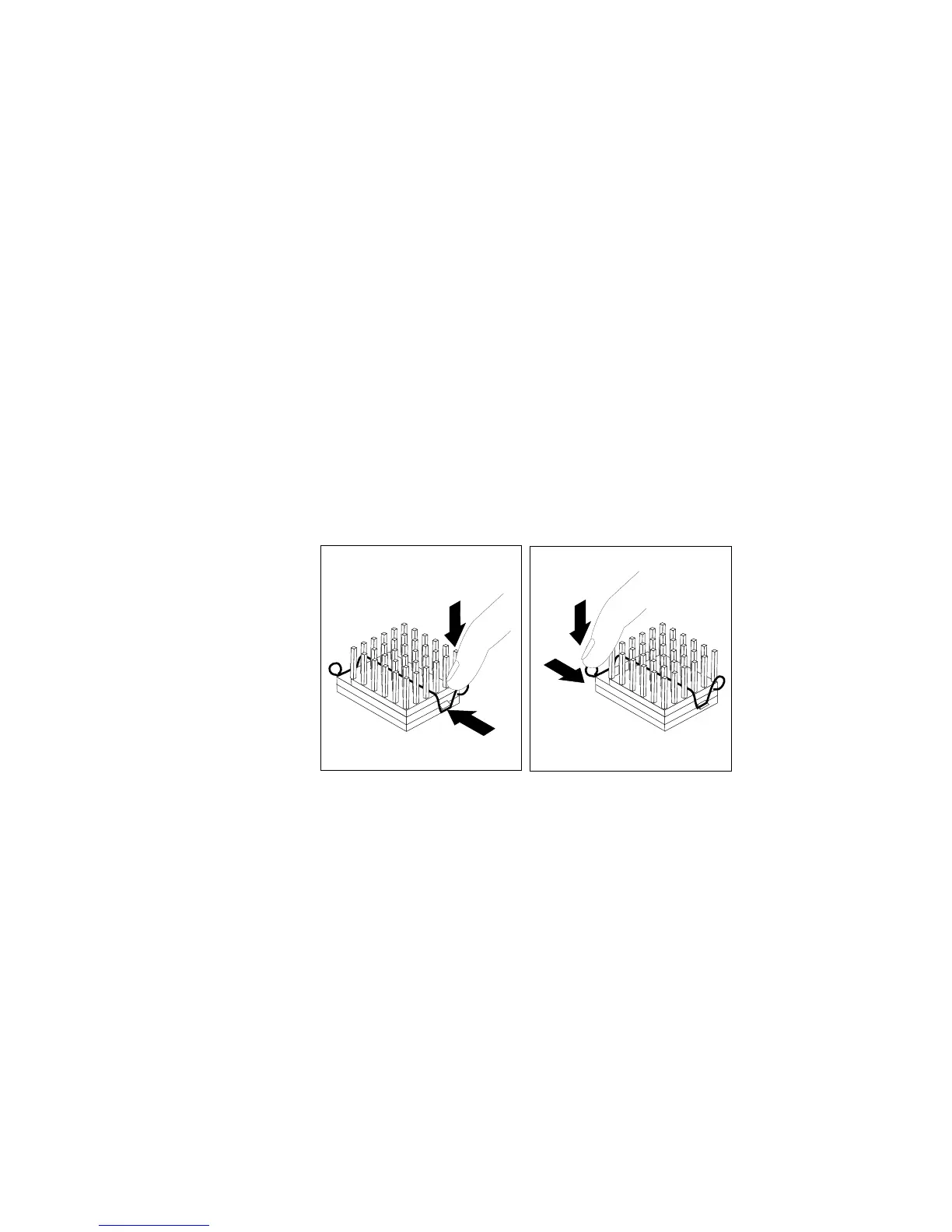
13. Push down on one of the rounded ends of the heat-sink clip .1/
until it catches under the flange .2/. Then, do the same to the
other end of the heat-sink clip .3/ to lock the microprocessor
into position .4/.
14. Push down on one of the rounded ends of the heat-sink clip
until it catches under the flange. Then, do the same to the other
end of the heat-sink clip to lock the microprocessor into
position.
1
2
3
4
15. If you have no other options to install, replace the cover on the
server (see “Completing the Installation” on page 266) and
reconnect the cables and power cord (see step 4 on page 268).
16. Because you installed a new microprocessor in your server, you
might want to upgrade your operating system. You must
update your server configuration.
a. Install one of the operating systems that is listed at the
beginning of this section. Follow the instructions in your
operating system-documentation and review the software
and operating system-considerations in Chapter 2,
“Installing Software” on page 21.
b. Run the Setup program. See “Using the Setup Program” on
page 281 for instructions.
c. If applicable, record your updated configuration information
in the appropriate tables in “Installed Device Records” on
page 378. Then, return here to determine your next step.
260 PC Server 520 User's Handbook for PCI/EISA








 To Next Page