Connecting External Options
If you plan to install external SCSI devices, you must order an
additional SCSI cable. That is, to use external devices with the PC
Server 520, you must connect them to the external SCSI-2 connector,
using a SCSI cable. This SCSI cable must have the proper connector
for the SCSI-2 external connector on one end, and the proper
connector for the first external device on the other end.
The SCSI-2 adapter for disk-array models has three channels, each
of which supports up to 15 devices. You can use all three channels
to support internal devices. If you want to connect external devices,
you can connect them to Channel 1, and connect internal devices to
Channels 2 and 3.
The SCSI-2 adapter for non-disk-array models can support a total of
15 devices. If your server has seven internal devices, the SCSI-2
adapter can support up to seven external devices.
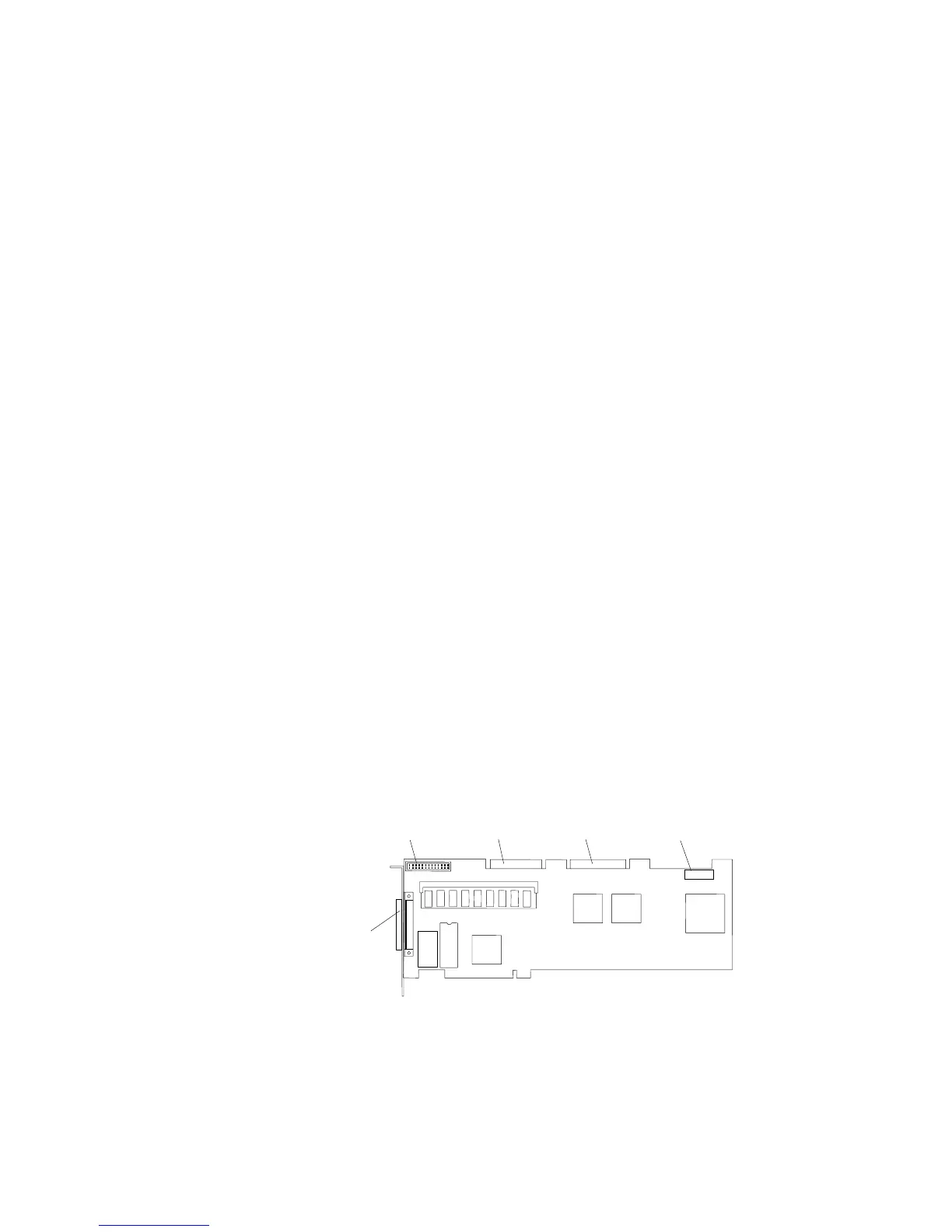
Note: You cannot use both internal connectors on the SCSI-2
adapter and also use the external connector. You cannot use
the internal channel 1 connector and the external connector at
the same time. If you intend to use the external connector,
connect internal SCSI-2 devices to the internal channel 2
connector. Refer to the following illustration.
External
Channel 1
Internal
Channel 1
System Status
Connector
Internal
Channel 2
Hard Disk Drive
LED Connector
Termination Requirements
The requirements for terminating external SCSI devices are:
If you attach both internal and external SCSI devices, you must
terminate the last internal device and the last external device.
For non-disk-array models, you must also change the
Chapter 5. Installing Options 271








 To Next Page