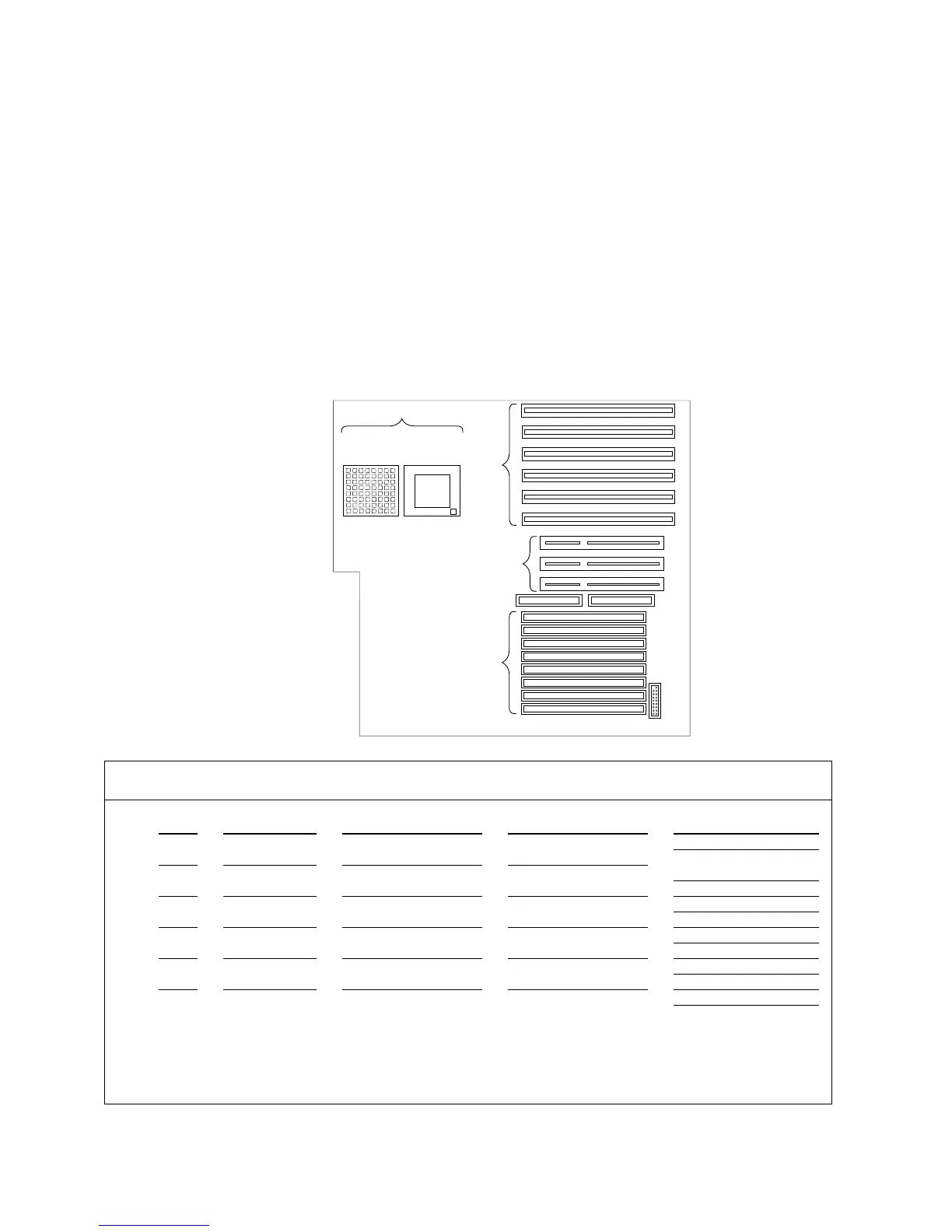
Installed Device Records
Refer to the following system-board illustration when completing
Table 4 and Table 5 on page 381.
6
2
1
3
5
4
3
2
1
EISA/
ISA
Slots
Memory
Sockets (8)
PCI Slots
Pentium
Primary
Processor
Socket
Upgrade
Processor
Socket
Diskette Controller
Table 4. EISA/ISA Expansion Slot Configuration Information
Slot IRQ DMA I/O Port ROM/RAM Address
Option Description and
Additional Information
1
2 Video: SVGA
3
4
5
6
Note: Do not use the bottom EISA slot if the adjacent PCI slot is occupied. Before setting values or installing options in
these slots, review “Configuring EISA, ISA, and PCI Adapters” on page 288, “Using the EISA Configuration Diskette” on
page 295, and “Installing Adapters” on page 180, and follow the instructions for avoiding configuration conflicts. If a
conflict occurs, resolve it as described in “Configuration Conflicts” on page 299.
380 PC Server 520 User's Handbook for PCI/EISA



 To Next Page