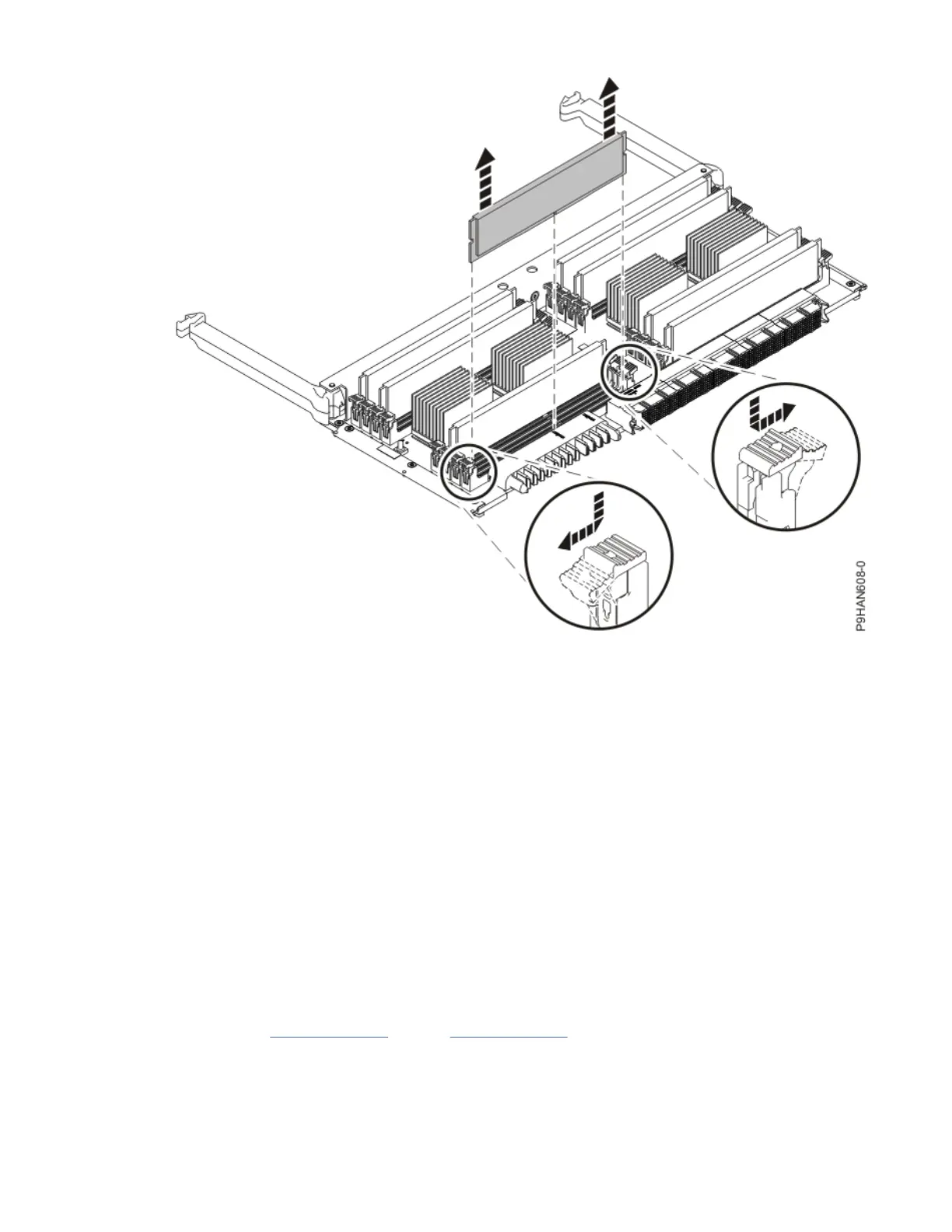
Figure 46. Removing a memory module
Replacing a memory riser in the 9040-MR9 system
To replace a memory riser in the system, complete the steps in this procedure.
Procedure
1. Ensure that you have the electrostatic discharge (ESD) wrist strap on and that the ESD clip is plugged
into a ground jack or connected to an unpainted metal surface. If not, do so now.
2. Replace the memory modules into the new memory riser:
a) Use the slot information that you recorded to determine the slot location to place the memory
module.
b) Grasp the new memory module along its edges and align it with the slot.
Memory modules are keyed to prevent a memory module from being installed incorrectly. Note the
location of the key tab within the memory module connector before you attempt to install the
memory module.
c) Ensure that the locking tabs of the memory module are open. Slowly press the memory module
straight down, rmly into the slot, until the locking tabs lock into place.
d) Repeat steps “2.a” on page 64
through “2.c” on page 64 for all of the memory modules that reside
on the memory riser you're replacing.
64
Power Systems: Power Systems: Memory




 To Next Page