Table 8. Four Node Configuration SMP Long Cabling (long cables)
Cable Number Cable Type From: (U-Loc) To: (U-Loc)
1 1.5 m (4.9 ft) SMP Cable U2: P1-T3 U5: P1-T1
2 1.5 m (4.9 ft) SMP Cable U1: P1-T1 U4: P1-T3
3 1.5 m (4.9 ft) SMP Cable U1: P1-T2 U5: P1-T2
4 1.5 m (4.9 ft) SMP Cable U2: P1-T4 U5: P1-T6
5 1.5 m (4.9 ft) SMP Cable U1: P1-T6 U4: P1-T4
6 1.5 m (4.9 ft) SMP Cable U1: P1-T5 U5: P1-T5
Note: U2 is System Node 1, U4 is System Node 2, U5 is System Node 3, and U1 is System Node
4.
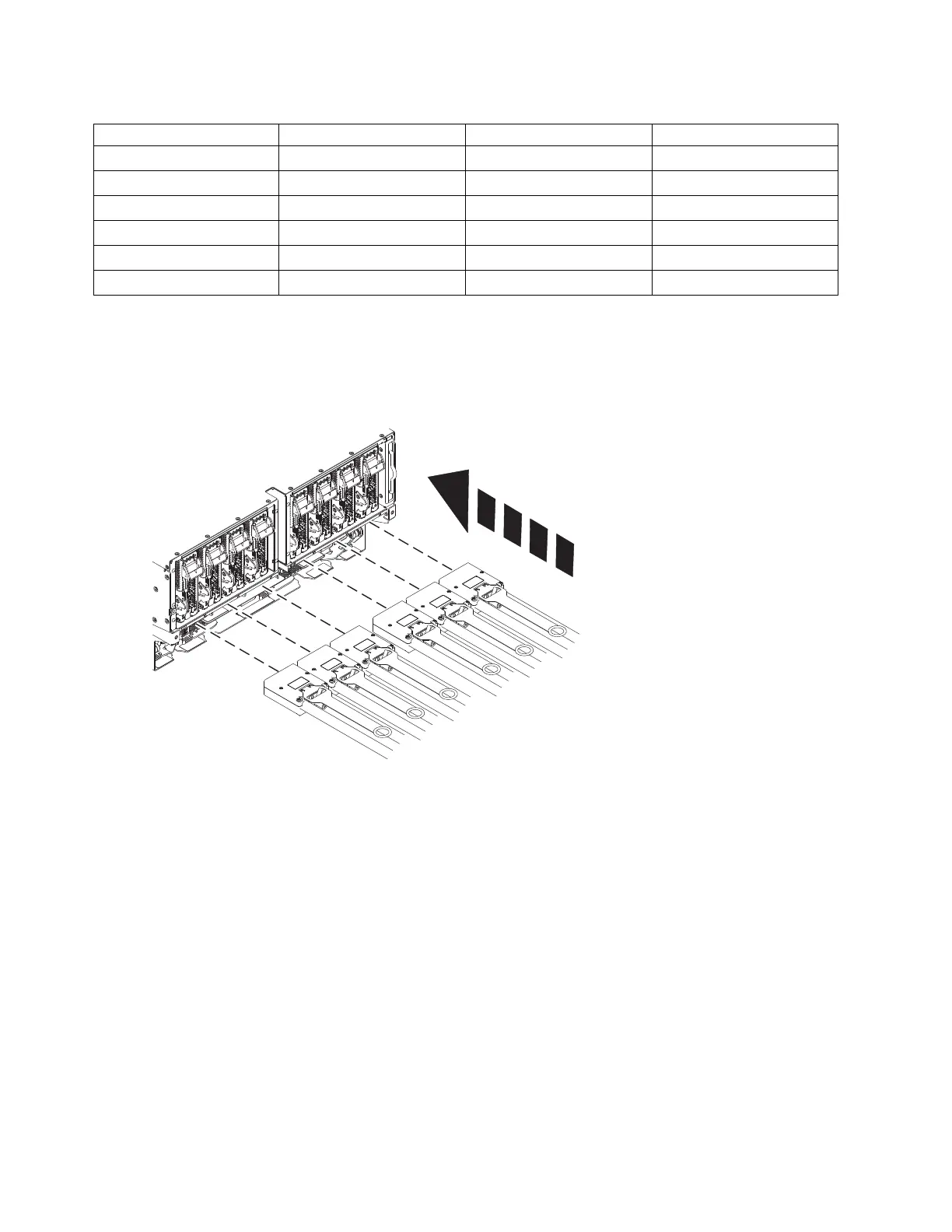
e. Plug the SMP cables into the system node.
f. Use the torque tool (41V1059) and turn in the direction indicated to lock. There is a stop to
prevent from over tightening the connector. Visually confirm that the SMP cable camming
mechanism is in the locked position and that the white dots are showing through the two holes at
the 5 and 11 o'clock positions. If they are still black, it is not latched.
42 Power Systems: SCM



 To Next Page