EasyManua.ls Logo

IBM T00 - Page 38

IBM T00
86 pages
Print Icon
To Next Page IconTo Next Page
To Previous Page IconTo Previous Page
Loading...
2.
If
more
than
one
ac
power
distribution
bus
is
installed
in
the
rack,
plug
the
power
cable
of
each
into
the
customer’s
ac
power
outlet.
CAUTION:
This
product
is
equipped
with
a
three-wire
power
cable
and
plug
for
the
user’s
safety.
Use
this
power
cable
with
a
properly
grounded
electrical
outlet
to
avoid
electrical
shock.
C01
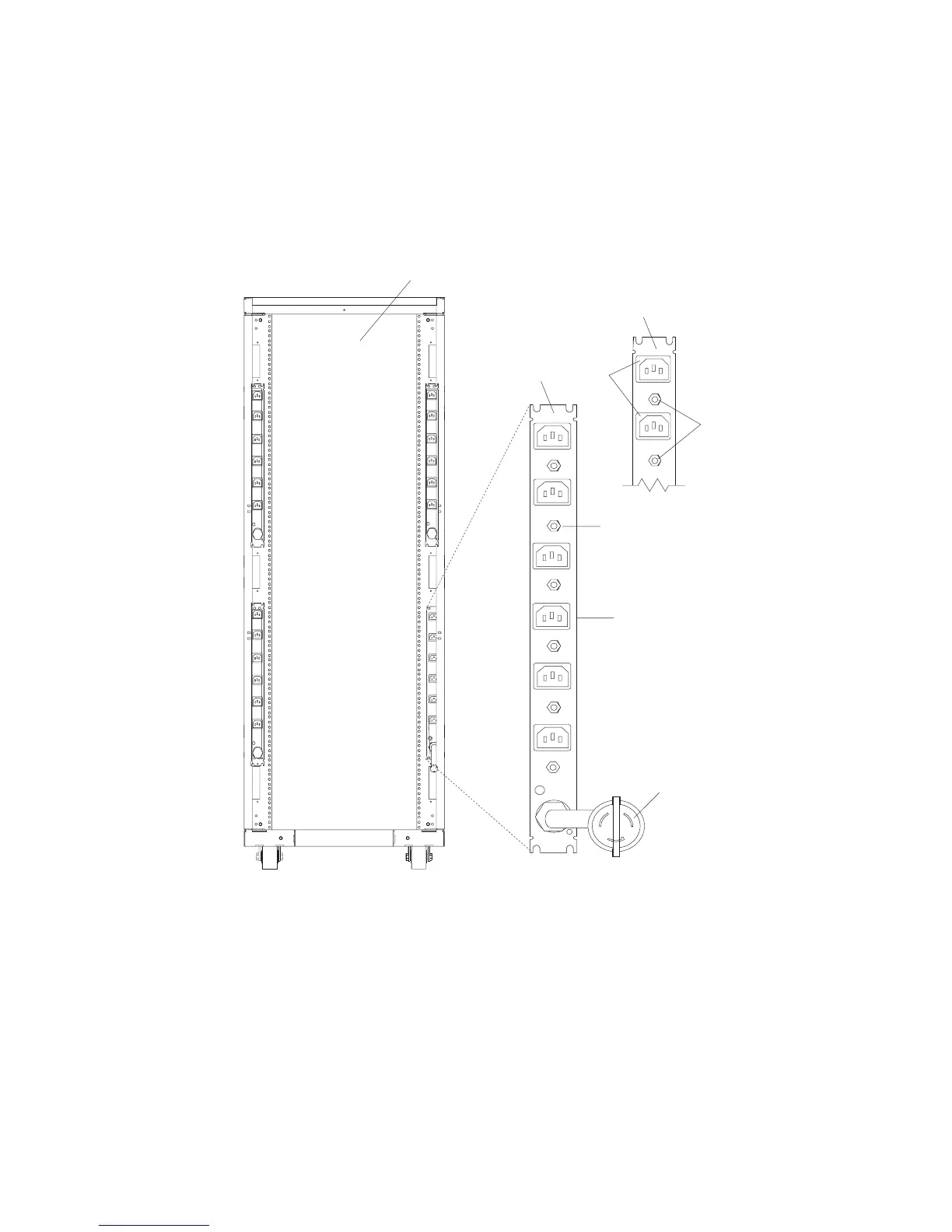
For
illustration
purposes,
the
type
6
power
distribution
bus
is
shown.
However,
this
procedure
also
applies
to
the
type
7
and
9188/7188
power
distribution
buses.
L1
L1
L1
L1
CB1
CB2
CB3
CB4
CB5
CB6
R6
R5
R4
R3
R2
R1
CB8
CB7
R7
R8
1
2
3
4
5
6
7
8
1
Rear
View
of
the
Rack
5
Reset
Buttons
(Two
Facing
the
Front
of
the
Rack)
2
Power
Distribution
Bus
6
Reset
Buttons
3
View
of
the
Power
Distribution
Bus
(Facing
the
Rack)
7
Outlet
for
Drawers
4
Outlets
for
Peripherals
(Two
Facing
the
Front
of
the
Rack)
8
Power
Cord
(Plug
Configuration
May
Vary)
3.
Follow
the
power-on
procedures
for
the
drawers
installed
in
the
rack.
For
more
information,
refer
to
the
service
guide
for
the
drawers
installed
in
the
rack.
4.
Close
the
rear
door
of
the
rack.
26
7014
Model
T00,
and
Model
T42
Service
Guide

Table of Contents

Related product manuals