EasyManua.ls Logo

IBM T00 - Power-Off Procedure with the DC Power Distribution Panel; Removal and Replacement of the AC Power Distribution Bus

IBM T00
86 pages
Print Icon
To Next Page IconTo Next Page
To Previous Page IconTo Previous Page
Loading...
Power-Off
Procedure
with
the
DC
Power
Distribution
Panel
This
section
covers
the
power-off
procedure
for
the
dc
rack.
1.
Be
sure
the
operating
system
is
shut
down.
See
“Operating
System
Shutdown”
on
page
25.
2.
Turn
off
power
to
all
devices
and
drawers
in
the
rack.
For
more
information,
refer
to
the
service
guide.
3.
Turn
off
power
to
all
external
devices
attached
to
the
system.
4.
Unplug
the
device
power
cords
from
the
customer’s
electrical
outlets.
Note:
If
drawers
in
attached
racks
are
connected
to
circuit
breakers
in
the
dc
power
distribution
panel
of
this
rack,
power
to
the
drawers
in
attached
racks
will
be
powered
off
if
the
circuit
breakers
in
this
rack
are
set
to
off.
5.
Except
for
circuit
breakers
in
this
rack
that
are
connected
to
drawers
in
another
rack,
set
all
circuit
breakers
to
the
off
position
(down).
CAUTION:
Energy
hazard,
remove
power
before
servicing.
Disconnect
two
power
supply
cords.
C23
Note:
Because
a
large
number
of
external
devices
can
be
connected
to
the
system
unit,
it
might
be
impractical
for
you
to
turn
off
power
to
all
the
devices
and
unplug
their
power
cords.
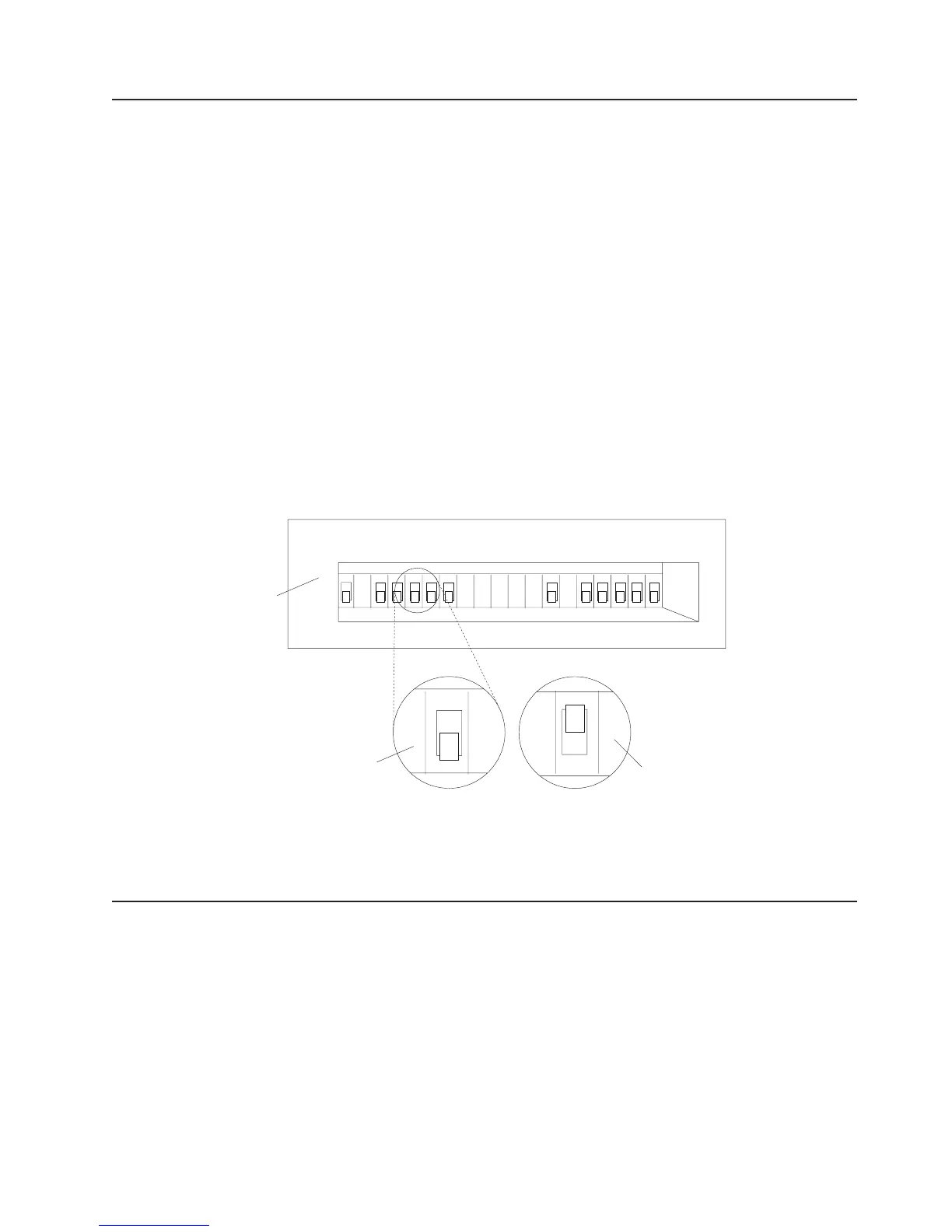
The
following
illustration
shows
the
front
view
of
the
power
distribution
panel
(PDP)
2
3
1
A1 B1A2 B2A3 B3
A4 B4A5 B5
A6 B6
A7
A8 A9
B7
B8 B9
1
Circuit
Breaker
Positions
(Not
labeled
on
PDP)
2
Down
Position
(Off)
3
Up
Position
(On)
Removal
and
Replacement
of
the
AC
Power
Distribution
Bus
This
section
covers
the
removal
and
replacement
procedures
for
the
ac
power
distribution
bus.
The
following
illustration
shows
where
the
ac
power
distribution
bus
might
be
installed.
Note:
If
there
are
more
than
four
power
distribution
buses
in
the
rack,
additional
buses
may
be
mounted
horizontally
in
the
rear
mounting
rails
of
the
rack.
Chapter
3.
Removal
and
Replacement
29

Table of Contents

Related product manuals