EasyManua.ls Logo

IBM T00 - Page 49

IBM T00
86 pages
Print Icon
To Next Page IconTo Next Page
To Previous Page IconTo Previous Page
Loading...
7.
Using
a
multimeter,
verify
that
no
voltage
exists
between
the
-48
V
dc
bus
bars
and
the
-48
V
dc
return
bus
bars,
A
and
B
sides.
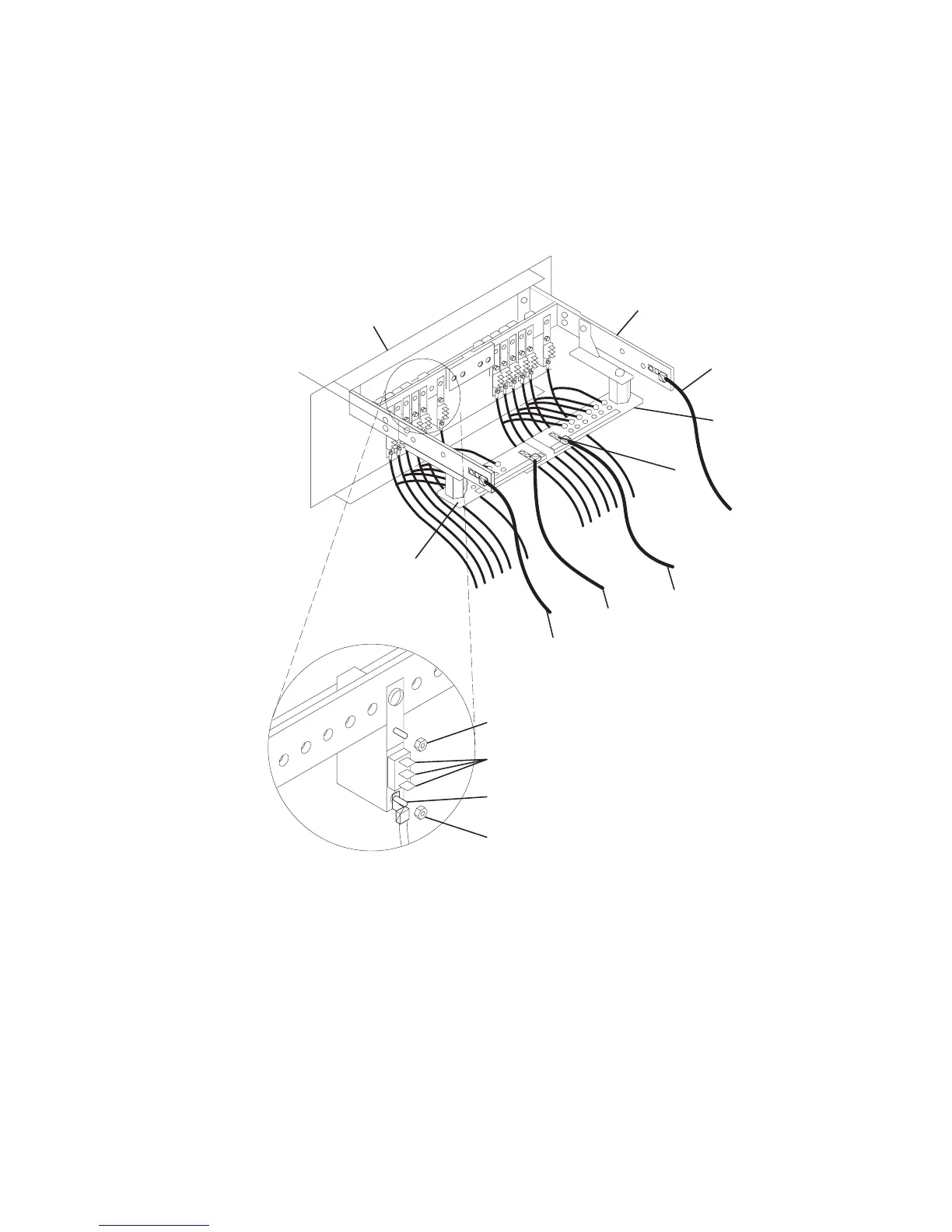
8.
Record
the
locations
of
all
cables
or
wires
connected
to
the
three
connector
pins
on
the
circuit
breaker
that
is
being
removed.
Disconnect
the
wires
from
the
three
connector
pins
and
the
-48
V
dc
power
connector.
9.
Disconnect
the
wire
that
is
attached
to
the
bottom
of
the
circuit
breaker.
10.
Disconnect
the
mounting
nut
that
attaches
the
rear
of
the
circuit
breaker
to
the
dc
power
bus
bar.
13
12
14
4
7
3
10
2
8
6
9
11
1
5
1
A
-48
V
dc
(-)
Bus
Bar
8
Mounting
Nut
2
A
-48
V
dc
(-)
Power
Cable
9
Three
Connector
Pins
3
A
Return
(+)
Bus
Bar
10
-48
V
dc
(-)
Power
Connector
4
10
mm
hole,
25.4
mm
Spacing
11
Connector
Nut
5
A
Return
(+)
Power
Cable
12
B
Return
(+)
Bus
Bar
6
B
Return
(+)
Power
Cable
13
B
-48
V
dc
(-)
Bus
Bar
7
B
-48
V
dc
(-)
Power
Cable
14
Front
of
Power
Distribution
Panel
Chapter
3.
Removal
and
Replacement
37

Table of Contents

Related product manuals