5
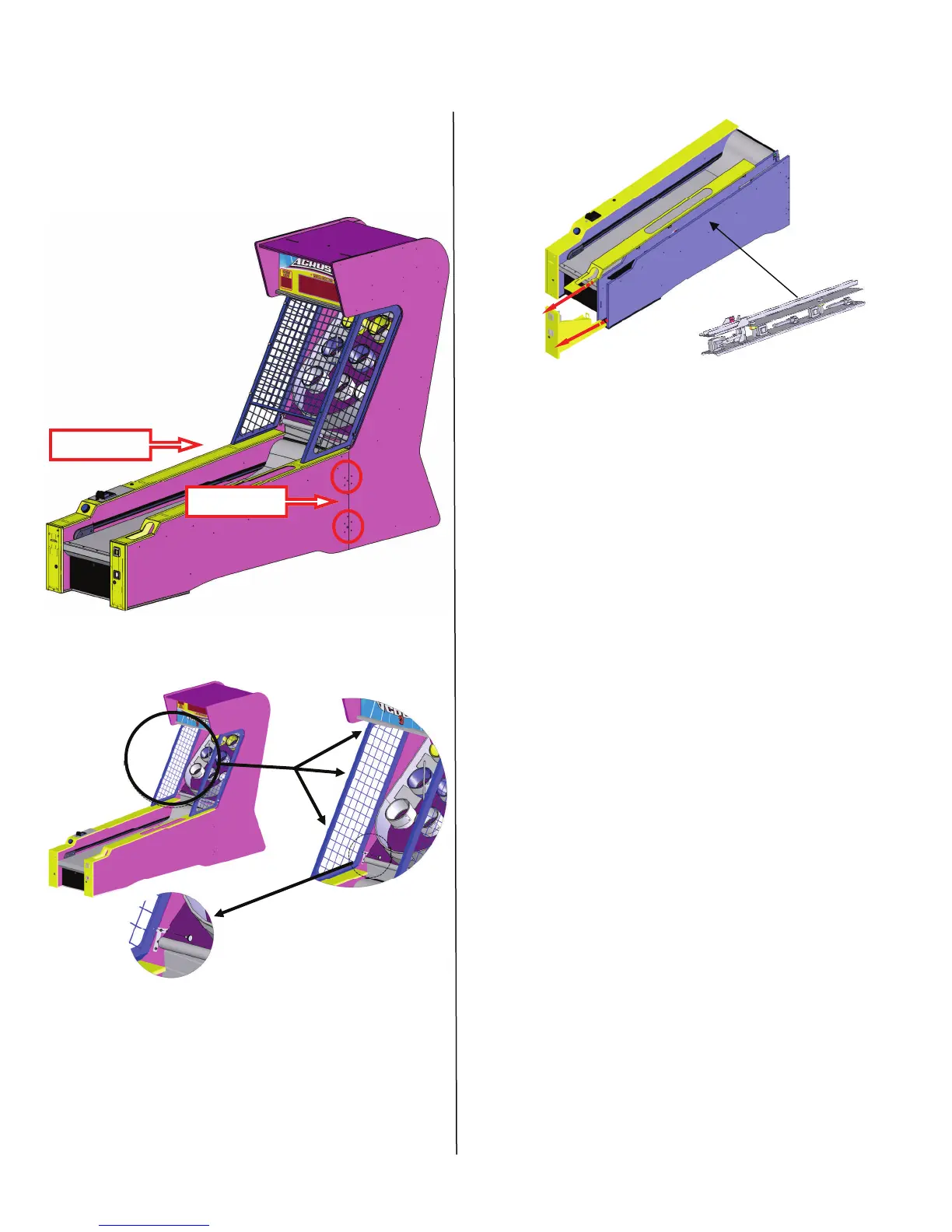
6. Slide the two halves together and using the
included latching tool, latch both sides, top
and bottom together. Insert the four latch
plugs where you inserted the latch tool.
7. Install cage as shown below.
8.
There are 3 thumb screws on each side to
connect the front cage and two bottom
screws to hold the sides.
Two per side
Two per side
Slide both the cash box and ball release cover out
and out of the way. Remove the foam packing
material located on top and underneath the ball
release assembly. Replace the cover and coin
door.
Although your game is ready for use and is set to
its optimal settings it is still recommended to re-
view the program settings and credit settings and
make any changes at this time.
LINK INSTALL INSTRUCTIONS
To link games together you must first set the
game’s ID differently from one to the other. No
game can have the same Link ID. In order to link
past 10 you will need to upgrade the brain board.
Please contact ICE Service for details.
A 25’ phone cable is supplied that will need to run
from one to the next linked game. See page 8 for
location of phone cable connections and Link ID
dial.
Coin Meter Location
The coin meter is located in the cash drawer. See
page 22 for exact location.
INSTALLATION


 To Next Page