78
PROGRAM SETTINGS
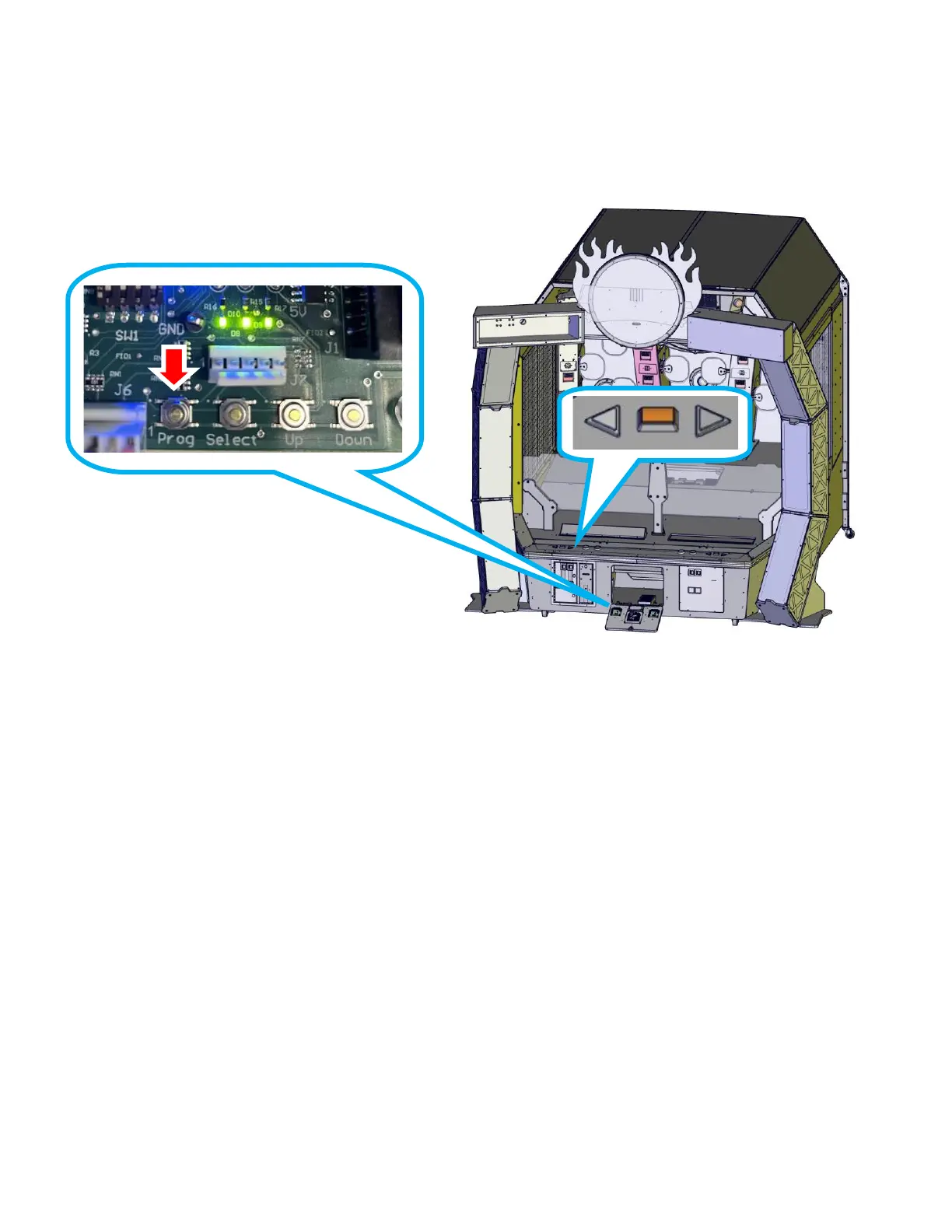
To enter programming mode, open the center access door and press the LEFT Front board’s “prog”
button. The right Font board’s “prog” will NOT enter programming. The jumbotron will display the first
option and the value for it. Use the “UP” and “DOWN” buttons or the left side arrows to change the
value. Press the “SELECT” button or the left square button to go to the next option.
Accounting Mode Access
To enter accounting mode, open the center access door and press the LEFT Front board’s “DOWN”
and then press the “UP” buttons. Press the “SELECT” or left square button to navigate to different
audits. Press either “UP” or “DOWN” to clear the highlighted audit. You must set it to 1 to clear.
Ticket audits will roll over after 65535 tickets. If tracking tickets paid, check this audit weekly.
• Press and hold the Blue player’s competitive and solo buttons together for ten seconds to clear
the high score tables. It will exit the menu after clearing.
• Press and hold the Blue player’s select button for ten seconds to clear the audits. It will exit the
menu after clearing the audits.
• Either of the above operations require the game to run for ten seconds to save all values correctly.
Account tracks the following:
Games Played Training Games Competitive Games Timeout Starts
Bonuses won Motor Stalls Training Skips Competitive Skips
Board Error 1-14 Coins in Tickets out Clear Left Coins
Clear Right coins Clear Left tickets Clear Right tickets


 To Next Page