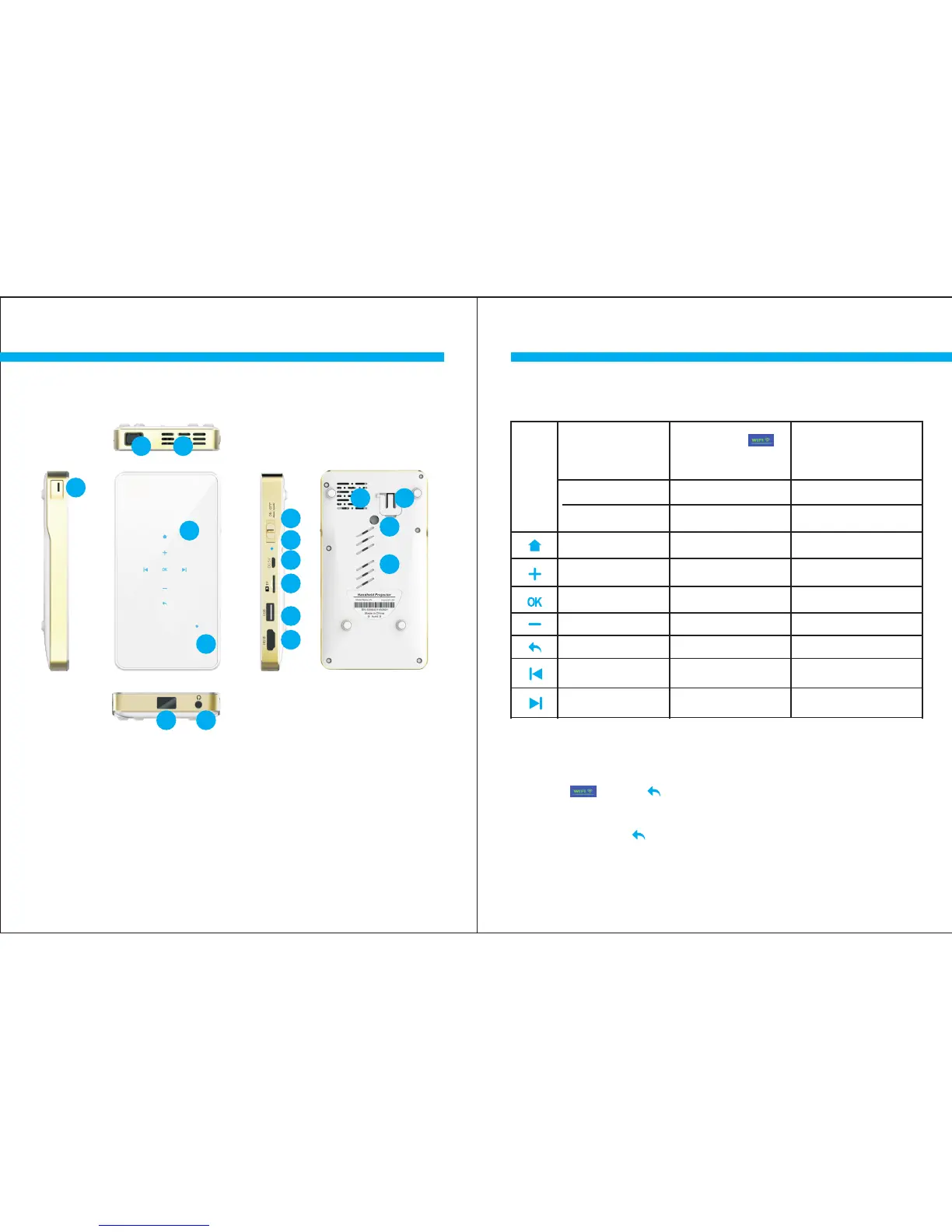
1.Lens
2.Air outlet
3.ON/OFF
4.Charging Indicator
5.DC
6.USB Interface
7.TF CARD
8.HDMI Interface
9.Touch Key
10.Battery Level Indicator
11.Focus
12.Support Knob
13.Air Inlet
14.Tripod Hole
15.Speaker
16.Headphone
17.IR
1
2
3
4
5
6
7
8
9
11
12
13
15
16
14
10
Summary
Summary
4
WiFi mode is used to enable Miracast and
Airplay / DLNA.
Touch key
Summary
Touch
Key
Projector Mode
WIFI Mode
(Mobile phone,
PC or tablet PC )
Wire Mode (Mirror)
( Mobile phone,
IOS / Android )
Standard
Options Options
Function Function Function
Home Home Home
UP / Vol+ UP / Vol+ UP / Vol+
Confirm Confirm Confirm
Down / Vol- Down / Vol- Down / Vol-
Return
Return / Switch Return / Switch
Left / Previous Left / Previous Left / Previous
Right / Next
Before use, please confirm whether the product
supports the corresponding model.
Mirror+ mode is used to enable audio mode for
Android devices.
*
*
*
5
Right / Next Right / Next
17



 To Next Page