18
4
BATTERY CHARGING
1
2
3
4
5
6
7
8
9
10
11
12
13
14
15
16
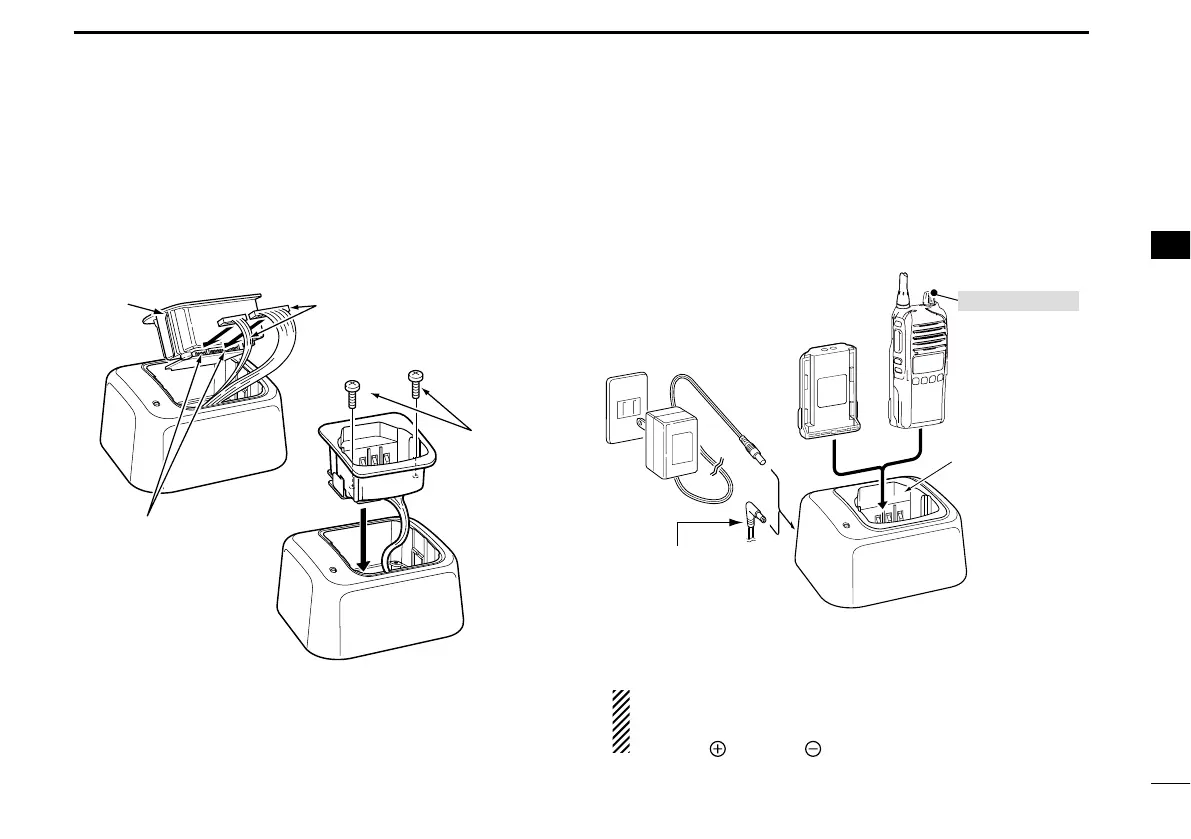
AD-106 installation D
The AD-106 CHARGER ADAPTER must be installed into the BC-
119N or BC-121N before battery charging.
± Connect the AD-106
CHARGER ADAPTER and the BC-119N/
BC-121N as below, then install the AD-106 into the hold-
er space of the BC-119N or BC-121N with the supplied
screws.
Screws supplied
with the charger
adapter
AD-106
Connectors
Plugs
* This illustration is described with the BC-119N.
Rapid charging with the BC-119N+AD-106 D
The optional BC-119N provides rapid charging of the Li-ion
battery pack. The following items are additionally required.
s !$ CHARGER ADAPTER
s !N !# ADAPTER MAY BE SUPPLIED WITH "#. DEPENDING ON VER-
sion) or the DC power cable (OPC-515L/CP-23L).
AD-106 charger
adapter is installed
in BC-119N.
AC adapter
(Not supplied with
some versions.)
Optional OPC-515L
(for 13.8 V power
source) or CP-23L
(for 12 V cigarette
lighter socket) can
be used instead of
the AC adapter.
Transceiver
Battery
pack
Tu rn power OFF
CAUTION: NEVER connect the OPC-
515L to a power source using reverse
polarity. This will ruin the battery charger.
White line: Black line
:
*
*



 To Next Page
 Loading...