Need help?
Do you have a question about the ICON BIA-iPRESS and is the answer not in the manual?
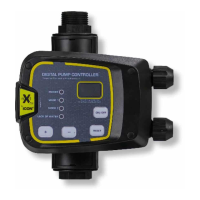
Real-time pressure indication in the pipeline.
Two easily switchable modes with button push.
Includes overload, over-pressure, and frequent start/stop protection.
Anti-seize function and auto restart features for pump longevity.
Adjusting mode, start, and stop pressures using function button and arrows.
Step-by-step guide to set cut-in and cut-out pressures per mode.
System actions during power failure, dry-running, and manual/auto restart procedures.
Causes and troubleshooting steps when the pump fails to initiate operation.
Troubleshooting for pumps that fail to stop or operate intermittently.
Meaning of status light flashing and associated causes like water shortage.
Interpretation of display error codes P-- and A--, and their causes.
Prohibits medical use; states no user-serviceable parts and requires qualified professional for maintenance.
The manufacturer is not responsible for damages from direct or indirect influence on the controller.
 General
| Brand | ICON |
|---|---|
| Model | BIA-iPRESS |
| Category | Controller |
| Language | English |

 To Next Page