ICON EDGE USER MANUAL
9
Procedures:
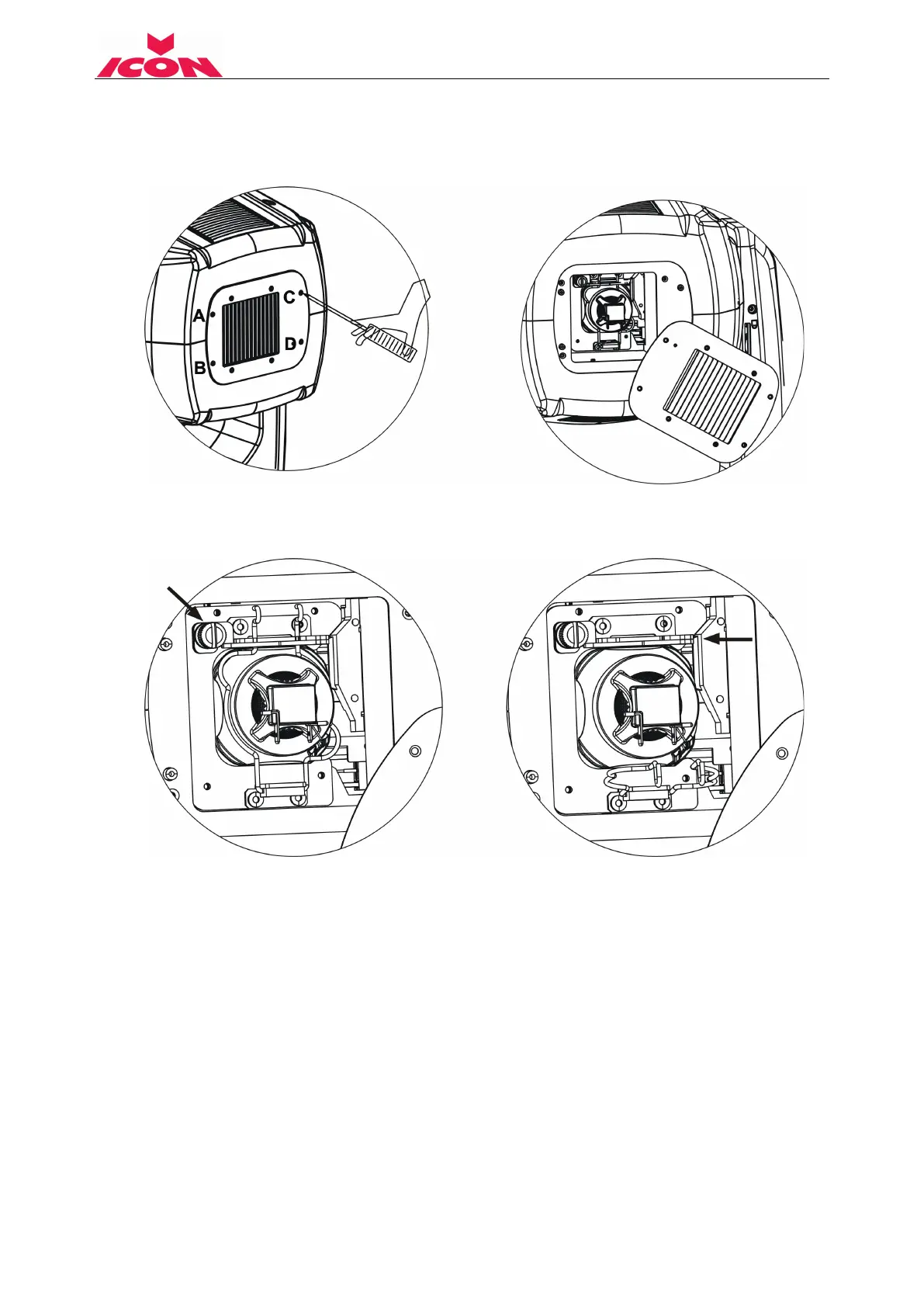
1) Please put the fixture on a flat surface, release the screw A, B, C, D. Then open the back plate to
view the lamp-socket.
2) Before removing the lamp, please release the lamp wires which connect to the lamp terminals.
3) Release the screw indicated by arrow below, pull the metal plate to the right, and then pull down
the spring, whilst holding the lamp to ensure it doesn’t fall out.
4) Ensure to use a soft cloth to remove and replace the lamp to avoid your fingers touching the
glass of the lamp.
5) Replace lamp and make it stable and located. Please note that there's only one orientation for
the lamp. Make sure the replaced lamp is installed in the same direction as the old with the
terminals of the lamp pointing down.
6) Replace the spring over the lamp and re-install the plate over the spring. Tighten screw and
replace lamp wires.
7) Replace the back plate and tighten screw A, B, C, D.
8) Please reset the lamp life-time. Otherwise it is likely to trigger the protecting firmware of the
system to make the replaced lamp close itself automatically.


 To Next Page