ICON EDGE USER MANUAL
13
5.5. CMY Module and Pattern Module Disassembly and Installation
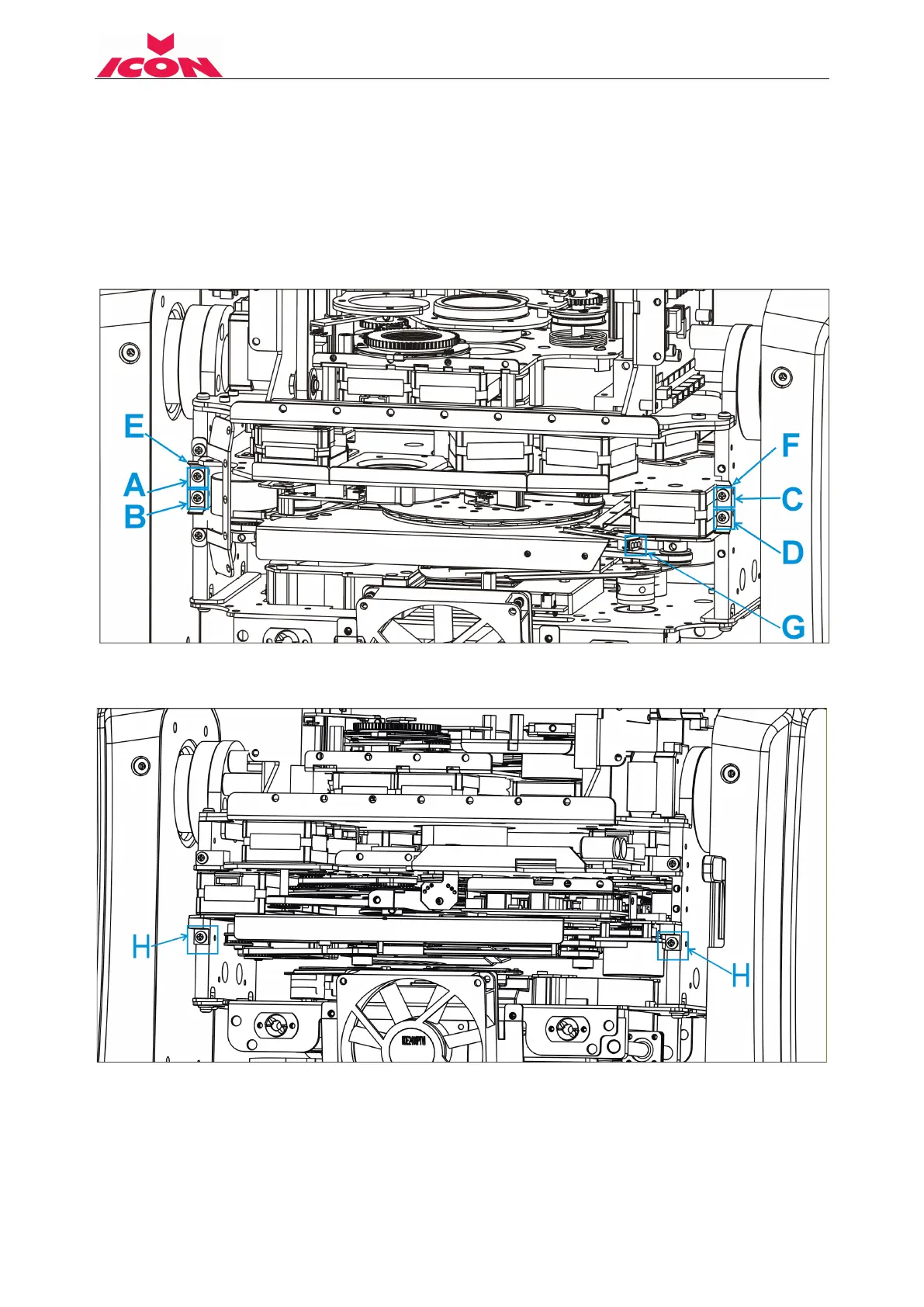
CMY Module Disassemble and Install Instruction:
Disassemble 1: Remove 4 screws: A, B, C, D. Remove the 2 positioning plates: E,F. Unplug the
sensor signal wire from socket G.
Install 4 or 7: rotate the yoke 180, flip the head to another side, and use screw A, B to lock
positioning plate E tightly and screw C, D to lock positioning plate F tightly. Plug the sensor signal
wire into socket G.
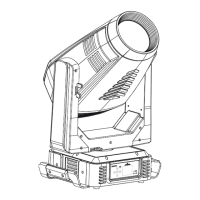
Disassemble 2: rotate the yoke 180, flip the head to the other side, and remove 2 screws: H, I.
Install 3 or 6: Positioning the CMY module to the right place, lock 2 screws: H, I.
Disassemble 3: Pull out the CMY module about 30mm, unplug power cord from socket J and
signal wire from K.
Install 2 or 5: Push along the CMY module into the slot about 90mm, plug the power cord into
socket J and signal wire into socket K.


 To Next Page